

If you are planning on putting together a website, to establish your presence in the online world, then you might already be on the looks for an intuitive website builder to help you get started. Without the need to know any coding, website builders help people put together websites from the simplest, single-paged ones, to complex eCommerce platforms.
Most website builders are quite simple to use, with drag and drop functions, as well as a multitude of options to create and personalize each page to your liking.
The best part? You can do it all by yourself, without having to hire a developer to help you out.

More than a decade ago, when website builders first started being around, there were only a hand full of options to choose from. Today, you can choose from a variety of builders suited for each and every need. The following list will give you some details about the best options you can find on the market, to help narrow your search.
- WordPress.org
- Wix
- Gator by HostGator
- BigCommerce
- Shopify
- Weebly
- Squarespace
- GoDaddy Website Builder
- WordPress.com
Best Website Builder 2019: We've Reviewed the 9 Best (and Worst)
Build Your Website Just the Way You Want. Compare The Best Website Builders Out There. Website Building was Never so Easy! So Read Reviews & Compare Top Brands. And Pick the Right Builder for You Now! Please go through below review:
1. WordPress.org
The list could not start any different than with the most popular option on the market, WordPress.org. The platform has been around since 2003 and, today, it hosts more than a third of the websites you can find online.

WordPress has two separate hosting platforms, WordPress.org and WordPress.com, which will be featured later in the article as well. WordPress.org is WordPress’ free website building platform. By being an open-source builder, the platform allows you to customize and have full control over the features and plugins of your website. The .org platform is a self-hosted platform, which means you will have to host the website on your own, by using a WordPress hosting platform, which you can find with a simple online search.
Pros:
- Complete control over each and every aspect of your website
- Suited for every kind of website, from blogs to forums and eCommerce stores
- Access to over 50,000 plugins, free to use
- A large variety of pre-made themes, which you can find online
Cons:
- You will be fully responsible for the maintenance of the website
- You will also have to handle security and backup on your own
- Keeping up to date with all the new WordPress features and plugins is also your responsibility
In terms of pricing, WordPress.org is free, but you will need to purchase a domain name and hosting, which typically starts at around $3/month. You can look online for hosting providers, but make sure to choose a WordPress official one.
2. Wix
Another popular option for website owners, Wix offers a large variety of strong features, which are easy to integrate into your website. As it is a cloud-based, fully hosted platform, you will not have to worry about finding another hosting platform for your new website.
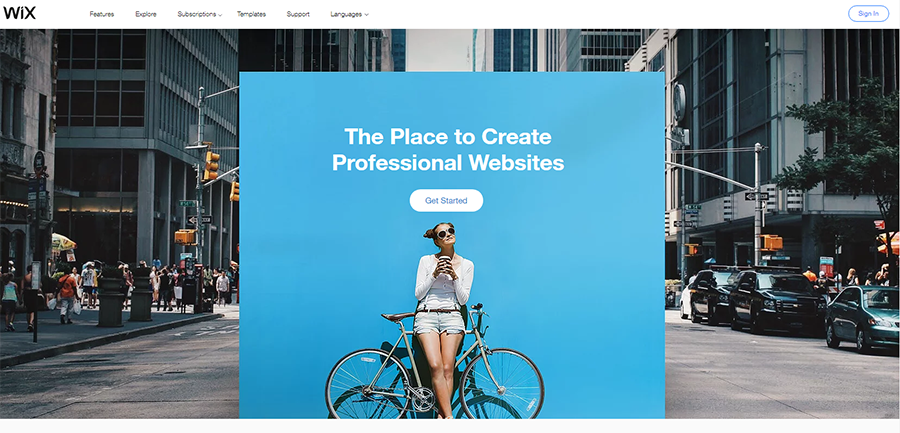
Wix can be used to create any type of website you want, from blogs to business websites and eCommerce stores as well. Plus, you get unlimited bandwidth and many other interesting rewards (Google Ad vouchers, anyone?).
Pros:
- Access to a wide variety of templates, all of which are fully customizable
- Drag and drop builder, extremely user-friendly and intuitive
- Tens of apps, both free and paid, which you can add to your website
- Free SSL with all Wix payment plans
Cons:
- The free plan will show adds on your website, as well as the Connect Domain plan
- You will have to buy a domain name to connect it to the Connect Domain plan
While Wix still offers a free plan, it is quite limited and offers a Wix sub domain name. If you want to connect your domain, you can choose the $9,16/month plan, or pick the combo plan for $14,95/month, which also comes with a free domain name. For eCommerce, the payment plan starts at $26,25/month.
3. Gator by HostGator
New on the website building market, Gator is a website builder developed by HostGator. Although it is quite a new platform, its creators are well-known in the web hosting industry, as HostGator is one of the most widely-used hosting providers.
Gator is a great option for someone who is looking for the whole package, as it offers complete website building and hosting solutions, so you won’t have to worry about self-hosting.
Pros:
- Fully hosted, which means all updates and backups are done automatically
- Very intuitive and easy to use
- Access to stock photo library included
- Customizable, with access to a large variety of templates, which you can easily personalize
- Drag and drop, as well as point and click, item editor
- The price also includes a free custom domain name
Cons:
- No free plan or free trial available
- As it is not fully customizable, the builder does have some limitations
- No built-in email marketing
- Unsuited for more complex websites
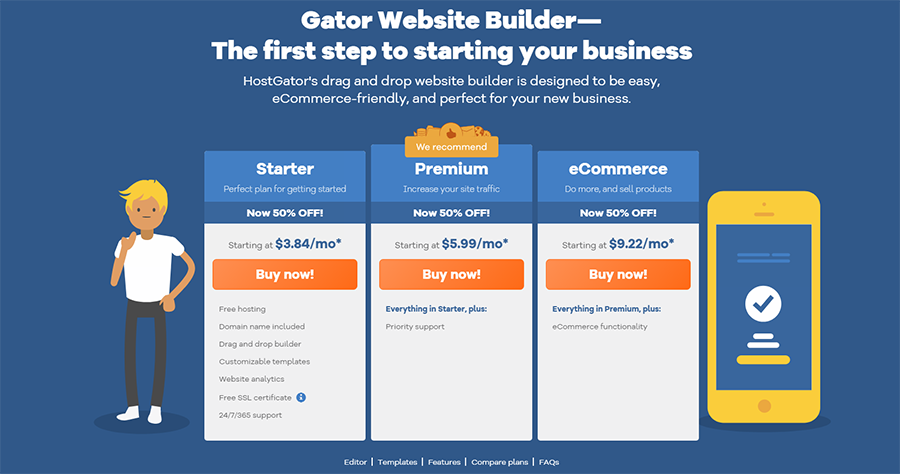
As mentioned before, Gator does not offer any free plan option, but it does offer three payment plans. The price for the starter plan starts at $3,84/month, the premium plan at $5,99/month and the special eCommerce plan at $9,22/month.
4. BigCommerce
If you are looking to start an eCommerce business, BigCommerce is the best option you can find on the market. As it is a platform that was specially developed for eCommerce, you will find all the vital features you need to start your business.

Pros:
- As BigCommerce is fully hosted, the technical aspects of your website are handled by them
- Native WordPress integration
- You can integrate any of the most popular payment gateways, such as PayPal, Amazon Pay and Visa Checkout, without having to pay any transaction fee
- Lots of pre-made templates, easy to customize
- Built-in conversion rate features
- Access to metrics, so you can monitor the growth of your business
Cons:
- Pricier than other regular website builders, as it is a niche platform.
When it comes to pricing, BigCommerce does offer a free 15-day trial for all payment plans. The standard plan starts at $29,95/month and the pro plan can reach $249,95/month, for all the advanced features an eCommerce website needs.
5. Shopify
Another website builder specially designed for eCommerce, Shopify is home to over 500,000 businesses all over the world. Being designed specifically for eCommerce, the platform offers a variety of features, such as inventory management and statistics, as well as some marketing solutions, to help you grow your business.

Pros:
- Fully hosted, which means Shopify will take care of all software updates and backups
- Apart from the popular payment gateways, Shopify does have its own integrated payment solution, Shopify Payments.
- Hundreds of templates to choose from
- Drag and drop interface, to help you build your store to your own likings
Cons:
- As most eCommerce-focused website builders, the payment plans are a bit on the price side
To get you started, the Basic payment plan starts at $29/month and can go as high as $299 for the Advanced plan. Additionally, Shopify also has a Lite plan, for only $9/month, which allows you to add a “BUY” button to any kind of page or website.
6. Weebly
Incredibly easy to use, Weebly offers a variety of building options, which allow you to create and edit your website without the need to contact a web developer or become a master in coding. Its ease of use is what makes Weebly so popular for creating almost any type of website you need. Along with the Business plan, you also get access to lots of eCommerce features, such as product reviews and discount coupons.

Pros:
- Fully hosted, which means you get a website builder and hosting services, all in one platform
- A multitude of designs that you can choose from, which you can then edit to your own preferences
- Built-in eCommerce support, to create a basic online store
- Various built-in features, such as photo galleries and contact forms, which you can add to your website with just a click
Cons:
- Because it is a fully hosted platform, you are limited only to the features that Weebly provides
- If you want to open an eCommerce website, but don’t want to upgrade to a business plan, Weebly has a 3% transaction fee on every purchase made through your website.
Weebly has three pricing plans, starting with the basic one, which is $8/month, a pro plan for $12/month and a business plan for $25/month. Weebly does have a free option as well, but it comes with very basic features.
7. Squarespace
One of the oldest in the bunch, Squarespace has managed to stick around since 2003 and become quite popular with website owners. If you are looking for a quick way to start your website, then Squarespace is the perfect option for you. What sets Squarespace apart is its incredible ease of use and variety of customizable website designs. Squarespace has gained a lot of popularity with photographers, who are looking to build their online portfolio, especially because of its image-based features. Their blogging features are amongst the best in the industry also, and recently, they have started focusing on eCommerce as well.

Pros:
- Enterprise-grade hosting infrastructure, good for business websites
- A wide variety of designs, all of which are fully customizable
- You can use multiple templates at a time for the same website
- Drag and drop function, as well as point and click content writing
- eCommerce function, which allows you to add an online store to your website
Cons:
- Limited third-party services integration
- Limited options for payment processing: PayPal, Apple Pay and Stripe
- Some people have reported slow and unhelpful customer support
For websites, the payment plan starts at $12/month, and for eCommerce, the basic payment plan starts at $26/month.
8. GoDaddy Website Builder
If you have been looking for a hosting service as well, you may have heard of GoDaddy. It is one of the largest hosting and domain name platforms in the words and now, they offer a website builder as well. The website builder comes with a complete hosting package included, to help you get started right away.

Pros:
- Simple, professional looking and easy to use.
- Comes with pre-loaded blocks, which you can use to create your own layout.
- Integrated photo gallery, which holds professional photos curated from Getty Photography.
- Mobile-friendly website builder, so you can work on your website anywhere.
- Includes a scheduling feature, perfect for online tutors and coaches.
Cons:
- Limited features and design options.
- Unsuited for rich-content websites.
The price for a basic plan starts at $5,99 and goes all the way up to $14,99 for a business plus plan.
9. WordPress.com
Although they share the same name, WordPress.com has quite a few notable differences from Wordpress.org. First of all, what differentiates the .com version from the .org one is hosting. WordPress.com is fully hosted, with a simple and user-friendly design, which means you won’t have to worry about learning how to code. Its features are perfect for blogging as it offers a great variety of tools for RSS and social bookmarking.

Pros:
- Hundreds of templated to choose from
- Built-in customizer for widgets and navigation menus
- Extremely helpful and fast customer support
Cons:
- The templates are only designed for blogging and can be quite hard to customize for other purposes.
- Custom plugins are off-limits, if you don’t choose the business payment plan.
- eCommerce features are only available with the business plan.
Pricing plans are quite varied, as the platform even offers a free plan, but it is extremely limited. For a basic personal plan, you will need to pay $4/month, including a custom domain. The most expensive plan is the business one, which starts at $24,92/month.
Final Verdict
Nowadays, the options for someone who is looking to open a website are endless. Website building platforms are constantly coming up with new features to outrank each other. Truth be told, the decision should not be made based on popularity, but on whether or not the platform suits your needs.
To make sure you picked the best option, make sure you have a clear idea of what the outcome should be and choose a platform that suits your needs, while at the same time fits your budget. Make use of the free-trial programs and test various options to find the one you most are content with.
To make sure you picked the best option, make sure you have a clear idea of what the outcome should be and choose a platform that suits your needs, while at the same time fits your budget. Make use of the free-trial programs and test various options to find the one you most are content with.


