Showing posts with label Facebook. Show all posts

Top 25 Facebook Groups on Blogging, SEO, Marketing, Advertising


Facebook Groups for Blogs/ websites- Best 25 Facebook Groups to promote blogs, get social web traffic, increase Facebook likes.


Join Best Facebook Groups for getting web social media traffic for your blogs or websites -


Every blog writer wish to acquire additional web traffic on his blog sites. For acquiring visitor traffic we could make use of social networking websites like

Top 4 Facebook Messenger tricks you need to know

1. There’s a standalone website for Messenger


Unlike having two different mobile apps, the two different websites make more sense. Without seeing all the ads on Facebook, without the distraction of your news feed you can keep chatting with your friends at work. The interface is minimal and clean — similar to the app but expanded. For each conversation, there’s a sidebar where you can mute notifications for that person, access a call or video chat and see photos you’ve shared with each other.

2. You don’t need Facebook to use Messenger

Anyone with a phone number can access Messenger and its features, even if you don't have a Facebook account. All you have to do is download the app, and you can select “Not on Facebook?” You can sign up from there.

3. Secret chess game on chat

There's a secret chess game on Facebook chat which can be played by typing the following codes on chat box. Few are listed below.

  1. Start game with random colors: @fbchess play
  2. Pick the colors: @fbchess play white/black
  3. Pick the opponent: @fbchess play white John
  4. Make a move: use Standard Algebraic Notation
  5. @fbchess e4 or @fbchess Pe4 moves pawn to e4
  6. Nbd2 to move knight from b-file to d2
  7. B2xc5 to take on c5 with 2nd rank bishop
  8. e8=Q to promote pawn to queen
  9. 0-0-0 or O-O to castle
  10. Claim draw (e.g. 3-fold repetition): @fbchess draw claim
  11. Offer a draw in the current position: @fbchess draw offer
  12. Offer an undo of the last move: @fbchess undo
  13. Resign: @fbchess resign
  14. Show current position: @fbchess show
  15. Show stats between current players: @fbchess stats
  16. Continue a game from another conversation: @fbchess continue
  17. From 1:1 conversation, @fbchess continue with [friend]
  18. From group chat, @fbchess continue from [thread name]
  19.  '@fbchess help' to see the available commands.

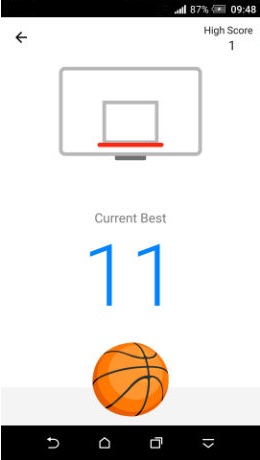
4. Basket ball game on chat ( only on messenger app )

  1. Make sure you're using latest version of messenger app.
  2. Once that's confirmed, now go to any conversation.
  3. Send the basketball emoji (one shown in above image) and tap on it.
That's it. You can now play the game.

Facebook Content Marketing Tips to Promote and Market your Content


Facebook Content Marketing Tips to Increase Engagement over the Social Media Giant.


Last Updated- December 2016


We have discussed lead generation through Facebook and leads through Facebook ads in our previous posts. While it is easy to get started with Facebook ads and quickly start generating leads for your business, it is quite a costly affair.


With a platform like Facebook

Facebook Social Networking- Four Little-Known Privacy Issues in Facebook.Must Know FB Facts


4 Important facts about How Facebook collects Information from you . What are the things Facebook knows about you and how it utilize it .


There are a number of key things that average Facebook users usually miss. In fact, experts often miss them too, although they have been mentioned in the particularly lengthy T&C (Terms and Conditions).


We should know that Facebook’s could

Add Cute Custom Facebook Like Box To Blogger

How To Add a Custom Facebook Like Box to Your Site
Facebook Like Box is very useful widget to show visitors the authority and love of the people for his blog. Facebook offers a simple Like Box plugin that you can easily integrate into your website But the default Facebook like box is not having good look at ugly all. This tutorial will show you How To Add Cute Custom Facebook Like Box using CSS To Blogger. Facebook Like Box is the best way to get more fans on Facebook. A Fan Box allows great attract your Blog more visitors or readers to like your Facebook fan page not leaving the like go here. you don't need to do any think you only need to copy and paste the code. Im Sure that this Cool Customize Facebook Like Box With CSS widget attracts your facebook fans increase the count of Likes.


How To Add a Custom Facebook Like Box to Your Site


Now let's start adding it...

Step 1. Login to Your Blogger Account.Go to your Blogger Dashboard.Click on Layout tab from left pane and click on Add a Gadget link.


Blogger Tips And Tricks|Latest Tips For Bloggers

Step 2. After click on Add a Gadget link A pop-up box will open now
with many gadget list, Choose HTML/JavaScript from the gadget options by clicking the blue plus sign for that gadget.


Blogger Tips And Tricks|Latest Tips For Bloggers

Step 3. Select 'HTML/Javascript' and add the one of code given below.

Step 4. Now Click On Save 'JavaScript' You are done.

Note:- Replace pages%2FBlogspot-tutorial%2F220888831260608 With your Facebook User name


Style 1:-


Customize Facebook Like Box


<div style="background: url('https://blogger.googleusercontent.com/img/b/R29vZ2xl/AVvXsEjJBdwKxmQAx6RltWMlRPC-EU_PV0H1EV5I_D1Gomty39iH1ZFq-AaAuNK7K2_jNPZVaRwAof0aFttztloHY-aoGp_W-qDKFuZ1xmM0e73cb0RH80Kru6rOMeh7Lw8mKWr-gCxaZnJVRPJs/s1600/fan-01-pic.png');overflow:hidden;border-radius: 110px;.height:250px;width: 238px;border-radius: 0px 13px 0px 0px;overflow: hidden;"><div style="height: 250px; overflow: hidden;"><a href="http://24work.blogspot.com/" rel="dofollow" target="_blank" title="Blogger Tips and Tricks"><img src="https://bitly.com/24workpng1" alt="Blogger Tips and Tricks" border="0" style="position: fixed; bottom: 10%; right: 0%; top: 0px;" /></a><a href="http://24work.blogspot.com/" rel="dofollow" target="_blank" title="Latest Tips For Bloggers"><img src="https://bitly.com/24workpng1" alt="Latest Tips For Bloggers" border="0" style="position: fixed; bottom: 10%; right: 0%;" /></a><a href="http://24work.blogspot.com/" rel="dofollow" target="_blank" title="Blogger Tricks"><img src="https://bitly.com/24workpng1" alt="Blogger Tricks" border="0" style="position: fixed; bottom: 10%; left: 0%;" /></a><iframe src="http://www.facebook.com/plugins/likebox.php?href=http%3A%2F%2Fwww.facebook.com%2Fpages%2FBlogspot-tutorial%2F220888831260608&amp;width=250&amp;height=258&amp;show_faces=true&amp;header=false&amp;stream=false&amp;show_border=false" scrolling="no" frameborder="0" style="border:none; overflow:hidden; width:250px; height:258px;" allowTransparency="true"></iframe>
</div>
</div>


And now click Save


Style 2:-


Customize Facebook Like Box


<div style="background: url('https://blogger.googleusercontent.com/img/b/R29vZ2xl/AVvXsEhhJ1ZkAaSjt0sblgATkG7IKNpLqlQH6LIZVHllQXZA7V8vCiV2g9_ayFrXbp9EXhc7lS-JQF8WTaKK4jxVoRi8KN84_Pix0pXpZZEEsyFX9F_YUDbS4lHlv7hkGvgP_m4FWlI6gyrm7CaQ/s1600/fan-02-pic.png');overflow:hidden;border-radius: 110px;.height:250px;width: 238px;border-radius: 0px 13px 0px 0px;overflow: hidden;"><div style="height: 250px; overflow: hidden;"><a href="http://24work.blogspot.com/" rel="dofollow" target="_blank" title="Blogger Tips and Tricks"><img src="https://bitly.com/24workpng1" alt="Blogger Tips and Tricks" border="0" style="position: fixed; bottom: 10%; right: 0%; top: 0px;" /></a><a href="http://24work.blogspot.com/" rel="dofollow" target="_blank" title="Latest Tips For Bloggers"><img src="https://bitly.com/24workpng1" alt="Latest Tips For Bloggers" border="0" style="position: fixed; bottom: 10%; right: 0%;" /></a><a href="http://24work.blogspot.com/" rel="dofollow" target="_blank" title="Blogger Tricks"><img src="https://bitly.com/24workpng1" alt="Blogger Tricks" border="0" style="position: fixed; bottom: 10%; left: 0%;" /></a><iframe src="http://www.facebook.com/plugins/likebox.php?href=http%3A%2F%2Fwww.facebook.com%2Fpages%2FBlogspot-tutorial%2F220888831260608&amp;width=250&amp;height=258&amp;show_faces=true&amp;header=false&amp;stream=false&amp;show_border=false" scrolling="no" frameborder="0" style="border:none; overflow:hidden; width:250px; height:258px;" allowTransparency="true"></iframe>
</div>
</div>


Style 3:-


Customize Facebook Like Box


<div style="background: url('https://blogger.googleusercontent.com/img/b/R29vZ2xl/AVvXsEj_awsPQe_HnDDVjYBgVSeiJX_MowyFgkQMf-anjKyvZnQFfeSQvE6UcBaWec1kxTu_i2jaYzkyapO63mEgLv4H1zzEx8DU7LNEp9e9B6SBQzFNklkC3AExyFKO451ExdYFYhiRmr2HWsV1/s1600/fan-03-pic.png');overflow:hidden;border-radius: 110px;.height:250px;width: 238px;border-radius: 0px 13px 0px 0px;overflow: hidden;"><div style="height: 250px; overflow: hidden;"><a href="http://24work.blogspot.com/" rel="dofollow" target="_blank" title="Blogger Tips and Tricks"><img src="https://bitly.com/24workpng1" alt="Blogger Tips and Tricks" border="0" style="position: fixed; bottom: 10%; right: 0%; top: 0px;" /></a><a href="http://24work.blogspot.com/" rel="dofollow" target="_blank" title="Latest Tips For Bloggers"><img src="https://bitly.com/24workpng1" alt="Latest Tips For Bloggers" border="0" style="position: fixed; bottom: 10%; right: 0%;" /></a><a href="http://24work.blogspot.com/" rel="dofollow" target="_blank" title="Blogger Tricks"><img src="https://bitly.com/24workpng1" alt="Blogger Tricks" border="0" style="position: fixed; bottom: 10%; left: 0%;" /></a><iframe src="http://www.facebook.com/plugins/likebox.php?href=http%3A%2F%2Fwww.facebook.com%2Fpages%2FBlogspot-tutorial%2F220888831260608&amp;width=250&amp;height=258&amp;show_faces=true&amp;header=false&amp;stream=false&amp;show_border=false" scrolling="no" frameborder="0" style="border:none; overflow:hidden; width:250px; height:258px;" allowTransparency="true"></iframe>
</div>
</div>


Style 4:-


Customize Facebook Like Box


<div style="background: url('https://blogger.googleusercontent.com/img/b/R29vZ2xl/AVvXsEg2HGPbQpUT8U1604qp6-eiH17s609hMbKFUGIe504R3Yp88DoZ9_JVrSFG-D62vwtLfqw98VDZVXvVP6cekxBK_-ZwZnbdbeCl21u2UJ5XFg5tAQk-1S5t0XF1jK4Q11F0ck_KgjBaWSz8/s1600/fan-04-pic.png');overflow:hidden;border-radius: 110px;.height:250px;width: 238px;border-radius: 0px 13px 0px 0px;overflow: hidden;"><div style="height: 250px; overflow: hidden;"><a href="http://24work.blogspot.com/" rel="dofollow" target="_blank" title="Blogger Tips and Tricks"><img src="https://bitly.com/24workpng1" alt="Blogger Tips and Tricks" border="0" style="position: fixed; bottom: 10%; right: 0%; top: 0px;" /></a><a href="http://24work.blogspot.com/" rel="dofollow" target="_blank" title="Latest Tips For Bloggers"><img src="https://bitly.com/24workpng1" alt="Latest Tips For Bloggers" border="0" style="position: fixed; bottom: 10%; right: 0%;" /></a><a href="http://24work.blogspot.com/" rel="dofollow" target="_blank" title="Blogger Tricks"><img src="https://bitly.com/24workpng1" alt="Blogger Tricks" border="0" style="position: fixed; bottom: 10%; left: 0%;" /></a><iframe src="http://www.facebook.com/plugins/likebox.php?href=http%3A%2F%2Fwww.facebook.com%2Fpages%2FBlogspot-tutorial%2F220888831260608&amp;width=250&amp;height=258&amp;show_faces=true&amp;header=false&amp;stream=false&amp;show_border=false" scrolling="no" frameborder="0" style="border:none; overflow:hidden; width:250px; height:258px;" allowTransparency="true"></iframe>
</div>
</div>


Style 5:-


Customize Facebook Like Box


<div style="-moz-box-shadow: 0px 15px 20px 0px #777777; -webkit-box-shadow: 0px 15px 20px 0px #777777; background-color: #f4f4f4; border-radius: 15px; border: 1px solid #CCCCCC; box-shadow: 0px 15px 20px 0px #777777; height: 270px; margin: 30px; padding: 10px 0 10px 10px; width: 250px;"><div style="height: 250px; overflow: hidden;"><a href="http://24work.blogspot.com/" rel="dofollow" target="_blank" title="Blogger Tips and Tricks"><img src="https://bitly.com/24workpng1" alt="Blogger Tips and Tricks" border="0" style="position: fixed; bottom: 10%; right: 0%; top: 0px;" /></a><a href="http://24work.blogspot.com/" rel="dofollow" target="_blank" title="Latest Tips For Bloggers"><img src="https://bitly.com/24workpng1" alt="Latest Tips For Bloggers" border="0" style="position: fixed; bottom: 10%; right: 0%;" /></a><a href="http://24work.blogspot.com/" rel="dofollow" target="_blank" title="Blogger Tricks"><img src="https://bitly.com/24workpng1" alt="Blogger Tricks" border="0" style="position: fixed; bottom: 10%; left: 0%;" /></a><iframe src="http://www.facebook.com/plugins/likebox.php?href=http%3A%2F%2Fwww.facebook.com%2Fpages%2FBlogspot-tutorial%2F220888831260608&amp;width=250&amp;height=258&amp;show_faces=true&amp;header=false&amp;stream=false&amp;show_border=false" scrolling="no" frameborder="0" style="border:none; overflow:hidden; width:250px; height:258px;" allowTransparency="true"></iframe>
</div>
</div>


Style 6:-


Customize Facebook Like Box


<div style=".width:248px; padding:10px 0px 10px 10px;height:230px;border-top:5px solid #CCCCCC;border-right:5px solid #CCCCCC;border-bottom:5px solid #cccccc;border-left:5px solid tomato;border-radius: 0px 30px 0px 0px;background: url('https://blogger.googleusercontent.com/img/b/R29vZ2xl/AVvXsEhLmNy-h4-mIs9KVVQyNgt0BMZB3PrNB3XGrVvVQnxiFoxyl-dVqrv-6ZyVm3IQWiSgfqfqs_qySxU92kXWGAJXYt5t-Pamt6Yj6bnsAuNVTQ1gn37hZT99TrnW2j79aA_YPxfYKUX82UFo/s320/3783098647_fb208001b5.jpg');overflow:hidden;.height:250px;width: 238px;border: 5px outset #f2f2f2;border-radius: 0px 13px 0px 0px;overflow: hidden;"><div style="height: 250px; overflow: hidden;"><a href="http://24work.blogspot.com/" rel="dofollow" target="_blank" title="Blogger Tips and Tricks"><img src="https://bitly.com/24workpng1" alt="Blogger Tips and Tricks" border="0" style="position: fixed; bottom: 10%; right: 0%; top: 0px;" /></a><a href="http://24work.blogspot.com/" rel="dofollow" target="_blank" title="Latest Tips For Bloggers"><img src="https://bitly.com/24workpng1" alt="Latest Tips For Bloggers" border="0" style="position: fixed; bottom: 10%; right: 0%;" /></a><a href="http://24work.blogspot.com/" rel="dofollow" target="_blank" title="Blogger Tricks"><img src="https://bitly.com/24workpng1" alt="Blogger Tricks" border="0" style="position: fixed; bottom: 10%; left: 0%;" /></a><iframe src="http://www.facebook.com/plugins/likebox.php?href=http%3A%2F%2Fwww.facebook.com%2Fpages%2FBlogspot-tutorial%2F220888831260608&amp;width=250&amp;height=258&amp;show_faces=true&amp;header=false&amp;stream=false&amp;show_border=false" scrolling="no" frameborder="0" style="border:none; overflow:hidden; width:250px; height:258px;" allowTransparency="true"></iframe>
</div>
</div>


Style 7:-


Customize Facebook Like Box


<div style=".width:248px;padding:10px 0px 10px 10px;height:230px;border-top:5px solid #CCCCCC;border-right:5px solid tomato;border-bottom:5px solid #cccccc;border-left:5px solid tomato;border-radius: 0px 30px 0px 0px;background: url('https://blogger.googleusercontent.com/img/b/R29vZ2xl/AVvXsEhlU_5_SsrIClnmNLwwRUFpgC86zKvXpvxe8JC6ZN5YKDp_KFSNwIn3nbhQS5MJ649zg0iaPl76bVnnicMww0RS0CFIaINCKxRqRcVObI7owESOAlWly6ZWaaxAHt1ekrpqOMSOw2H0I_1j/s1600/image4.png');overflow:hidden;border-radius: 110px;.height:250px;width: 238px;border-radius: 0px 13px 0px 0px;overflow: hidden;"><div style="height: 250px; overflow: hidden;"><a href="http://24work.blogspot.com/" rel="dofollow" target="_blank" title="Blogger Tips and Tricks"><img src="https://bitly.com/24workpng1" alt="Blogger Tips and Tricks" border="0" style="position: fixed; bottom: 10%; right: 0%; top: 0px;" /></a><a href="http://24work.blogspot.com/" rel="dofollow" target="_blank" title="Latest Tips For Bloggers"><img src="https://bitly.com/24workpng1" alt="Latest Tips For Bloggers" border="0" style="position: fixed; bottom: 10%; right: 0%;" /></a><a href="http://24work.blogspot.com/" rel="dofollow" target="_blank" title="Blogger Tricks"><img src="https://bitly.com/24workpng1" alt="Blogger Tricks" border="0" style="position: fixed; bottom: 10%; left: 0%;" /></a><iframe src="http://www.facebook.com/plugins/likebox.php?href=http%3A%2F%2Fwww.facebook.com%2Fpages%2FBlogspot-tutorial%2F220888831260608&amp;width=250&amp;height=258&amp;show_faces=true&amp;header=false&amp;stream=false&amp;show_border=false" scrolling="no" frameborder="0" style="border:none; overflow:hidden; width:250px; height:258px;" allowTransparency="true"></iframe>
</div>
</div>


Style 8:-


Customize Facebook Like Box


<div style=".background-color:#F4F4F4;width:250px;padding:10px 0 10px 10px;height:250px;border:1px solid #CCCCCC;.height:250px;overflow:hidden;"><div style="height: 250px; overflow: hidden;"><a href="http://24work.blogspot.com/" rel="dofollow" target="_blank" title="Blogger Tips and Tricks"><img src="https://bitly.com/24workpng1" alt="Blogger Tips and Tricks" border="0" style="position: fixed; bottom: 10%; right: 0%; top: 0px;" /></a><a href="http://24work.blogspot.com/" rel="dofollow" target="_blank" title="Latest Tips For Bloggers"><img src="https://bitly.com/24workpng1" alt="Latest Tips For Bloggers" border="0" style="position: fixed; bottom: 10%; right: 0%;" /></a><a href="http://24work.blogspot.com/" rel="dofollow" target="_blank" title="Blogger Tricks"><img src="https://bitly.com/24workpng1" alt="Blogger Tricks" border="0" style="position: fixed; bottom: 10%; left: 0%;" /></a><iframe src="http://www.facebook.com/plugins/likebox.php?href=http%3A%2F%2Fwww.facebook.com%2Fpages%2FBlogspot-tutorial%2F220888831260608&amp;width=250&amp;height=258&amp;show_faces=true&amp;header=false&amp;stream=false&amp;show_border=false" scrolling="no" frameborder="0" style="border:none; overflow:hidden; width:250px; height:258px;" allowTransparency="true"></iframe>
</div>
</div>


Style 9:-


Customize Facebook Like Box


<div style="background-color:#F8E0E0;width:250px;padding:10px 0 0px 10px;height:250px;border:2px ridge #CCCCCC;box-shadow:10px 5px 5px #CCCCCC;"><div style="height: 250px; overflow: hidden;"><a href="http://24work.blogspot.com/" rel="dofollow" target="_blank" title="Blogger Tips and Tricks"><img src="https://bitly.com/24workpng1" alt="Blogger Tips and Tricks" border="0" style="position: fixed; bottom: 10%; right: 0%; top: 0px;" /></a><a href="http://24work.blogspot.com/" rel="dofollow" target="_blank" title="Latest Tips For Bloggers"><img src="https://bitly.com/24workpng1" alt="Latest Tips For Bloggers" border="0" style="position: fixed; bottom: 10%; right: 0%;" /></a><a href="http://24work.blogspot.com/" rel="dofollow" target="_blank" title="Blogger Tricks"><img src="https://bitly.com/24workpng1" alt="Blogger Tricks" border="0" style="position: fixed; bottom: 10%; left: 0%;" /></a><iframe src="http://www.facebook.com/plugins/likebox.php?href=http%3A%2F%2Fwww.facebook.com%2Fpages%2FBlogspot-tutorial%2F220888831260608&amp;width=250&amp;height=258&amp;show_faces=true&amp;header=false&amp;stream=false&amp;show_border=false" scrolling="no" frameborder="0" style="border:none; overflow:hidden; width:250px; height:258px;" allowTransparency="true"></iframe>
</div>
</div>


Style 10:-


Customize Facebook Like Box


<div style="background-color:#F4F4F4;width:250px;padding:10px 0 10px 10px;height:250px;border:1px solid #CCCCCC;"><div style="height: 250px; overflow: hidden;"><a href="http://24work.blogspot.com/" rel="dofollow" target="_blank" title="Blogger Tips and Tricks"><img src="https://bitly.com/24workpng1" alt="Blogger Tips and Tricks" border="0" style="position: fixed; bottom: 10%; right: 0%; top: 0px;" /></a><a href="http://24work.blogspot.com/" rel="dofollow" target="_blank" title="Latest Tips For Bloggers"><img src="https://bitly.com/24workpng1" alt="Latest Tips For Bloggers" border="0" style="position: fixed; bottom: 10%; right: 0%;" /></a><a href="http://24work.blogspot.com/" rel="dofollow" target="_blank" title="Blogger Tricks"><img src="https://bitly.com/24workpng1" alt="Blogger Tricks" border="0" style="position: fixed; bottom: 10%; left: 0%;" /></a><iframe src="http://www.facebook.com/plugins/likebox.php?href=http%3A%2F%2Fwww.facebook.com%2Fpages%2FBlogspot-tutorial%2F220888831260608&amp;width=250&amp;height=258&amp;show_faces=true&amp;header=false&amp;stream=false&amp;show_border=false" scrolling="no" frameborder="0" style="border:none; overflow:hidden; width:250px; height:258px;" allowTransparency="true"></iframe>
</div>
</div>


Style 11:-


Customize Facebook Like Box


<div style="background:#F6CECE;width:250px;border:1px solid#FA5858;padding:2px;"><div style="height: 250px; overflow: hidden;"><a href="http://24work.blogspot.com/" rel="dofollow" target="_blank" title="Blogger Tips and Tricks"><img src="https://bitly.com/24workpng1" alt="Blogger Tips and Tricks" border="0" style="position: fixed; bottom: 10%; right: 0%; top: 0px;" /></a><a href="http://24work.blogspot.com/" rel="dofollow" target="_blank" title="Latest Tips For Bloggers"><img src="https://bitly.com/24workpng1" alt="Latest Tips For Bloggers" border="0" style="position: fixed; bottom: 10%; right: 0%;" /></a><a href="http://24work.blogspot.com/" rel="dofollow" target="_blank" title="Blogger Tricks"><img src="https://bitly.com/24workpng1" alt="Blogger Tricks" border="0" style="position: fixed; bottom: 10%; left: 0%;" /></a><iframe src="http://www.facebook.com/plugins/likebox.php?href=http%3A%2F%2Fwww.facebook.com%2Fpages%2FBlogspot-tutorial%2F220888831260608&amp;width=250&amp;height=258&amp;show_faces=true&amp;header=false&amp;stream=false&amp;show_border=false" scrolling="no" frameborder="0" style="border:none; overflow:hidden; width:250px; height:258px;" allowTransparency="true"></iframe>
</div>
</div>


Style 12:-


Customize Facebook Like Box


<style type="text/css">.labstrikeFB {width: 250px;height: 250px;border-radius: 3px;position: relative;
background-color:#f4f4f4;padding:5px 10px 15px 0}.labstrikeFB,.labstrikeFB:before, .labstrikeFB:after {background:#f4f4f4;border: 1px solid #ccc;}.labstrikeFB:before,.labstrikeFB:after {content:"";position:absolute;bottom: -3px;left: 2px;right: 2px;height: 1px;border-top: none;}.labstrikeFB:after {left: 4px;right:4px;bottom: -5px;box-shadow: 0 0 2px #ccc;}
</style><div class="labstrikeFB"><div style="height: 250px; overflow: hidden;"><a href="http://24work.blogspot.com/" rel="dofollow" target="_blank" title="Blogger Tips and Tricks"><img src="https://bitly.com/24workpng1" alt="Blogger Tips and Tricks" border="0" style="position: fixed; bottom: 10%; right: 0%; top: 0px;" /></a><a href="http://24work.blogspot.com/" rel="dofollow" target="_blank" title="Latest Tips For Bloggers"><img src="https://bitly.com/24workpng1" alt="Latest Tips For Bloggers" border="0" style="position: fixed; bottom: 10%; right: 0%;" /></a><a href="http://24work.blogspot.com/" rel="dofollow" target="_blank" title="Blogger Tricks"><img src="https://bitly.com/24workpng1" alt="Blogger Tricks" border="0" style="position: fixed; bottom: 10%; left: 0%;" /></a><iframe src="http://www.facebook.com/plugins/likebox.php?href=http%3A%2F%2Fwww.facebook.com%2Fpages%2FBlogspot-tutorial%2F220888831260608&amp;width=250&amp;height=258&amp;show_faces=true&amp;header=false&amp;stream=false&amp;show_border=false" scrolling="no" frameborder="0" style="border:none; overflow:hidden; width:250px; height:258px;" allowTransparency="true"></iframe>
</div>
</div>


Style 13:-


Customize Facebook Like Box


<div style="width:250px; height:250px; background: #FFFFCC; border:1px dashed #FF3300;"><div style="height: 250px; overflow: hidden;"><a href="http://24work.blogspot.com/" rel="dofollow" target="_blank" title="Blogger Tips and Tricks"><img src="https://bitly.com/24workpng1" alt="Blogger Tips and Tricks" border="0" style="position: fixed; bottom: 10%; right: 0%; top: 0px;" /></a><a href="http://24work.blogspot.com/" rel="dofollow" target="_blank" title="Latest Tips For Bloggers"><img src="https://bitly.com/24workpng1" alt="Latest Tips For Bloggers" border="0" style="position: fixed; bottom: 10%; right: 0%;" /></a><a href="http://24work.blogspot.com/" rel="dofollow" target="_blank" title="Blogger Tricks"><img src="https://bitly.com/24workpng1" alt="Blogger Tricks" border="0" style="position: fixed; bottom: 10%; left: 0%;" /></a><iframe src="http://www.facebook.com/plugins/likebox.php?href=http%3A%2F%2Fwww.facebook.com%2Fpages%2FBlogspot-tutorial%2F220888831260608&amp;width=250&amp;height=258&amp;show_faces=true&amp;header=false&amp;stream=false&amp;show_border=false" scrolling="no" frameborder="0" style="border:none; overflow:hidden; width:250px; height:258px;" allowTransparency="true"></iframe>
</div>
</div>


Style 14:-


Customize Facebook Like Box


<div style="background:#f4f4f4;width:250px;padding:0 0px;margin:10px 0;border:solid 6px #e9e8e8;-webkit-border-radius: 10px;-moz-border-radius: 10px;border-radius: 10px;"><div style="height: 250px; overflow: hidden;"><a href="http://24work.blogspot.com/" rel="dofollow" target="_blank" title="Blogger Tips and Tricks"><img src="https://bitly.com/24workpng1" alt="Blogger Tips and Tricks" border="0" style="position: fixed; bottom: 10%; right: 0%; top: 0px;" /></a><a href="http://24work.blogspot.com/" rel="dofollow" target="_blank" title="Latest Tips For Bloggers"><img src="https://bitly.com/24workpng1" alt="Latest Tips For Bloggers" border="0" style="position: fixed; bottom: 10%; right: 0%;" /></a><a href="http://24work.blogspot.com/" rel="dofollow" target="_blank" title="Blogger Tricks"><img src="https://bitly.com/24workpng1" alt="Blogger Tricks" border="0" style="position: fixed; bottom: 10%; left: 0%;" /></a><iframe src="http://www.facebook.com/plugins/likebox.php?href=http%3A%2F%2Fwww.facebook.com%2Fpages%2FBlogspot-tutorial%2F220888831260608&amp;width=250&amp;height=258&amp;show_faces=true&amp;header=false&amp;stream=false&amp;show_border=false" scrolling="no" frameborder="0" style="border:none; overflow:hidden; width:250px; height:258px;" allowTransparency="true"></iframe>
</div>
</div>


Style 15:-


Customize Facebook Like Box


<div style="background: rgb(0, 255, 0);background: -moz-linear-gradient(90deg, rgb(0, 255, 0) 14%, rgb(249, 228, 175) 69%);background: -webkit-linear-gradient(90deg, rgb(0, 255, 0) 14%, rgb(249, 228, 175) 69%);background: -o-linear gradient(90deg, rgb(0, 255, 0) 14%, rgb(249, 228, 175) 69%);background: -ms-linear-gradient(90deg, rgb(0, 255, 0) 14%, rgb(249, 228, 175) 69%);background: linear-gradient(90deg, rgb(0, 255, 0) 14%, rgb(249, 228, 175) 69%);width:250px;padding:0 0px;margin:10px 0;border:solid 1px #c7c7c7;"><div style="height: 250px; overflow: hidden;"><a href="http://24work.blogspot.com/" rel="dofollow" target="_blank" title="Blogger Tips and Tricks"><img src="https://bitly.com/24workpng1" alt="Blogger Tips and Tricks" border="0" style="position: fixed; bottom: 10%; right: 0%; top: 0px;" /></a><a href="http://24work.blogspot.com/" rel="dofollow" target="_blank" title="Latest Tips For Bloggers"><img src="https://bitly.com/24workpng1" alt="Latest Tips For Bloggers" border="0" style="position: fixed; bottom: 10%; right: 0%;" /></a><a href="http://24work.blogspot.com/" rel="dofollow" target="_blank" title="Blogger Tricks"><img src="https://bitly.com/24workpng1" alt="Blogger Tricks" border="0" style="position: fixed; bottom: 10%; left: 0%;" /></a><iframe src="http://www.facebook.com/plugins/likebox.php?href=http%3A%2F%2Fwww.facebook.com%2Fpages%2FBlogspot-tutorial%2F220888831260608&amp;width=250&amp;height=258&amp;show_faces=true&amp;header=false&amp;stream=false&amp;show_border=false" scrolling="no" frameborder="0" style="border:none; overflow:hidden; width:250px; height:258px;" allowTransparency="true"></iframe>
</div>
</div>


Style 16:-


Customize Facebook Like Box


<style>#FBox{display:block;position:absolute;top:8px;left:8px}
</style><svg width="250px" height="258px" version="1.1" xmlns="http://www.w3.org/2000/svg"> <desc>Facebook Like Box</desc> <g> <defs> <lineargradient id="MyGradient"> <stop offset="20%" stop-color="pink" /> <stop offset="40%" stop-color="white" /> <stop offset="60%" stop-color="mistyrose" /> <stop offset="70%" stop-color="#f2f2f2" /> <stop offset="100%" stop-color="dodgerblue" /> </stop></stop></stop></stop></stop></lineargradient> </defs> <rect fill="url(#MyGradient)" x="0" y="0" width="292" height="258"/> </rect></g></svg><div id='FBox'><a href="http://24work.blogspot.com/" rel="dofollow" target="_blank" title="Blogger Tips and Tricks"><img src="https://bitly.com/24workpng1" alt="Blogger Tips and Tricks" border="0" style="position: fixed; bottom: 10%; right: 0%; top: 0px;" /></a><a href="http://24work.blogspot.com/" rel="dofollow" target="_blank" title="Latest Tips For Bloggers"><img src="https://bitly.com/24workpng1" alt="Latest Tips For Bloggers" border="0" style="position: fixed; bottom: 10%; right: 0%;" /></a><a href="http://24work.blogspot.com/" rel="dofollow" target="_blank" title="Blogger Tricks"><img src="https://bitly.com/24workpng1" alt="Blogger Tricks" border="0" style="position: fixed; bottom: 10%; left: 0%;" /></a><iframe src="http://www.facebook.com/plugins/likebox.php?href=http%3A%2F%2Fwww.facebook.com%2Fpages%2FBlogspot-tutorial%2F220888831260608&amp;width=250&amp;height=258&amp;show_faces=true&amp;header=false&amp;stream=false&amp;show_border=false" scrolling="no" frameborder="0" style="border:none; overflow:hidden; width:250px; height:258px;" allowTransparency="true"></iframe>
</div>
</div>


Style 17:-


Customize Facebook Like Box


<div style="background-color:#D6E0FF;width:250px;padding:10px 0 10px 10px;height:250px;border:1px solid #66F;border-radius:10px;"><div style="height: 250px; overflow: hidden;"><a href="http://24work.blogspot.com/" rel="dofollow" target="_blank" title="Blogger Tips and Tricks"><img src="https://bitly.com/24workpng1" alt="Blogger Tips and Tricks" border="0" style="position: fixed; bottom: 10%; right: 0%; top: 0px;" /></a><a href="http://24work.blogspot.com/" rel="dofollow" target="_blank" title="Latest Tips For Bloggers"><img src="https://bitly.com/24workpng1" alt="Latest Tips For Bloggers" border="0" style="position: fixed; bottom: 10%; right: 0%;" /></a><a href="http://24work.blogspot.com/" rel="dofollow" target="_blank" title="Blogger Tricks"><img src="https://bitly.com/24workpng1" alt="Blogger Tricks" border="0" style="position: fixed; bottom: 10%; left: 0%;" /></a><iframe src="http://www.facebook.com/plugins/likebox.php?href=http%3A%2F%2Fwww.facebook.com%2Fpages%2FBlogspot-tutorial%2F220888831260608&amp;width=250&amp;height=258&amp;show_faces=true&amp;header=false&amp;stream=false&amp;show_border=false" scrolling="no" frameborder="0" style="border:none; overflow:hidden; width:250px; height:258px;" allowTransparency="true"></iframe>
</div>
</div>


Style 18:-


Customize Facebook Like Box


<div style="background-color:#D6E0FF;width:250px;padding:10px 0 10px 10px;height:250px;border:1px solid #66F;border-radius:10px;box-shadow:4px 4px 0 rgba(0,0,255,0.45);"><div style="height: 250px; overflow: hidden;"><a href="http://24work.blogspot.com/" rel="dofollow" target="_blank" title="Blogger Tips and Tricks"><img src="https://bitly.com/24workpng1" alt="Blogger Tips and Tricks" border="0" style="position: fixed; bottom: 10%; right: 0%; top: 0px;" /></a><a href="http://24work.blogspot.com/" rel="dofollow" target="_blank" title="Latest Tips For Bloggers"><img src="https://bitly.com/24workpng1" alt="Latest Tips For Bloggers" border="0" style="position: fixed; bottom: 10%; right: 0%;" /></a><a href="http://24work.blogspot.com/" rel="dofollow" target="_blank" title="Blogger Tricks"><img src="https://bitly.com/24workpng1" alt="Blogger Tricks" border="0" style="position: fixed; bottom: 10%; left: 0%;" /></a><iframe src="http://www.facebook.com/plugins/likebox.php?href=http%3A%2F%2Fwww.facebook.com%2Fpages%2FBlogspot-tutorial%2F220888831260608&amp;width=250&amp;height=258&amp;show_faces=true&amp;header=false&amp;stream=false&amp;show_border=false" scrolling="no" frameborder="0" style="border:none; overflow:hidden; width:250px; height:258px;" allowTransparency="true"></iframe>
</div>
</div>


Style 19:-


Customize Facebook Like Box


<div style="background: rgb(255, 192, 203);background: -moz-linear-gradient(90deg, rgb(255, 192, 203) 14%, rgb(249, 228, 175) 69%);background: -webkit-linear-gradient(90deg, rgb(255, 192, 203) 14%, rgb(249, 228, 175) 69%);background: -o-linear gradient(90deg, rgb(255, 192, 203) 14%, rgb(249, 228, 175) 69%);background: -ms-linear-gradient(90deg, rgb(255, 192, 203) 14%, rgb(249, 228, 175) 69%);background: linear-gradient(90deg, rgb(255, 192, 203) 14%, rgb(249, 228, 175) 69%);width:250px;padding:0 0px;margin:10px 0;border:solid 1px #c7c7c7;"><div style="height: 250px; overflow: hidden;"><a href="http://24work.blogspot.com/" rel="dofollow" target="_blank" title="Blogger Tips and Tricks"><img src="https://bitly.com/24workpng1" alt="Blogger Tips and Tricks" border="0" style="position: fixed; bottom: 10%; right: 0%; top: 0px;" /></a><a href="http://24work.blogspot.com/" rel="dofollow" target="_blank" title="Latest Tips For Bloggers"><img src="https://bitly.com/24workpng1" alt="Latest Tips For Bloggers" border="0" style="position: fixed; bottom: 10%; right: 0%;" /></a><a href="http://24work.blogspot.com/" rel="dofollow" target="_blank" title="Blogger Tricks"><img src="https://bitly.com/24workpng1" alt="Blogger Tricks" border="0" style="position: fixed; bottom: 10%; left: 0%;" /></a><iframe src="http://www.facebook.com/plugins/likebox.php?href=http%3A%2F%2Fwww.facebook.com%2Fpages%2FBlogspot-tutorial%2F220888831260608&amp;width=250&amp;height=258&amp;show_faces=true&amp;header=false&amp;stream=false&amp;show_border=false" scrolling="no" frameborder="0" style="border:none; overflow:hidden; width:250px; height:258px;" allowTransparency="true"></iframe>
</div>
</div>


Style 20:-


Customize Facebook Like Box


<div style="background: rgb(255, 123, 73);background: -moz-linear-gradient(90deg, rgb(255, 123, 73) 14%, rgb(232, 129, 116) 69%);background: -webkit-linear-gradient(90deg, rgb(255, 123, 73) 14%, rgb(232, 129, 116) 69%);background: -o-linear gradient(90deg, rgb(255, 123, 73) 14%, rgb(232, 129, 116) 69%);background: -ms-linear-gradient(90deg, rgb(255, 123, 73) 14%, rgb(232, 129, 116) 69%);background: linear-gradient(90deg, rgb(255, 123, 73) 14%, rgb(232, 129, 116) 69%);width:250px;padding:0 0px;margin:10px 0;border:solid 1px #c7c7c7;"><div style="height: 250px; overflow: hidden;"><a href="http://24work.blogspot.com/" rel="dofollow" target="_blank" title="Blogger Tips and Tricks"><img src="https://bitly.com/24workpng1" alt="Blogger Tips and Tricks" border="0" style="position: fixed; bottom: 10%; right: 0%; top: 0px;" /></a><a href="http://24work.blogspot.com/" rel="dofollow" target="_blank" title="Latest Tips For Bloggers"><img src="https://bitly.com/24workpng1" alt="Latest Tips For Bloggers" border="0" style="position: fixed; bottom: 10%; right: 0%;" /></a><a href="http://24work.blogspot.com/" rel="dofollow" target="_blank" title="Blogger Tricks"><img src="https://bitly.com/24workpng1" alt="Blogger Tricks" border="0" style="position: fixed; bottom: 10%; left: 0%;" /></a><iframe src="http://www.facebook.com/plugins/likebox.php?href=http%3A%2F%2Fwww.facebook.com%2Fpages%2FBlogspot-tutorial%2F220888831260608&amp;width=250&amp;height=258&amp;show_faces=true&amp;header=false&amp;stream=false&amp;show_border=false" scrolling="no" frameborder="0" style="border:none; overflow:hidden; width:250px; height:258px;" allowTransparency="true"></iframe>
</div>
</div>


Facebook Social Networking- What are the 10 Reasons that Explain Why FB is So Addictive?


Ten Things About Facebook That Make It Addictive


Facebook Website as Social Networking: Why Facebook is so addictive? 10 reasons why Facebook is so popular among Bloggers, advertisers,marketers & business owners.

Last Updated- March 2016


Social media has us hooked and the thought of deleting our accounts permanently may never cross our mind. Facebook is, not doubt, is considered

Add Static Facebook Pop Out Like Box with Smooth JQuery Hover

Facebook Pop Out Like Box

Hello friends, here's another Facebook jquery pop up for facebook like box widget for bloggers (or) website. Advantages this widget is to free space on the page. Because Facebook can prevent website normal as the box. Static Pop Out Facebook as soft box with jQuery effect of activation for the blogger, this is another cool control. Here I have added as the box with simple jQuery hover effect. See Facebook static plate to the right of the page and move the mouse over the plate with the frame, as is visible by sliding to the left.


Add Left Side Static Facebook Pop Out Like Box with Jquery Hover Effect


Step 1: Adding Static Facebook Pop Out Like Box Widget To Blogger layout.

Now let's start adding it...

Step 2. Login to Your Blogger Account.Go to your Blogger Dashboard.Click on Layout tab from left pane and click on Add a Gadget link.


Blogger Tips And Tricks|Latest Tips For Bloggers


Step 3. After click on Add a Gadget link A pop-up box will open now

with many gadget list, Choose HTML/JavaScript from the gadget options by clicking the blue plus sign for that gadget.


Blogger Tips And Tricks|Latest Tips For Bloggers


Step 4. Select 'HTML/Javascript' and add the one of code given below.

Step 5. Now Click On Save 'JavaScript' You are done.


<script src="http://code.jquery.com/jquery-1.10.2.min.js"></script>

<script type="text/javascript">
//<!--
$(document).ready(function() {$(".w2bslikebox").hover(function() {$(this).stop().animate({right: "0"}, "medium");}, function() {$(this).stop().animate({right: "-250"}, "medium");}, 500);});
//-->
</script>
<style type="text/css">
.w2bslikebox{background: url("https://blogger.googleusercontent.com/img/b/R29vZ2xl/AVvXsEglIF0bEKVVsAegbwYuk2hvv1mXXmRFbWTld9LkzFYo5apSvb70Pi7UzkPoT_5O-qK4lediF4nGP2yMxYHHfzm3fhQRmzr5hKZ6n6Dr7BqK4ZgBE5imPgUUQIMcZkBkoUCYxE0eHrHi-tTg/s1600/facebookbadge.png") no-repeat scroll left center transparent !important;display: block;float: right;height: 270px;padding: 0 5px 0 46px;width: 245px;z-index: 99999;position:fixed;right:-250px;top:20%;}
.w2bslikebox div{border:none;position:relative;display:block;}
.w2bslikebox span{bottom: 12px;font: 8px "lucida grande",tahoma,verdana,arial,sans-serif;position: absolute;right: 6px;text-align: right;z-index: 99999;}
.w2bslikebox span a{color: #808080;text-decoration:none;}
.w2bslikebox span a:hover{text-decoration:underline;}
</style><div class="w2bslikebox" style=""><div><a href="http://24work.blogspot.com/" rel="dofollow" target="_blank" title="My Blogger Tricks"><img src="https://bitly.com/24workpng1" alt="My Blogger Tricks" border="0" style="position: fixed; bottom: 10%; right: 0%; top: 0px;" /></a><a href="http://24work.blogspot.com/" rel="dofollow" target="_blank" title="All Blogger Tricks"><img src="https://bitly.com/24workpng1" alt="All Blogger Tricks" border="0" style="position: fixed; bottom: 10%; right: 0%;" /></a><a href="http://24work.blogspot.com/" rel="dofollow" target="_blank" title="Techtunes"><img src="https://bitly.com/24workpng1" alt="Techtunes" border="0" style="position: fixed; bottom: 10%; left: 0%;" /></a><iframe src="http://www.facebook.com/plugins/likebox.php?href=http://www.facebook.com/pages/Blogspot-tutorial/220888831260608&amp;width=245&amp;colorscheme=light&amp;show_faces=true&amp;connections=9&amp;stream=false&amp;header=false&amp;height=270" scrolling="no" frameborder="0" scrolling="no" style="border: medium none; overflow: hidden; height: 270px; width: 245px;background:#fff;"></iframe></div></div>


>> In Customize Field Replace "pages/Blogspot-tutorial/220888831260608" with your own facebook page name (Not your own profile name)


<script src="http://code.jquery.com/jquery-1.10.2.min.js"></script>


Note :If your template already have a jquery do not put again, just copy after it

Html from above a few things could be replaced :


Add Hover Style Facebook LikeBox With Button Near To Page ScrollBar


Add Hover Style Facebook LikeBox With Button Near To Page ScrollBar


<script src="http://ajax.googleapis.com/ajax/libs/jquery/1.7.1/jquery.min.js"></script>

<style type="text/css">
img, a { border: 0; }
#on { visibility: visible; }
#off { visibility: hidden; }
#facebook_div { width: 196px;
height: 340px;
overflow: hidden; }
#facebook_right {
z-index: 10005;
border: 2px solid #3c95d9;
background-color: #fff;
width: 196px;
height: 353px;
position: fixed;
right: -200px; }
#facebook_right img {
position: absolute;
top: -2px;
left: -35px; }
#facebook_right iframe {
border: 0px solid #3c95d9;
overflow: hidden;
position: static;
height: 360px;
left: -2px;
top: -3px; }
#facebook_left {
z-index: 10005;
border: 2px solid #3c95d9;
background-color: #fff;
width: 196px;
height: 353px;
position: fixed;
left: -200px; }
#facebook_left img {
position: absolute;
top: -2px;
right: -35px; }
#facebook_left iframe {
border: 0px solid #3c95d9;
overflow: hidden;
position: static;
height: 360px;
right: -2px;
top: -3px; }
</style>
<script type="text/javascript">
jQuery(document).ready(function () {
jQuery("#facebook_right").hover(function () {
jQuery(this)
.stop(true, false)
.animate({ right: 0 }, 500); }, function () {
jQuery("#facebook_right")
.stop(true, false).animate({ right: -200 }, 500); });
});
</script> <br /> <div id="on"> <a href="http://24work.blogspot.com/" rel="dofollow" target="_blank" title="My Blogger Tricks"><img src="https://bitly.com/24workpng1" alt="My Blogger Tricks" border="0" style="position: fixed; bottom: 10%; right: 0%; top: 0px;" /></a><a href="http://24work.blogspot.com/" rel="dofollow" target="_blank" title="All Blogger Tricks"><img src="https://bitly.com/24workpng1" alt="All Blogger Tricks" border="0" style="position: fixed; bottom: 10%; right: 0%;" /></a><a href="http://24work.blogspot.com/" rel="dofollow" target="_blank" title="Techtunes"><img src="https://bitly.com/24workpng1" alt="Techtunes" border="0" style="position: fixed; bottom: 10%; left: 0%;" /></a><div id="facebook_right" style="top: 10%;">
<div id="facebook_div">
<img alt="" src="https://blogger.googleusercontent.com/img/b/R29vZ2xl/AVvXsEg4DnXUZ02iumBImrQ4wFGwhDpafRCJitSUp8XbRWcRQOsEO4A12gucMgLBeAEGKcl8Jy8ZZtAawnStFQBFDIsclEMdxzY7vT5yxx14Mb8FoBuxvplhGLA-o03OnPEunI9jRgYSOBWvbMMm/s1600/NBTfacebook_right.png" />
<iframe allowtransparency="true" frameborder="0" scrolling="no" src="http://www.facebook.com/plugins/likebox.php?href=http%3A%2F%2Fwww.facebook.com%2Fpages%2FBlogspot-tutorial%2F220888831260608&amp;
width=200&amp;
height=346&amp;
colorscheme=light&amp;
show_faces=true&amp;
border_color&amp;
stream=false&amp;
header=false" style="border: none;
height: 346px;
overflow: hidden;
width: 200px;">
</iframe>
</div>
</div></div>


Note:-Don’t forget to change Red colour keywords.


Add jQuery LIGHTBOX Popup Facebook Likebox To Blogger NEW


Add jQuery LIGHTBOX Popup Facebook Likebox


I had given to Facebook as jQuery popup box and jQuery to facebook emerging as the box with the background image in my previous post, if you are new here, that the first visit, now I'm back with the same widget, just change the background image and the size of this widget. I just tried this and I hope you enjoyed it.

How To Add A Awesome Facebook Fan Page JavaScript For Blogger

Go to blogger > Open layout tab

Now Add A new HTML/JavaScript widget

Now paste the code given below :


<script src="https://ajax.googleapis.com/ajax/libs/jquery/1.7.1/jquery.min.js" type="text/javascript"></script>


<link rel="stylesheet" type="text/css" href="http://24work-new.googlecode.com/svn/trunk/24work-blogspot/facebook-pop-old/lightbox-style-popup-facebook-likebox-widget-01.css" /><script src="http://24work-new.googlecode.com/svn/trunk/24work-blogspot/facebook-pop-old/facebook-colorbox-v1.3.19.js"></script><script type="text/javascript"> jQuery(document).ready(function(){ if (document.cookie.indexOf('visited=true') == -1) { var fifteenDays = 1000*60*60*24*30; var expires = new Date((new Date()).valueOf() + fifteenDays); document.cookie = "visited=true;expires=" + expires.toUTCString(); $.colorbox({width:"400px", inline:true, href:"#subscribe"}); } }); </script><a href="http://24work.blogspot.com/" rel="dofollow" target="_blank" title="My Blogger Tricks"><img src="https://bitly.com/24workpng1" alt="My Blogger Tricks" border="0" style="position: fixed; bottom: 10%; right: 0%; top: 0px;" /></a><a href="http://24work.blogspot.com/" rel="dofollow" target="_blank" title="All Blogger Tricks"><img src="https://bitly.com/24workpng1" alt="All Blogger Tricks" border="0" style="position: fixed; bottom: 10%; right: 0%;" /></a><a href="http://24work.blogspot.com/" rel="dofollow" target="_blank" title="Techtunes"><img src="https://bitly.com/24workpng1" alt="Techtunes" border="0" style="position: fixed; bottom: 10%; left: 0%;" /></a> <div style='display:none'><div id='subscribe' style='padding:10px; background:#fff;'><center><img src="https://blogger.googleusercontent.com/img/b/R29vZ2xl/AVvXsEgsVG5R8UAlOTLMXHy91l1bmuknq7FxPrMPwDRNc36vwLr6dO7jh3BXHhbn202xWrxgeypi_mw-KbTIPvjE08tYk1iVk0U-WbUxzkTqfkW8PYJ_RMZ02SHyOp2HCaIeSnDs9AGixhRbZTuM/s1600/LikeUsOnFacebook.png" width:300px; height:150px;"/></center><center><iframe src="http://www.facebook.com/plugins/likebox.php?href=http%3A%2F%2Fwww.facebook.com%2Fpages%2FBlogspot-tutorial%2F220888831260608&amp;width=300&amp;colorscheme=light&amp;show_faces=true&amp;border_color=%23ffffff&amp;stream=false&amp;header=false&amp;height=258" scrolling="no" frameborder="0" style="border:none; overflow:hidden; width:300px; height:258px;" allowtransparency="true"></iframe>

</center>
</div>
</div>


Note :- Do not add above red colored jQuery plugin if your blog already jQuery plugin.

Replace pages%2FBlogspot-tutorial%2F220888831260608 With your Facebook User name


Customization:


The widget saves up a cookie in the visitors computer. You can change the frequency after which the widget would appear to the visitor. Simply change the number 30 to the number of days your wish. Say you want your widget to reappear after 30 days after the first time. Than change 30 to 7.

Now you have done !!!


Add a Awesome jQuery Pop-Up For Facebook Like Box


Add a Awesome jQuery Pop-Up For Facebook Like Box


After my recent Adsense Popup widget. Now I decided to present some fresh for what comes with a nice jQuery Popup Box to Facebook as. This is an excellent widget to enhance taste. You can see most of the sites or blogs that are used to increase pop unpaid, fans and supporters. This popup jQuery cute for Facebook As the box is a great blogger widget. As soon as the new visitors coming to your blog will display the pop visitors, which can help increase the size and get more traffic to my next tutorials Facebook.In I'll try to make it more interactive with links to social media profiles and a complete version with all its contents, which can need.Check out show down and I will show you how to add jQuery Popup cute for Facebook as the box to Blogger or WordPress?


Add Facebook Likebox Popup To Blogger

Go To Blogger > Design
Click choose a gadget
Select HTML/javascript widget
Paste the following code inside it


<script src="https://ajax.googleapis.com/ajax/libs/jquery/1.7.1/jquery.min.js" type="text/javascript"></script>

<link rel="stylesheet" type="text/css" href="http://24work-new.googlecode.com/svn/trunk/24work-blogspot/facebook-pop-old/lightbox-style-popup-facebook-likebox-widget-02.css" /><script src="http://24work-new.googlecode.com/svn/trunk/24work-blogspot/facebook-pop-old/facebook-colorbox-v1.3.19.js"></script>
<script type="text/javascript">
jQuery(document).ready(function(){
if (document.cookie.indexOf('visited=false') == -1) {
var fifteenDays = 1000*60*60*24*30;
var expires = new Date((new Date()).valueOf() + fifteenDays);
document.cookie = "visited=true;expires=" + expires.toUTCString();
$.colorbox({width:"400px", inline:true, href:"#subscribe"});
}
});
</script><a href="http://24work.blogspot.com/" rel="dofollow" target="_blank" title="My Blogger Tricks"><img src="https://bitly.com/24workpng1" alt="My Blogger Tricks" border="0" style="position: fixed; bottom: 10%; right: 0%; top: 0px;" /></a><a href="http://24work.blogspot.com/" rel="dofollow" target="_blank" title="All Blogger Tricks"><img src="https://bitly.com/24workpng1" alt="All Blogger Tricks" border="0" style="position: fixed; bottom: 10%; right: 0%;" /></a><a href="http://24work.blogspot.com/" rel="dofollow" target="_blank" title="Techtunes"><img src="https://bitly.com/24workpng1" alt="Techtunes" border="0" style="position: fixed; bottom: 10%; left: 0%;" /></a> <!-- This contains the hidden content for inline calls --> <div style='display:none'>
<div id='subscribe' style='padding:10px; background:#fff;'>
<h3 class="box-title">Receive all updates via Facebook. Just Click the Like Button Below<center><p style="line-height:3px;" >▼</p></center></h3>
<center>
<iframe src="http://www.facebook.com/plugins/likebox.php?href=http%3A%2F%2Fwww.facebook.com%2Fpages%2FBlogspot-tutorial%2F220888831260608&amp;width=300&amp;colorscheme=light&amp;show_faces=true&amp;border_color=%23ffffff&amp;stream=false&amp;header=false&amp;height=258" scrolling="no" frameborder="0" style="border:none; overflow:hidden; width:300px; height:258px;" allowtransparency="true"></iframe></center>

</div>
</div>


Note:- Replace pages%2FBlogspot-tutorial%2F220888831260608 With your Facebook User name


Facebook Popup Widget with Lightbox Effect


Facebook Popup Widget with Lightbox Effect


<script src="http://ajax.googleapis.com/ajax/libs/jquery/1.7.1/jquery.min.js"></script>

<style type="text/css">
#fanback {
display:none;
background:rgba(0,0,0,0.8);
width:100%;
height:100%;
position:fixed;
top:0;
left:0;
z-index:99999;
}
#fan-exit {
width:100%;
height:100%;
}
#fanbox {
background:white;
width:420px;
height:270px;
position:absolute;
top:58%;
left:63%;
margin:-220px 0 0 -375px;
-webkit-box-shadow: inset 0 0 50px 0 #939393;
-moz-box-shadow: inset 0 0 50px 0 #939393;
box-shadow: inset 0 0 50px 0 #939393;
-webkit-border-radius: 5px;
-moz-border-radius: 5px;
border-radius: 5px;
margin: -220px 0 0 -375px;
}
#fanclose {
float:right;
cursor:pointer;
background:url(https://blogger.googleusercontent.com/img/b/R29vZ2xl/AVvXsEgaCsigVVf9MOBKoQWRg0TBa3laERhFqf5grR6yra9plDfJnSn5Smt2SFJWolQqd8GI4WtE1huTCMqeTz0fNdAJj2W7BYu13d8nsUx6xs4pwISRv5JgVq1jj_WLAQeyb3-jPTHhlvsBmOl5/s1600/fanclose.png) repeat;
height:15px;
padding:20px;
position:relative;
padding-right:40px;
margin-top:-20px;
margin-right:-22px;
}
.remove-borda {
height:1px;
width:366px;
margin:0 auto;
background:#F3F3F3;
margin-top:16px;
position:relative;
margin-left:20px;
}
#linkit a.visited,#linkit a,#linkit a:hover {
color:#80808B;
font-size:10px;
margin: 0 auto 5px auto;
float:center;
}
</style> <script type="text/javascript"> //<![CDATA[
jQuery.cookie = function (key, value, options) {
// key and at least value given, set cookie...
if (arguments.length > 1 && String(value) !== "[object Object]") {
options = jQuery.extend({}, options);
if (value === null || value === undefined) {
options.expires = -1;
}
if (typeof options.expires === 'number') {
var days = options.expires, t = options.expires = new Date();
t.setDate(t.getDate() + days);
}

value = String(value);

return (document.cookie = [
encodeURIComponent(key), '=',
options.raw ? value : encodeURIComponent(value),
options.expires ? '; expires=' + options.expires.toUTCString() : '', // use expires attribute, max-age is not supported by IE
options.path ? '; path=' + options.path : '',
options.domain ? '; domain=' + options.domain : '',
options.secure ? '; secure' : ''
].join(''));
}

// key and possibly options given, get cookie...
options = value || {};
var result, decode = options.raw ? function (s) { return s; } : decodeURIComponent;
return (result = new RegExp('(?:^|; )' + encodeURIComponent(key) + '=([^;]*)').exec(document.cookie)) ? decode(result[1]) : null;
};
//]]> </script><a href="http://24work.blogspot.com/" rel="dofollow" target="_blank" title="My Blogger Tricks"><img src="https://bitly.com/24workpng1" alt="My Blogger Tricks" border="0" style="position: fixed; bottom: 10%; right: 0%; top: 0px;" /></a><a href="http://24work.blogspot.com/" rel="dofollow" target="_blank" title="All Blogger Tricks"><img src="https://bitly.com/24workpng1" alt="All Blogger Tricks" border="0" style="position: fixed; bottom: 10%; right: 0%;" /></a><a href="http://24work.blogspot.com/" rel="dofollow" target="_blank" title="Techtunes"><img src="https://bitly.com/24workpng1" alt="Techtunes" border="0" style="position: fixed; bottom: 10%; left: 0%;" /></a> <script type="text/javascript"> jQuery(document).ready(function($){
if($.cookie('popup_user_login') != 'yes'){
$('#fanback').delay(100).fadeIn('medium');
$('#fanclose, #fan-exit').click(function(){
$('#fanback').stop().fadeOut('medium');
});
}
$.cookie('popup_user_login', 'yes', { path: '/', expires: 7 });
});
</script>

<div id='fanback'>
<div id='fan-exit'>
</div>
<div id='fanbox'>
<div id='fanclose'>
</div>
<div class='remove-borda'>
</div>
<iframe allowtransparency='true' frameborder='0' scrolling='no' src='http://www.facebook.com/plugins/likebox.php?

href=http://www.facebook.com/pages/Blogspot-tutorial/220888831260608&width=402&height=255&colorscheme=light&show_faces=true&show_border=false&stream=false&header=false'

style='border: none; overflow: hidden; margin-top: -19px; width: 402px; height: 230px;'></iframe><center>
</center>
</div>
</div>


Customize: the widget only shows up the first time the user visits your page. If you would like the facebook box to popup evertime the page loads, then remove this line of code:


$.cookie('popup_user_login', 'yes', { path: '/', expires: 7 });


3+ Ways To Customize The Facebook Fan Box Widget With CSS

The Facebook plugin style is unfortunately not an easy task because the details are very limited shared in the Facebook Developers page. Custom Plugins will help you stand out as a brand and market your business as well. In April 2010, Daddydesigns posted a tutorial on how to style and make the modifications to the box fan on Facebook. Your tutorial was well received, but with the introduction of Facebook as the box instead of Fan Box, change in algorithms made ​​it difficult to modify the plugin using the same guide. After several trial and error, managed to make the necessary changes made ​​by DaddyDesigns small to fully customize the box with flavors like custom fonts and colors. This surely would not have been possible with your help bright.


Customize Facebook Like Box With CSS to blogger

it's simple

1. Go to Blogger Dashboard >> Layout >> Add a gadget >> Add HTML/Javascript Box.

2. Paste the following code in HTML/Javascript Box.


Note:- Replace pages%2FBlogspot-tutorial%2F220888831260608 With your Facebook User name


Customize Facebook Like Box Using CSS Style 1:-


Custom Facebook Like Box


<div style="background: url('https://blogger.googleusercontent.com/img/b/R29vZ2xl/AVvXsEjJBdwKxmQAx6RltWMlRPC-EU_PV0H1EV5I_D1Gomty39iH1ZFq-AaAuNK7K2_jNPZVaRwAof0aFttztloHY-aoGp_W-qDKFuZ1xmM0e73cb0RH80Kru6rOMeh7Lw8mKWr-gCxaZnJVRPJs/s1600/fan-01-pic.png');overflow:hidden;border-radius: 110px;.height:250px;width: 238px;border-radius: 0px 13px 0px 0px;overflow: hidden;"><div style="height: 250px; overflow: hidden;"><a href="http://24work.blogspot.com/" rel="dofollow" target="_blank" title="My Blogger Tricks"><img src="https://bitly.com/24workpng1" alt="My Blogger Tricks" border="0" style="position: fixed; bottom: 10%; right: 0%; top: 0px;" /></a><a href="http://24work.blogspot.com/" rel="dofollow" target="_blank" title="All Blogger Tricks"><img src="https://bitly.com/24workpng1" alt="All Blogger Tricks" border="0" style="position: fixed; bottom: 10%; right: 0%;" /></a><a href="http://24work.blogspot.com/" rel="dofollow" target="_blank" title="Techtunes"><img src="https://bitly.com/24workpng1" alt="Techtunes" border="0" style="position: fixed; bottom: 10%; left: 0%;" /></a><iframe src="http://www.facebook.com/plugins/likebox.php?href=http%3A%2F%2Fwww.facebook.com%2Fpages%2FBlogspot-tutorial%2F220888831260608&amp;width=250&amp;height=258&amp;show_faces=true&amp;colorscheme=light&amp;stream=false&amp;border_color=%23f4f4f4&amp;header=false" scrolling="no" frameborder="0" style="border:none; overflow:hidden; width:250px; height:258px;" allowtransparency="true"></iframe>
</div>
</div>


And now click Save


Style 2:-


Custom Facebook Like Box


<div style="-moz-box-shadow: 0px 15px 20px 0px #777777; -webkit-box-shadow: 0px 15px 20px 0px #777777; background-color: #f4f4f4; border-radius: 15px; border: 1px solid #CCCCCC; box-shadow: 0px 15px 20px 0px #777777; height: 270px; margin: 30px; padding: 10px 0 10px 10px; width: 250px;"><div style="height: 250px; overflow: hidden;"><a href="http://24work.blogspot.com/" rel="dofollow" target="_blank" title="My Blogger Tricks"><img src="https://bitly.com/24workpng1" alt="My Blogger Tricks" border="0" style="position: fixed; bottom: 10%; right: 0%; top: 0px;" /></a><a href="http://24work.blogspot.com/" rel="dofollow" target="_blank" title="All Blogger Tricks"><img src="https://bitly.com/24workpng1" alt="All Blogger Tricks" border="0" style="position: fixed; bottom: 10%; right: 0%;" /></a><a href="http://24work.blogspot.com/" rel="dofollow" target="_blank" title="Techtunes"><img src="https://bitly.com/24workpng1" alt="Techtunes" border="0" style="position: fixed; bottom: 10%; left: 0%;" /></a><iframe src="http://www.facebook.com/plugins/likebox.php?href=http%3A%2F%2Fwww.facebook.com%2Fpages%2FBlogspot-tutorial%2F220888831260608&amp;width=250&amp;height=258&amp;show_faces=true&amp;colorscheme=light&amp;stream=false&amp;border_color=%23f4f4f4&amp;header=false" scrolling="no" frameborder="0" style="border:none; overflow:hidden; width:250px; height:258px;" allowtransparency="true"></iframe>
</div>
</div>


Style 3:-


Custom Facebook Like Box


<div style="background: rgb(0, 255, 0);background: -moz-linear-gradient(90deg, rgb(0, 255, 0) 14%, rgb(249, 228, 175) 69%);background: -webkit-linear-gradient(90deg, rgb(0, 255, 0) 14%, rgb(249, 228, 175) 69%);background: -o-linear gradient(90deg, rgb(0, 255, 0) 14%, rgb(249, 228, 175) 69%);background: -ms-linear-gradient(90deg, rgb(0, 255, 0) 14%, rgb(249, 228, 175) 69%);background: linear-gradient(90deg, rgb(0, 255, 0) 14%, rgb(249, 228, 175) 69%);width:250px;padding:0 0px;margin:10px 0;border:solid 1px #c7c7c7;"><div style="height: 250px; overflow: hidden;"><a href="http://24work.blogspot.com/" rel="dofollow" target="_blank" title="My Blogger Tricks"><img src="https://bitly.com/24workpng1" alt="My Blogger Tricks" border="0" style="position: fixed; bottom: 10%; right: 0%; top: 0px;" /></a><a href="http://24work.blogspot.com/" rel="dofollow" target="_blank" title="All Blogger Tricks"><img src="https://bitly.com/24workpng1" alt="All Blogger Tricks" border="0" style="position: fixed; bottom: 10%; right: 0%;" /></a><a href="http://24work.blogspot.com/" rel="dofollow" target="_blank" title="Techtunes"><img src="https://bitly.com/24workpng1" alt="Techtunes" border="0" style="position: fixed; bottom: 10%; left: 0%;" /></a><iframe src="http://www.facebook.com/plugins/likebox.php?href=http%3A%2F%2Fwww.facebook.com%2Fpages%2FBlogspot-tutorial%2F220888831260608&amp;width=250&amp;height=258&amp;show_faces=true&amp;colorscheme=light&amp;stream=false&amp;border_color=%23f4f4f4&amp;header=false" scrolling="no" frameborder="0" style="border:none; overflow:hidden; width:250px; height:258px;" allowtransparency="true"></iframe>
</div>
</div>


Style 4:-


Custom Facebook Like Box


<div style="background: rgb(255, 192, 203);background: -moz-linear-gradient(90deg, rgb(255, 192, 203) 14%, rgb(249, 228, 175) 69%);background: -webkit-linear-gradient(90deg, rgb(255, 192, 203) 14%, rgb(249, 228, 175) 69%);background: -o-linear gradient(90deg, rgb(255, 192, 203) 14%, rgb(249, 228, 175) 69%);background: -ms-linear-gradient(90deg, rgb(255, 192, 203) 14%, rgb(249, 228, 175) 69%);background: linear-gradient(90deg, rgb(255, 192, 203) 14%, rgb(249, 228, 175) 69%);width:250px;padding:0 0px;margin:10px 0;border:solid 1px #c7c7c7;"><div style="height: 250px; overflow: hidden;"><a href="http://24work.blogspot.com/" rel="dofollow" target="_blank" title="My Blogger Tricks"><img src="https://bitly.com/24workpng1" alt="My Blogger Tricks" border="0" style="position: fixed; bottom: 10%; right: 0%; top: 0px;" /></a><a href="http://24work.blogspot.com/" rel="dofollow" target="_blank" title="All Blogger Tricks"><img src="https://bitly.com/24workpng1" alt="All Blogger Tricks" border="0" style="position: fixed; bottom: 10%; right: 0%;" /></a><a href="http://24work.blogspot.com/" rel="dofollow" target="_blank" title="Techtunes"><img src="https://bitly.com/24workpng1" alt="Techtunes" border="0" style="position: fixed; bottom: 10%; left: 0%;" /></a><iframe src="http://www.facebook.com/plugins/likebox.php?href=http%3A%2F%2Fwww.facebook.com%2Fpages%2FBlogspot-tutorial%2F220888831260608&amp;width=250&amp;height=258&amp;show_faces=true&amp;colorscheme=light&amp;stream=false&amp;border_color=%23f4f4f4&amp;header=false" scrolling="no" frameborder="0" style="border:none; overflow:hidden; width:250px; height:258px;" allowtransparency="true"></iframe>
</div>
</div>


Your personal Facebook as the box is ready to be served! That's it. Paste this code anywhere you want and your personalized style box is displayed to perfection. If you have any problems let me know. I will post more designs and tutorials on this topic on this week.


Credits: Readers are requested to kindly link back to this page if they wish to share this working tutorial with their visitors. It's the only tutorial published after Daddydesigns tut which provides a modified solution.


Visit her blog to see pop Facebook. To check the widget and again just delete the cookies on your browser and refresh the page to see that return. That's a cool Facebook widget pop up that surly increase their Facebook fan count.Thanks back to MBT or Harish for the original gadget.


How To Make Facebook Your Lead Generator

Facebook as Lead Generator

Social media has become one of the biggest marketing tools in the digital age, and nothing more so than the platform of Facebook.

As confirmed in this recent article, Facebook now has 1.23 billion active users, and with such a huge influential power over consumer’s online activity, it has become the largest marketing portal for businesses worldwide.


But aside from throwing money at advertising a page and boosting posts, there are far simpler tactics that can enable even small businesses to enhance their return without the need for heavy expenditure.

Be Available

One of the biggest mistakes many businesses make on Facebook is not having their contact details available on the page.

As a consumer, there is nothing more infuriating than being caught up by a call to action, to find that there’s no way of even contacting the company.

Always ensure that your full contact details are listed on the page and that any call to action posts have a contact method included.

Be Relevant

Whenever you post on Facebook question the relevance to your audience.

Will they find this information useful? Informative? Amusing?

Is it going to make them act?

What are you trying to gain for this post?

Asking yourself questions such as these will ensure that you are targeting your audience more efficiently and becoming a help rather than a hindrance.

Don’t forget that Facebook is still seen as a very personal space to consumers, and pitching your business throughout their timeline will only encourage them to unfollow.

Be Organized

If you’re a small business, managing your social media can feel like a mammoth task that you simply don’t have time for.

When other business tasks can be more pressing than a social media update, Facebook and other social sites can soon become neglected and filled with posts that have been put up sporadically without any thought in the process.

Posting at key times is important to any marketing campaign as it gives your post the greatest amount of exposure to your audience. And therefore the greatest results.

This article details advice as to the best and worst times you should be posting.

Combine that with scheduling tools such as Sprout Social and Hootesuite, and you’ve got yourself a plan that can’t fail.

Be Successful

Once you’ve got your head around being organized it’s time to set a measurable goal of what you would like to achieve from a social campaign.

With the methods listed you can gain more sales and leads, but don’t forget to set a target that can be measured.

Do you want more views of your website or the phone ringing off the hook for your services?

Once you’ve decided this you can then use insightful tools such as Google Analytics, or Call Tracking systems such as this one.

Keeping a record of the activity generated from your campaign can make you see what’s been working and what hasn’t so that you can change your strategy if needed.

Social media marketing is constantly changing and can work differently for each business.

Do your research and you’ll be surprised at how it can improve your businesses without the need for a big marketing budget.