Showing posts with label Apps. Show all posts

Designing for iPhone X: Tips and Tricks

Designing for iPhone X: Tips and Tricks

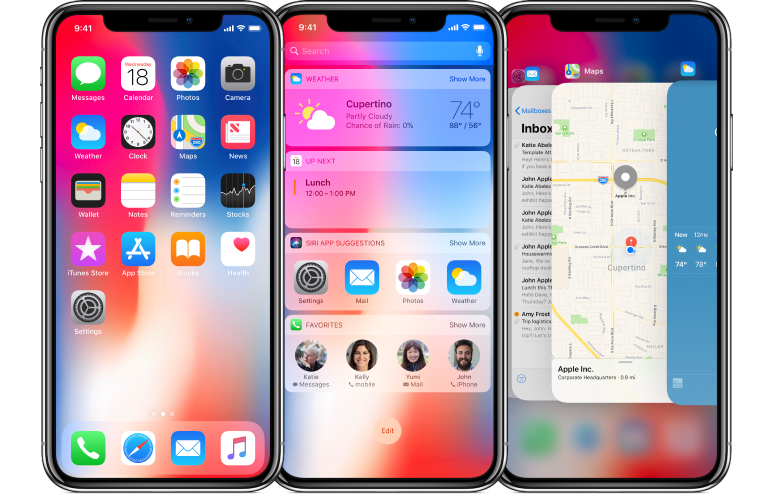
iPhone X is already here redesigning the way the content is displayed and creating a brand-new experience. It has an edge to edge Super Retina Display with a resolution of 1125×2436 px. iPhone X features a special cut-out at the top of the screen. Thus designing apps for this futuristic machine brings new challenges as well as opportunities. Let’s learn how to design an app or game to feel and look great on iPhone X.

Screen Sizes

iPhone X Screen Sizes
Source: Apple
Though the screen width remains the same for iPhone X, and it's 145 pt taller than the iPhone 6, 7, and 8. Such screen dimensions result in 20% more vertical space. When working out the app design for iPhone X, try not to make the UI too complex taking advantage of all new features (cut-out, new home indicator, round edges).

The good news is if you have a native app for iOS, you don’t have to make any changes - the app will be automatically adopted for the new iPhone X. All navigation bars, collection views, tables, and tab bars will be automatically positioned. When designing, you must ensure that the layouts fit the screen perfectly. If your app has a custom layout, you may need to update it for the new iPhone X. With the Auto Layout, everything will be easy.


Designing for iPhone X: Custom Layout
Source: Apple
Specific challenges may occur with full-screen images. If you use them, consider updating the app while they can be cropped and some essential elements may be hidden.

Source: Apple

Center your content

The device features new sensors and particular screen corners so make sure that your UI won’t get clipped. Speaking about the content, it’s preferable to place it in the center with symmetrical insets. Again with the Auto Layout, your content will be automatically adapted to the safe area of iPhone X. Nothing will be hidden behind round corners, home indicator or sensors.
Designing for iPhone X: Center your content
Source: Apple
Note, Apple highly recommend not to hide the cut-out and curved edges. So forget about placing black bars.

Brand-new status bar

Designing for iPhone X: Staus Bar
Source: Apple
Due to the sensors, the new bar has got 2 parts. It has become nearly 2x taller than on iPhone 6,7, and 8 (previously it was 20 pt, and now it’s 44 pt). So if your app features a fixed status bar and content just below it, consider updating the app in order not lose anything. Again, don’t forget about the safe area while designing a new app or iOS.

Moreover, the status bar should be visible all time. Since the screen is bigger and taller, it would be a good idea to unhide the bar. It is essential to point, that the new status bar doesn’t change its height when the device records voice or tacks the location.

Where to place interactive controls?

Since the physical home button was replaced by the home indicator, the place of interactive controls should be changed. There should be more space for gestures and swiping up around the home indicator. And if there are interactive controls, how will the user go back to the home screen? The users may accidentally use swiping up, and the UI of an app will be difficult to reach since every time they swipe, they will go back to the home screen.

However, you should and have to use the function bars and tab bars but try not to interfere with the home indicator.

Designing for iPhone X: interactive controls
Source: Apple

Smart home indicator

iPhone X features a redesigned home indicator. Apple decided to opt out of a physical home button. It’s a small white line on the bottom of the screen. To get back to the homescreen, you can swipe up from any app.

With the new iOS, the users get an adoptive home indicator which hides automatically when the screen is inactive and appears when you relaunch the app. This function comes in handy when listing photos or watching videos. Besides the auto-hide, the home indicator adapts to the color of your app’s background and changes it automatically.

With the new smart home indicator, there is no place for button pressing, everything is controlled by gestures. Moreover, you can use custom gestures in games as well as set own gestures to control the device.

More colors than ever before

Designing for iPhone X: Colors

iPhone X features the new Super Retina Display with the support of P3 colors. And it means that the colors are richer and more saturated when compared to the older devices.

Improved security with Face ID

Previously, iPhones were fitted with Touch ID. And iPhone X features Face ID for authentication to keep your data secure. Face ID features state-of-the-art algorithms to scan your face and unlock iPhone X. In case your app needs Apple Pay or other identifications, don’t integrate Touch ID for that, take advantage of the new technology brought up by Apple.

Video

The new screen of iPhone X changes the way video is played on the device. The system video player has two viewing modes - full-screen and fit-to-screen. Make sure that all custom video players behave as expected. The video should fill the display when played. If it fails, it may result in too much cropping. Moreover, it would be great if the users will be able to switch between two viewing modes.

Apple advises keeping the original aspect ratio since the iOS won’t be able to scale the video based on the viewing mode correctly.

Designing for iPhone X: Full screen - fit to screen
Source: Apple

Where can I preview my app UI for iPhone X?

The good news is you can use Xcode 9 stimulator to preview your app. And check if something needs to be updated for iPhone X.

In a nutshell

Though the new iPhone X stands out from the crowd providing absolutely new user experience, designing apps for iPhone X is still a smooth sail. Take care of the new display capabilities and its dimensions and make most of them.


Author bio:
Helen Morrice - Technical writer and copywriter at IDAP Group. Say “hi” to us on Facebook or Twitter.

The Tale of ChatOnGo for Business


The dawn of Business Communication apps brought a lot of opportunities to be cashed on. The fact that communication gaps were directly proportional to the attrition rate of the organization had made the advent such apps unavoidable. Business communication apps were the next big thing that the world needed.

Soon came an overabundance of team collaboration tools and corporate chat apps. Each and every business chat app seemed like a copy of the other with nothing new to offer. This rendered these app redundant. There was still a whole in the market which needed to be filled. There was a requirement for periodic dissipation and collection of information. Task management was a challenge; there seemed no way past the clutter.

New and more effective messaging apps came aiming their business at the corporates. Secure messaging apps were what organization seeked and still do. Nimap Infotech, a software and app development company, saw the void that needed to be filled. The company saw it as an opportunity. This is when ChatOnGo for Business was created, co-founded by Mr. Priyank Ranka and Mr. Sagar Nagda. They already had the best resources and team to go ahead with the idea of the business communication app.

The team at ChatOnGo studied the market very deeply to know what the market really wanted. They built the app, brick by brick, with features desirable of the prospective clients. The commitment of the co-founders and the app development team made ChatOnGo for Business a force to be reckoned with. Rising above the redundant business chat apps and giving its competitors a run for their money, ChatOnGo is growing at a pace that is amazing for a new app.

With features like smart messages, category tagging, filters and generating metrics at a secure platform make ChatOnGo for Business what it is. The smart message feature lets you collect information in quantitative, multi-quantitative and many other forms. Not only this, these messages can be scheduled to occur repeatedly on a periodic basis. Additionally, metrics can be generated instantly for any period since the post was made. These features just don’t stop here. ChatOnGo for Business lets you assign and track tasks so that you don’t have to rummage through your calendar to know when the deadline is for a particular task. Communication can be done in the form of public posts on different groups (each for a specific purpose) with privacy control or by chatting one-on-one. The secure messaging app for corporates fills the void for communication perfectly. And when it doesn’t, they customize it as per their client’s needs.

It wouldn’t be so hard to admit for all the stakeholders of ChatOnGo for Business that the app development team has done a commendable job under the leadership of Mr. Ranka and Mr. Nagda creating and developing the app. Their endeavor with making the app better hasn’t ceased yet. They still strive working on the app day and night, just to make the user experience better.

Visit ChatOnGo website for more details about this amazing secure business communication app or download the app from Playstore or iTunes to take it for a spin.

How to Convert Image to Text on iOS and Android

Can you imagine your life without smartphones? Probably you can, but it would be a catastrophe. How would you connect with your family and friend from anywhere? How would you take a quick selfie whenever it is a good moment? How would you remember to do all the things from your list? In a nutshell, mobile phones have become indispensable gadgets today that make our life much easier.

Another occasion where smartphones give us a hand and make our life easier is note taking. Nowadays you don't have to lose time on trying to find paper and pen to write down notes, contacts or schedules. Just snap a photo of them and there you go. All important data is preserved quickly and effortlessly. Also, all notes are always at your fingertips given that your mobile phone is always by your side.

However, apart from these positive aspects, there is, unfortunately, a downside, too. For instance, those pieces of information are unusable since they are locked inside the image format. So, when you want to speed up the process and directly copy them to make a call or to forward them through email, you need to do it manually and to squander your time additionally.

Luckily, there is a quick fix for this issue. Image to Text app will accurately convert your images into editable text files. In that way, your data won't be sealed and you'll be able to use it further. Besides, this productivity app has many other helpful features:

  • First-rate recognition and conversion quality
  • No limitations on the file size or number of converted files
  • Screenshots can be converted as well
  • Easily share converted documents or open them in another app
  • Converted documents are editable so, if it's needed, you can quickly make small adjustments in any text editor on your phone or a computer
In addition, Image to Text has a very clear and user-friendly interface. Therefore, it's adapted for every user type. So, let's cut a long story short and let's see how to convert image to text on mobile devices.

  • Firstly, download Image to Text from App Store or Google Play
  • Select a photo you'd like to convert or take a new picture
  • Finally, you'll find your text among converted files
How to Convert Image to Text on iOS and Android

A positive side is that the file is being converted on the servers, so the entire conversion won’t drain your battery. Also, the file is deleted right after the conversion, therefore your data is safe and protected.

The only thing left to do is to download this helpful app and to get the most of your notes!

5 Smartphone Apps That Parents Need To Worry About

Owning a smartphone filled with countless apps that can help one from keeping track of their appointments to telling them how many calories they have lost by walking down the road is a norm these days. Yet, there are a few apps that parents should worry about as soon as they see them on their kids’ phones. Here are 5 of the worse apps your child could have on their phones.

Vine

Vine is home to some of the most popular online celebrities like King Bach who makes vine one of the most entertaining and fun social networking platforms out there. But like everything else, there are good ways to use vine and then there are the bad ones. The bad ones being the fact that one can upload any kind of pornographic material on vine without any restrictions. Now Hofmann, Yusupov and Kroll, the founders, incorporated a 17+ age restriction to make an account for vine, however, it is fairly simple for teens to make an account on vine.

Other than just viewing inappropriate videos on Vine, they can also upload their own videos which may or may not be indecent in nature and may even contain child abuse content.

ChatRoulette or Omegle

Same as other social networking apps on this list, ChatRoulette and Omegle allow teens to talk to strangers from all over the world. Now, these two apps are a mile ahead from other apps of its kind, providing video chatting facility, it is one of the most inappropriate apps for minors on the internet these days.

There are several features that the founders and the owners of these apps certainly overlooked. One being the fact that you can record the online video chats and upload them anywhere on the internet meaning that what your child says or does can most certainly come back to bite them in the near future. It also greatly increases the chances of cyber bullying. A large number of people just log into these apps to bully people and turn them against the people they love.

Ask.fm

Ask.fm allows access to a feature that is unlike any other, it enable its users to ask fellow members questions. Now these questions can very well be of any nature, there is no profanity filter of any sorts that prevents people from asking personal or sometimes sexual question from other people.

The questions aren’t reviewed by anyone so that it can be filtered before being published, that is the reason that abuse on ask.fm has been growing rapidly. If you fear that someone is bullying you online on ask.fm, it does come with the option to block people. However, the people you block can still view your profile and know about all your likes and dislikes and you can’t do anything about it.

Blendr

Blendr is an app which allows anyone to communicate with someone anywhere on the planet. However, it also incorporates a feature that uses the GPS Location of a device to find users located nearby. It’s never safe when strangers know your child’s location up to the block you live in. Even if we ignore the GPS Locating feature, it is also a pretty harmful app for the young minds because it allows online predators to prey on their minds and without anyone finding out about it.

Kik

This is another free texting app that enables children to talk to strangers, you don’t need to know anything about the other person, and you could just type in random names and hope for the best.

Other than the fact that you can search random people, there are also apps available on Google Play Store and the Apple Store that can provide usernames for males and females, whichever you may be interested in.

You don’t need to download the app to find out that it is mostly used to sexting, the app description and the comments on the app says it all. There are several hundred comments of people providing their private information and asking girls and boys for sexting and role play which makes it seems like a 100% hookup site.

The Bottom Line
           These are just 5 of the hundreds, even thousands of apps in the market that put the mind of children at great risk. The fact that kids can gain access to these apps as soon as they learn how to operate a smartphone is a cause of great worry for parents all over the world. The thrill of having explicit chats with strangers could very well be the only thing that could ruin the rest of their lives and get them addicted to stuff like pornography which very well leads to an act that the children might regret greatly in the future. Hence, using a smartphone monitoring app is the best precaution for parents in the world today.


Author Bio: 
Elizbeth is a blogger and writer. She loves to write about digital parenting teens and issues related them. She is currently working on monitoring you kid’s text messages to keep an eye on you kid. Follow her on twitter @elizbethsewell6

Six New Essential iPhone Apps Each Traveller Can't Live Without

If you are a traveler, you need to invest in some iPhone applications as they will help you in the long run. Think about it, if you are in the country or overseas, you can make your life easier with a few apps. While true, there are a lot of applications that are a waste of time, and you should try to find ones that offer you what you need. With this in mind, here are six new essential iPhone apps each traveler can't live without.

Weather Line: If you are like most people, you like to know what the weather will be like any given day. This is especially important if you want to get out of your hotel room and go out on your own. Since most travelers will walk a lot, it’s important to download the Weather Line app. Then, when you wake up in the morning, you can see the weather forecast for the day. Furthermore, if you are wise, you will use this app to get the forecast for later in the week and future cities you plan to visit. Either way, with the Weather Line app, you are not going to leave the hotel or hostel unprepared.

XE Currency App: When you travel abroad, you will want to know the currency exchange rate. By knowing the true value of your money and the local currency, you can’t get ripped off by people who take advantage of unknowing tourists. Since the exchange rate changes daily, and sometimes widely, this is a wise application to have on your phone. Yes, you can't trust the local money changers as many of them are out to make money off foolish tourists. On the other hand, if you check the local paper, you will get yesterday’s rate, and you won't know the true value of your money. So, before you head overseas, make sure to download the XE Currency App.

Yelp: While on the road, most people have no idea what lies ahead as far as restaurants and bars. Not only that, if you want to get a massage or check out a movie, you will have to rely on luck and lots of asking questions in the streets. To save time and find the best places to check out, make sure to install the Yelp application on your phone. Then, without a doubt, you can find the best places to go, and you will have an easier time enjoying the local experience.

Skype: If you want to make long-distance phone calls from out of your home country, you are going to waste a lot of money. Not only that, you will get a horrible connection many of the times. On the other hand, with Skype, you can chat with your buddies in real-time, all for free. Furthermore, you can message your friends or family member’s links of your photos and information. Then, you will enjoy your trip more as you can show off and keep in constant contact with the ones you love.

Dropbox: When you are out-of-town and on the road, you will want access to your stuff. Think about it, what if you want to access your passport photo or important files? With Dropbox, you can log in and see your stuff. This makes it easier should you run into any problems. In fact, if you work on the road, you should download Dropbox now and synch it to your iPhone. That way, when you are gone, you are not truly away from your computer and files.

WhatsApp: While not wildly popular in some countries, WhatsApp is a great texting app. Whether you are renting a place off Airbnb or trying to meet a local for a coffee, you will have an easier time with WhatsApp as you won’t pay any fees to text someone in another country, and the person on the other end will not pay a fee. All you must do is download the program and synch it with your current number. Then, when you want to text someone, add him or her to your contacts. Then, you can send images, video, audio or texts to your friends and family all over the world. Simply put, if you are going to travel internationally, you need to download and install WhatsApp.

With these six iPhone applications, you can save a lot of time and money while you are on vacation. In the end, it’s wise to consider these apps and a few more as you will go a long way in ensuring that you have a fun, safe and enjoyable adventure wherever you may go. Remember, while these are great apps and you can rely on them to make your tri more enjoyable, you need to think of your own unique wants and needs while on the road.


Author Bio:
This article was written by Natalya Pobedova. She is 28, from Czech Republic, and runs a flight help website called http://www.travelsiders.com/ as a hobby. At the moment, she works as a freelance web developer. When she has a free minute, she is hanging out with her friends or helping others at Stack Overflow.