Showing posts with label iphone apps. Show all posts

Designing for iPhone X: Tips and Tricks

Designing for iPhone X: Tips and Tricks

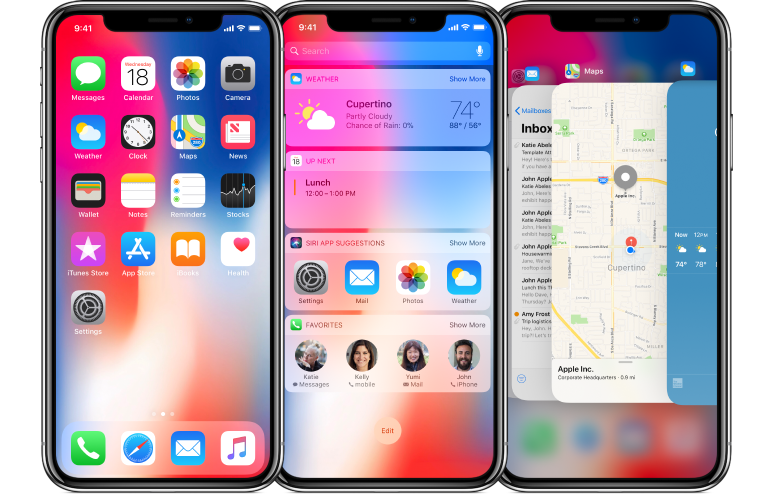
iPhone X is already here redesigning the way the content is displayed and creating a brand-new experience. It has an edge to edge Super Retina Display with a resolution of 1125×2436 px. iPhone X features a special cut-out at the top of the screen. Thus designing apps for this futuristic machine brings new challenges as well as opportunities. Let’s learn how to design an app or game to feel and look great on iPhone X.

Screen Sizes
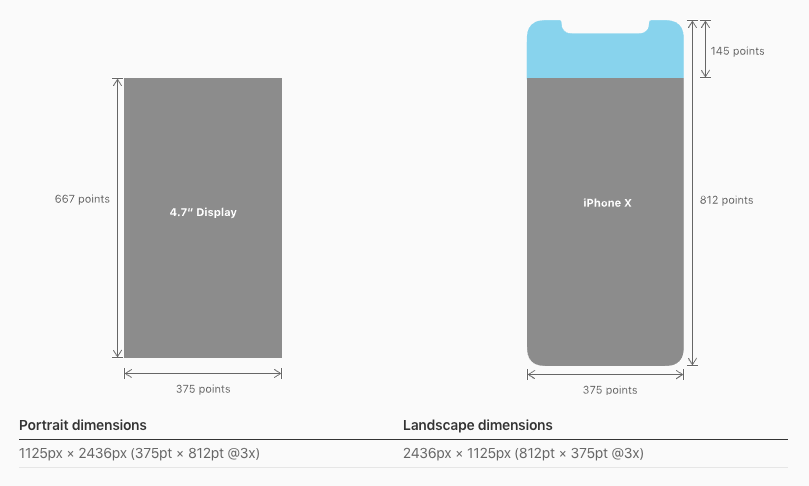
iPhone X Screen Sizes
Source: Apple
Though the screen width remains the same for iPhone X, and it's 145 pt taller than the iPhone 6, 7, and 8. Such screen dimensions result in 20% more vertical space. When working out the app design for iPhone X, try not to make the UI too complex taking advantage of all new features (cut-out, new home indicator, round edges).

The good news is if you have a native app for iOS, you don’t have to make any changes - the app will be automatically adopted for the new iPhone X. All navigation bars, collection views, tables, and tab bars will be automatically positioned. When designing, you must ensure that the layouts fit the screen perfectly. If your app has a custom layout, you may need to update it for the new iPhone X. With the Auto Layout, everything will be easy.
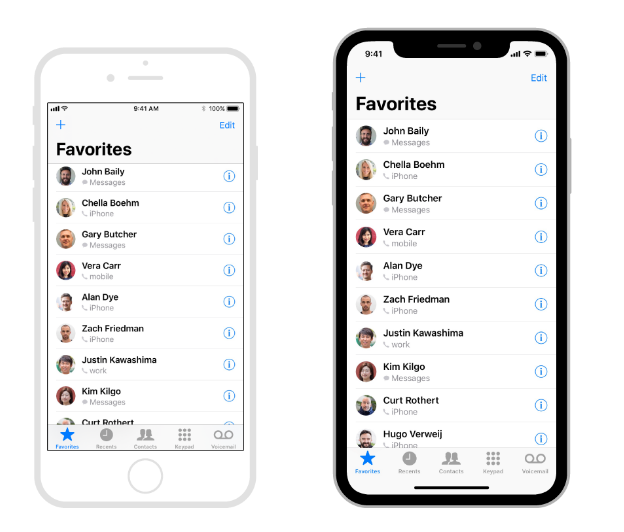


Designing for iPhone X: Custom Layout
Source: Apple
Specific challenges may occur with full-screen images. If you use them, consider updating the app while they can be cropped and some essential elements may be hidden.

Source: Apple

Center your content

The device features new sensors and particular screen corners so make sure that your UI won’t get clipped. Speaking about the content, it’s preferable to place it in the center with symmetrical insets. Again with the Auto Layout, your content will be automatically adapted to the safe area of iPhone X. Nothing will be hidden behind round corners, home indicator or sensors.
Designing for iPhone X: Center your content
Source: Apple
Note, Apple highly recommend not to hide the cut-out and curved edges. So forget about placing black bars.

Brand-new status bar

Designing for iPhone X: Staus Bar
Source: Apple
Due to the sensors, the new bar has got 2 parts. It has become nearly 2x taller than on iPhone 6,7, and 8 (previously it was 20 pt, and now it’s 44 pt). So if your app features a fixed status bar and content just below it, consider updating the app in order not lose anything. Again, don’t forget about the safe area while designing a new app or iOS.

Moreover, the status bar should be visible all time. Since the screen is bigger and taller, it would be a good idea to unhide the bar. It is essential to point, that the new status bar doesn’t change its height when the device records voice or tacks the location.

Where to place interactive controls?

Since the physical home button was replaced by the home indicator, the place of interactive controls should be changed. There should be more space for gestures and swiping up around the home indicator. And if there are interactive controls, how will the user go back to the home screen? The users may accidentally use swiping up, and the UI of an app will be difficult to reach since every time they swipe, they will go back to the home screen.

However, you should and have to use the function bars and tab bars but try not to interfere with the home indicator.

Designing for iPhone X: interactive controls
Source: Apple

Smart home indicator

iPhone X features a redesigned home indicator. Apple decided to opt out of a physical home button. It’s a small white line on the bottom of the screen. To get back to the homescreen, you can swipe up from any app.

With the new iOS, the users get an adoptive home indicator which hides automatically when the screen is inactive and appears when you relaunch the app. This function comes in handy when listing photos or watching videos. Besides the auto-hide, the home indicator adapts to the color of your app’s background and changes it automatically.

With the new smart home indicator, there is no place for button pressing, everything is controlled by gestures. Moreover, you can use custom gestures in games as well as set own gestures to control the device.

More colors than ever before

Designing for iPhone X: Colors

iPhone X features the new Super Retina Display with the support of P3 colors. And it means that the colors are richer and more saturated when compared to the older devices.

Improved security with Face ID

Previously, iPhones were fitted with Touch ID. And iPhone X features Face ID for authentication to keep your data secure. Face ID features state-of-the-art algorithms to scan your face and unlock iPhone X. In case your app needs Apple Pay or other identifications, don’t integrate Touch ID for that, take advantage of the new technology brought up by Apple.

Video

The new screen of iPhone X changes the way video is played on the device. The system video player has two viewing modes - full-screen and fit-to-screen. Make sure that all custom video players behave as expected. The video should fill the display when played. If it fails, it may result in too much cropping. Moreover, it would be great if the users will be able to switch between two viewing modes.

Apple advises keeping the original aspect ratio since the iOS won’t be able to scale the video based on the viewing mode correctly.
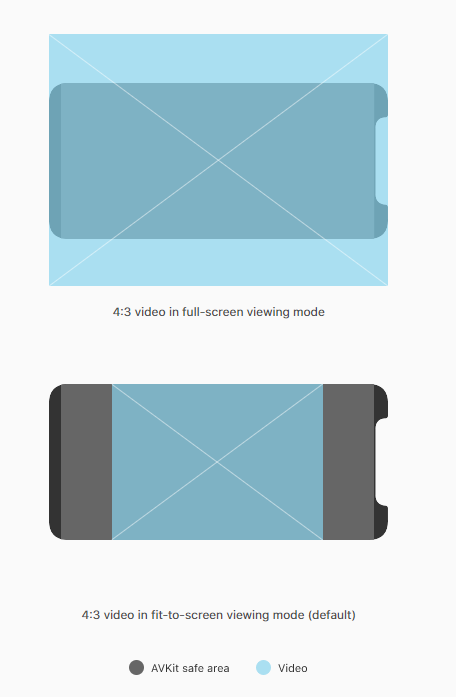
Designing for iPhone X: Full screen - fit to screen
Source: Apple

Where can I preview my app UI for iPhone X?

The good news is you can use Xcode 9 stimulator to preview your app. And check if something needs to be updated for iPhone X.

In a nutshell

Though the new iPhone X stands out from the crowd providing absolutely new user experience, designing apps for iPhone X is still a smooth sail. Take care of the new display capabilities and its dimensions and make most of them.


Author bio:
Helen Morrice - Technical writer and copywriter at IDAP Group. Say “hi” to us on Facebook or Twitter.

The Tale of ChatOnGo for Business


The dawn of Business Communication apps brought a lot of opportunities to be cashed on. The fact that communication gaps were directly proportional to the attrition rate of the organization had made the advent such apps unavoidable. Business communication apps were the next big thing that the world needed.

Soon came an overabundance of team collaboration tools and corporate chat apps. Each and every business chat app seemed like a copy of the other with nothing new to offer. This rendered these app redundant. There was still a whole in the market which needed to be filled. There was a requirement for periodic dissipation and collection of information. Task management was a challenge; there seemed no way past the clutter.

New and more effective messaging apps came aiming their business at the corporates. Secure messaging apps were what organization seeked and still do. Nimap Infotech, a software and app development company, saw the void that needed to be filled. The company saw it as an opportunity. This is when ChatOnGo for Business was created, co-founded by Mr. Priyank Ranka and Mr. Sagar Nagda. They already had the best resources and team to go ahead with the idea of the business communication app.

The team at ChatOnGo studied the market very deeply to know what the market really wanted. They built the app, brick by brick, with features desirable of the prospective clients. The commitment of the co-founders and the app development team made ChatOnGo for Business a force to be reckoned with. Rising above the redundant business chat apps and giving its competitors a run for their money, ChatOnGo is growing at a pace that is amazing for a new app.

With features like smart messages, category tagging, filters and generating metrics at a secure platform make ChatOnGo for Business what it is. The smart message feature lets you collect information in quantitative, multi-quantitative and many other forms. Not only this, these messages can be scheduled to occur repeatedly on a periodic basis. Additionally, metrics can be generated instantly for any period since the post was made. These features just don’t stop here. ChatOnGo for Business lets you assign and track tasks so that you don’t have to rummage through your calendar to know when the deadline is for a particular task. Communication can be done in the form of public posts on different groups (each for a specific purpose) with privacy control or by chatting one-on-one. The secure messaging app for corporates fills the void for communication perfectly. And when it doesn’t, they customize it as per their client’s needs.

It wouldn’t be so hard to admit for all the stakeholders of ChatOnGo for Business that the app development team has done a commendable job under the leadership of Mr. Ranka and Mr. Nagda creating and developing the app. Their endeavor with making the app better hasn’t ceased yet. They still strive working on the app day and night, just to make the user experience better.

Visit ChatOnGo website for more details about this amazing secure business communication app or download the app from Playstore or iTunes to take it for a spin.

How to Convert Image to Text on iOS and Android

Can you imagine your life without smartphones? Probably you can, but it would be a catastrophe. How would you connect with your family and friend from anywhere? How would you take a quick selfie whenever it is a good moment? How would you remember to do all the things from your list? In a nutshell, mobile phones have become indispensable gadgets today that make our life much easier.

Another occasion where smartphones give us a hand and make our life easier is note taking. Nowadays you don't have to lose time on trying to find paper and pen to write down notes, contacts or schedules. Just snap a photo of them and there you go. All important data is preserved quickly and effortlessly. Also, all notes are always at your fingertips given that your mobile phone is always by your side.

However, apart from these positive aspects, there is, unfortunately, a downside, too. For instance, those pieces of information are unusable since they are locked inside the image format. So, when you want to speed up the process and directly copy them to make a call or to forward them through email, you need to do it manually and to squander your time additionally.

Luckily, there is a quick fix for this issue. Image to Text app will accurately convert your images into editable text files. In that way, your data won't be sealed and you'll be able to use it further. Besides, this productivity app has many other helpful features:

  • First-rate recognition and conversion quality
  • No limitations on the file size or number of converted files
  • Screenshots can be converted as well
  • Easily share converted documents or open them in another app
  • Converted documents are editable so, if it's needed, you can quickly make small adjustments in any text editor on your phone or a computer
In addition, Image to Text has a very clear and user-friendly interface. Therefore, it's adapted for every user type. So, let's cut a long story short and let's see how to convert image to text on mobile devices.

  • Firstly, download Image to Text from App Store or Google Play
  • Select a photo you'd like to convert or take a new picture
  • Finally, you'll find your text among converted files
How to Convert Image to Text on iOS and Android

A positive side is that the file is being converted on the servers, so the entire conversion won’t drain your battery. Also, the file is deleted right after the conversion, therefore your data is safe and protected.

The only thing left to do is to download this helpful app and to get the most of your notes!

5 Smartphone Apps That Parents Need To Worry About

Owning a smartphone filled with countless apps that can help one from keeping track of their appointments to telling them how many calories they have lost by walking down the road is a norm these days. Yet, there are a few apps that parents should worry about as soon as they see them on their kids’ phones. Here are 5 of the worse apps your child could have on their phones.

Vine

Vine is home to some of the most popular online celebrities like King Bach who makes vine one of the most entertaining and fun social networking platforms out there. But like everything else, there are good ways to use vine and then there are the bad ones. The bad ones being the fact that one can upload any kind of pornographic material on vine without any restrictions. Now Hofmann, Yusupov and Kroll, the founders, incorporated a 17+ age restriction to make an account for vine, however, it is fairly simple for teens to make an account on vine.

Other than just viewing inappropriate videos on Vine, they can also upload their own videos which may or may not be indecent in nature and may even contain child abuse content.

ChatRoulette or Omegle

Same as other social networking apps on this list, ChatRoulette and Omegle allow teens to talk to strangers from all over the world. Now, these two apps are a mile ahead from other apps of its kind, providing video chatting facility, it is one of the most inappropriate apps for minors on the internet these days.

There are several features that the founders and the owners of these apps certainly overlooked. One being the fact that you can record the online video chats and upload them anywhere on the internet meaning that what your child says or does can most certainly come back to bite them in the near future. It also greatly increases the chances of cyber bullying. A large number of people just log into these apps to bully people and turn them against the people they love.

Ask.fm

Ask.fm allows access to a feature that is unlike any other, it enable its users to ask fellow members questions. Now these questions can very well be of any nature, there is no profanity filter of any sorts that prevents people from asking personal or sometimes sexual question from other people.

The questions aren’t reviewed by anyone so that it can be filtered before being published, that is the reason that abuse on ask.fm has been growing rapidly. If you fear that someone is bullying you online on ask.fm, it does come with the option to block people. However, the people you block can still view your profile and know about all your likes and dislikes and you can’t do anything about it.

Blendr

Blendr is an app which allows anyone to communicate with someone anywhere on the planet. However, it also incorporates a feature that uses the GPS Location of a device to find users located nearby. It’s never safe when strangers know your child’s location up to the block you live in. Even if we ignore the GPS Locating feature, it is also a pretty harmful app for the young minds because it allows online predators to prey on their minds and without anyone finding out about it.

Kik

This is another free texting app that enables children to talk to strangers, you don’t need to know anything about the other person, and you could just type in random names and hope for the best.

Other than the fact that you can search random people, there are also apps available on Google Play Store and the Apple Store that can provide usernames for males and females, whichever you may be interested in.

You don’t need to download the app to find out that it is mostly used to sexting, the app description and the comments on the app says it all. There are several hundred comments of people providing their private information and asking girls and boys for sexting and role play which makes it seems like a 100% hookup site.

The Bottom Line
           These are just 5 of the hundreds, even thousands of apps in the market that put the mind of children at great risk. The fact that kids can gain access to these apps as soon as they learn how to operate a smartphone is a cause of great worry for parents all over the world. The thrill of having explicit chats with strangers could very well be the only thing that could ruin the rest of their lives and get them addicted to stuff like pornography which very well leads to an act that the children might regret greatly in the future. Hence, using a smartphone monitoring app is the best precaution for parents in the world today.


Author Bio: 
Elizbeth is a blogger and writer. She loves to write about digital parenting teens and issues related them. She is currently working on monitoring you kid’s text messages to keep an eye on you kid. Follow her on twitter @elizbethsewell6

Six New Essential iPhone Apps Each Traveller Can't Live Without

If you are a traveler, you need to invest in some iPhone applications as they will help you in the long run. Think about it, if you are in the country or overseas, you can make your life easier with a few apps. While true, there are a lot of applications that are a waste of time, and you should try to find ones that offer you what you need. With this in mind, here are six new essential iPhone apps each traveler can't live without.

Weather Line: If you are like most people, you like to know what the weather will be like any given day. This is especially important if you want to get out of your hotel room and go out on your own. Since most travelers will walk a lot, it’s important to download the Weather Line app. Then, when you wake up in the morning, you can see the weather forecast for the day. Furthermore, if you are wise, you will use this app to get the forecast for later in the week and future cities you plan to visit. Either way, with the Weather Line app, you are not going to leave the hotel or hostel unprepared.

XE Currency App: When you travel abroad, you will want to know the currency exchange rate. By knowing the true value of your money and the local currency, you can’t get ripped off by people who take advantage of unknowing tourists. Since the exchange rate changes daily, and sometimes widely, this is a wise application to have on your phone. Yes, you can't trust the local money changers as many of them are out to make money off foolish tourists. On the other hand, if you check the local paper, you will get yesterday’s rate, and you won't know the true value of your money. So, before you head overseas, make sure to download the XE Currency App.

Yelp: While on the road, most people have no idea what lies ahead as far as restaurants and bars. Not only that, if you want to get a massage or check out a movie, you will have to rely on luck and lots of asking questions in the streets. To save time and find the best places to check out, make sure to install the Yelp application on your phone. Then, without a doubt, you can find the best places to go, and you will have an easier time enjoying the local experience.

Skype: If you want to make long-distance phone calls from out of your home country, you are going to waste a lot of money. Not only that, you will get a horrible connection many of the times. On the other hand, with Skype, you can chat with your buddies in real-time, all for free. Furthermore, you can message your friends or family member’s links of your photos and information. Then, you will enjoy your trip more as you can show off and keep in constant contact with the ones you love.

Dropbox: When you are out-of-town and on the road, you will want access to your stuff. Think about it, what if you want to access your passport photo or important files? With Dropbox, you can log in and see your stuff. This makes it easier should you run into any problems. In fact, if you work on the road, you should download Dropbox now and synch it to your iPhone. That way, when you are gone, you are not truly away from your computer and files.

WhatsApp: While not wildly popular in some countries, WhatsApp is a great texting app. Whether you are renting a place off Airbnb or trying to meet a local for a coffee, you will have an easier time with WhatsApp as you won’t pay any fees to text someone in another country, and the person on the other end will not pay a fee. All you must do is download the program and synch it with your current number. Then, when you want to text someone, add him or her to your contacts. Then, you can send images, video, audio or texts to your friends and family all over the world. Simply put, if you are going to travel internationally, you need to download and install WhatsApp.

With these six iPhone applications, you can save a lot of time and money while you are on vacation. In the end, it’s wise to consider these apps and a few more as you will go a long way in ensuring that you have a fun, safe and enjoyable adventure wherever you may go. Remember, while these are great apps and you can rely on them to make your tri more enjoyable, you need to think of your own unique wants and needs while on the road.


Author Bio:
This article was written by Natalya Pobedova. She is 28, from Czech Republic, and runs a flight help website called http://www.travelsiders.com/ as a hobby. At the moment, she works as a freelance web developer. When she has a free minute, she is hanging out with her friends or helping others at Stack Overflow.

iOS 8 vs iOS 7: Which One to Choose and Why?


iOS 8 vs iOS 7:  Which One to Choose and Why?
It's been a year since Apple introduced iOS7 to the world by calling it as a “stunning new user interface”. Since that the world started thinking it as one of the biggest updates in the realm of mobile operating systems. Indeed, its simple, beautiful design, feel instantly familiar, which creates a useful and enjoyable experience to its users. While iOS7 bought a huge change in the asetheticity of iOS, it was more or less a rehashed version of the previous installments, with just a few added features. On the other hand, iOS8 emerges as an important and massive overhaul in the way Apple released its previous OS versions.

Apples's next release iOS8 has come up with many new features and upgradations that users will certainly appreciate. To give a better idea of both of the operating systems, we are presenting you a comparison review of iOS7 and iOS8 to help Apple fans to decide which one they would like to have or whether they should upgrade their device to the new OS version.

1) iOS8 vs iOS7: Visual Design

When Apple launched iOS7, people were more concerned about the way Apple has created its UI and visuals which was “flatter”, brighter, more colorful and strickingly different from iOS6. But, if we talk about iOS8, frankly speaking, it has borrowed its visual interface from iOS7, except from a few subtle variations. The UI of iOS8 is flat just like iOS7, and Apple fans who are more concernd about the looks might find it disappointing. On the other hand, those who are planning to upgrade from iOS6 to 7 might find it exciting as they will have an entirely new interface.

2) iOS8 vs iOS7: Continuity

iOS8 vs iOS7: Continuity

So, as of now you got to know that Apple hasn't changed the visuals of iOS8 and its still the “flat” design just like iOS7. So, if visuals are the same then what are changes that Apple has brought to its users? Obviously, its the core features that remain the focal point while designing iOS8. Continuity is one the most noticeable functions that the latest release will support. Now, you must be thinking what this continuity means? It's actually a set of features that help you to stay seamlessly connected with your other Apple devices.

The example of this is the new Handoff feature, which enables the user to continue with their textual or phone conversations side by side of your other Apple devices. Means, now you can go on with your conversations even if your switch between your devices. Handoff will show you a link, once you've connected both of the devices, so that you can carry forward your conversation. So, if you are talking on the phone and suddenly realise the need of your Mac, what you all need is just simply carry forward the conversation.

3) iOS8 vs iOS7: Keyboard

Another striking feature with which every iPhone App Developer must be awara that Apple has introduced to its OS software. In the past, many users complaint about the limited keyboard options as the previous versions only supported the default type keyboard. However, in iOS8, Apple has finally give an opportunity to install a third-party software such as Swiftkey or Swype on their devices. In iOS7 it featured a native Quicktype keyboard and it lacks some advanced features if we compare it with the latest version. Plus, it also does not provide developers with a facility to access API like iOS8

4) iOS8 vs iOS7: Health Review

iOS8 vs iOS7: Health Review
One of the biggest and most hyped features of iOS8 is its wealth of health and fitness apps. iOS8 is purely dedicated to fitness fanatics to help them better keep a firm track of their personal and fitness data. The Health umbrella app offers a wide range of possibilities to to monitor, track, record, and analyse the fitness schedules accross a variety of levels. Although, Health app was too available in iOS7, the new additions made in iOS8 making it more popular and garnering an impressive fan base worldwide.

5) iOS8 vs iOS7: Camera

iOS8 comes up with a host of innovative camera and album features which makes it truly stand out as compare to the previous versions. The camera not only gives sharp and clear appeal, but include several rich features such as time-lapse video, independent exposure, focus controls and many more.

6) iOS8 vs iOS7: Notifications

iOS8 vs iOS7: Notifications
Apple takes the notifications to a new level in iOS8, by making it all the more interactive and user-oriented than iOS7. The updates enable the users to directly interact with the apps through the notification screen. You can do voice messages, answer to your Facebook messages or Whatsapp and a lot more.

Conclusion:

So, there we have it, a list of few but significant features of both of the operating systems. The differences between both of them are actually not “differences” but are just few more improvements here and there to make it more impressive for the user. Now, you question yourself which one you would like to have. The answer depends on how you look and percieve of the features.


Author Bio:
Rick Brown
Rick Brown is a tech savvy content writer associated with a renowned iOS Application Development Company – Mobiers Ltd. You can avail iPhone Application Developers as well in case you are looking forward for the same.

Flights Apps That Bring You The Best Deals Out There

Flights Apps That Bring You The Best Deals Out There
Cheap flight deals are every traveller's’ dream come true. The question then is, how to make a flight booking by making use of the best deals in the market with the least amount of effort? Flight apps are built to solve this purpose exactly. Two premier flight apps in the market are built to help travellers worldwide find flight options that suit their budget and convenience.

ixigo hotels flight restaurant

This app allows you to explore options of flights, hotels, trains, places to visit and eat in the vicinity of the destination you choose in the search bar. The interesting part about the flight app is that it has all these complex structures built into a single, simple user interface. By this logic, a user can look at one option at one time. So you can first make your flight booking in the website of your choice, track the status of your flight and thereafter, look at several hotel options in the city. You are redirected to all these options one after the other in the search platform.

For hotels, it allows you to look at photos of the property, read their reviews from other websites, compare and contrast the cost analysis and make a booking instantly. Similarly, you can also look at several options for trains and buses and make a booking accordingly. There is a status tracker associated to train and bus bookings as well. The search bar also helps you locate popular places and restaurants close by and gives you information and pictures of the activities ongoing in the place.

The flights app is accessible to all iOS, Android and Windows users. It covers the whole of the Indian subcontinent, Thailand, Malaysia, South Asia, Middle East countries and island groups--Maldives, Bora Bora, Seychelles and Mauritius.

Skyscanner

The flights app helps you find the cheapest airline deal, by comparing flight costs with over a 1,000 airlines. It filters out the best 100 entries and shows it to you at a glance one page after the other. It also helps you find the cheapest hotels around the place and taxi rental options closeby. It redirects you to the website of the airline or concerned travel agent, when you choose to proceed with a particular deal for your chosen date.

Simply fill in your date and port of departure and the flights app furnishes you with the requisite information for buying cheap flight tickets online on a daily basis. It searches, collates, receives and gives you daily news feed on the same. Some of the best deals are made when one makes a booking both for travelling to and fro.

You are in a better position to gain from this flights app if your travel dates are flexible. When you feed the requisite information in the app months in advance, it prompts you on the cheapest dates of the month to fly on. The flights app also displays cheapest flights to the most popular countries of the world.

The flights app is accessible to iOS, Android, Windows and Blackberry users. It covers UK, USA, all of Europe, Asia and the Middle East.

This could be the beginning of many adventurous trips or some of the best value-for-money business trips. So make sure you strike the best deal by making use of the best flights app. Bon Voyage!


Author Bio:

This post is submitted by Chandralekha. This time she has written information about Flight app for windows. In order to make your trip hassle free use Indian rail app and PNR status app etc. Hope the information shared about the flight app may help to plan your trip.

Replace Your Wedding Photographer With These Apps

Replace Your Wedding Photographer With These Apps

Imagine how great it would be if you could get out of spending one to four thousand dollars on a wedding photographer and still get the most wonderful pictures of your special day. This is all possible through a wedding photo app. If that is not enough to get you excited, then how about the fact that you can get such an app for just around $100? You will still have to pay to have the photos printed and framed, but you cut your wedding photography costs down an impressive amount. Here are some of the best photo apps that 2014 has to offer.

1. Wedsta

Remember when cameras were put out for the wedding guests to pick up and take pictures of the bride and groom, themselves and other people at the wedding? Well, this app really simplifies the whole process and is compatible with any iPhone or Android. You get the app and setup your account, then make sure that each of your guests has the app on their phone and is registered in your account. From here, a digital copy of any pictures your guests take while using the app will appear in your account, and you can access these pictures to share, print, edit, etc. for a year.

2. Capsule

This is a new one that's still free. Just like the other photo apps, Capsule allows anyone who you grant access to upload photos to your album. In addition, your guests can also choose the photos they want as keepsakes and print them on their own or order them.

Those whom the bride and groom grant access to their account can also like and comment on any photos in the album, whether they were present at the wedding or not. Popular social media accounts are also integrated so that the bride and groom can share their pics easily and quickly. If you have pictures on Instagram that you would like to include in your Capsule album, then you can do that as well through the use of the famous hashtag. There is no expiration date for this app, so you and others you invite can begin adding photos as early as you like.

3. Wedding Snap

This is another photo app that is compatible with both iPhones and Androids. Pricing starts at $99. With this app, your wedding moments are captured through the eyes of your family and dear friends rather than some photographer. Anyone you share this app with can take both pictures and videos of your wedding. There is no expiration date on your account so you can go to your Wedding Snap gallery and enjoy the special memories captured here forever. Since you can purchase this app as early as you want, you can capture those special moments from prewedding days as well.

4. Wed Pics

This wedding photo app seems to have some neat features and it's free. The bride and groom as well as an unlimited amount of guests can upload videos as well as photos. Uploads can then be organized into different albums. Those who were unable to attend the wedding can also be granted access to view the photos. You can do high quality downloads of any of the photos for printing and conventional framing or digital framing. There is no expiration on storage time, so you can download the app and make an account as soon as you want and include photos from events such as the proposal, the bachelor and bachelorette parties, etc.

Best Utility Apps for iPhone


Best Utility Apps for iPhone
While the iPhone is a great help to everyday life, it is necessary to check if its applications function up to its greatest potential. For as long as everything is up and running perfectly, you can enjoy every feature without a problem. To keep your iPhone’s functionality, here are some apps to use:

BatteryMagic

There is an icon on your iPhone screen that tells you how much percentage of battery is left. Once it reaches the lowest portion, it is a signal that you have to charge it. Indeed, the icon is a helpful warning sign but you ought to know that better battery consumption is what you can enjoy with the BatteryMagic app. The BatteryMagic app is free for the beta version and paid for the BatteryMagicPro version. This app provides an indication on how much battery is left for a specific running application such as Wifi, 3G Internet, Talk Time, Game Play, Stand-by Time, Audio Playback and Video Playback. For the pro version, you are able to check if the battery life is enough to show a full-length movie.

iNotify

Priced at 99 cents, iNotify is an application that allows you to check on important appointments or errands under your to-do list. This notification appears on your lock screen, therefore every time you take a look at your phone, you are reminded of the things you need to accomplish within the day. The iNotification can be easily customized. You can add or remove activities under the list.

AppBoxPro

AppBoxPro garnered a number of thumbs-up because of its multiple functionality. This all-in-one app provides a number of utility apps that are totally helpful and beneficial. AppBoxPro comprise of the following: currency converter of up to 195 currencies, clinometer, battery life, loan calculator, 52-language translator, holidays observed in 83 nations, flashlight with adjustable brightness, sale price calculator and tip calculator. The best thing is that this app costs only 99 cents.

Camera Flash and More

If you love taking photos, the Camera Flash and More App is a great feature to have on your iPhone. As you use this app in taking photos, you can increase or decrease the brightness of a particular photo. You can also use this app in customizing photos, making them black and white or in a sepia format. If you want to add some fun with your photos, this app allows you put some funky effect on them. You can get this app at 99 cents.

SpeedTest

If you think that your connection is running slow on your iPhone, it’s time to do a speed test. By downloading and installing the SpeedTest app on your device, you can check whether or not connectivity is running correctly as it should. In the case of getting very slow speed, you can get in touch with your ISP to report the issue. If you are getting good results from the SpeedTest, you can perform tasks requiring connectivity efficiently. SpeedTest is a free app. You can use this app at any time and place.

WiFi Locator

WiFi connectivity is what allows iPhones to acquire connection to the internet. Since 3G/4G/LTE is always difficult to obtain, the WiFi locator can be more reliable. By using this app, you can connect to any desired network as long as no password is required. You don’t need to walk around finding a good WiFi spot because the WiFi Locator will provide all the information on your screen through the maps app. The WiFi Locator helps you find the strongest signal and strength of network signals are sorted on your phone for viewing. Thus, you can easily determine which network to try first.

Your iPhone can truly do wonders as long as you have the right helpful apps in it. The best thing is that these apps are very affordable, they won’t break the bank.

Image Credit: KROMKRATHOG


Author Bio:
Bogdan Shumei is team leader at Top Net SEO corporation. Often shares his experience blogging.

Best Small Business Apps You Need To Know About

Below is an Infographic on "The Best Small Business Apps" you need to know about. Best Business apps for Brainstormin,g Customer Service, Cash Flow Helper, Package Tracker, File Sharing, Email Campaign Manager, Business Trip Organiser, Social Media Manager and Best Rolodex Alternative are Discussed in the following Infographic!


Best Small Business Apps You Need To Know About

Infographic By Irishapps

Apps To Make Free Phone Calls

Software to make free phone calls to any mobile!

Before the invention of smartphones and hi-tech mobile OS users mainly used their phones for calling and messaging. Since that time the call costs have been inflating. With improvement of technologies, the users are blessed with plenty of apps that they can use day today for varied purposes. One of the main purpose being free calls. With National and International call rates heavily shooting up the following Android Apps will let you to make free phone calls at a much less price (data connection charges/Wi-Fi charges alone).

The following are top free phone call apps for your Android/iPhone/Windows devices:

1. Fring:

Fring has a lot of great features that will make you go for it, ranging from free calls to normal chat to advanced video calling. Fring app now lets you also to append various other communication based services viz. AOL, GTalk. Also there is an option for connecting with your phone’s contact book thus letting you to talk with anyone with just one app.

However you can do the free call only when the other party has Fring app on their phone, which is obvious. This won’t be a big problem since the Fring app available not only for Android, but also on other operating systems like iOS, Windows, Symbian and also via a mobile browser.

Their latest feature is being capable of video calling between four people at the same time over any Wi-Fi or data connection. Albeit it’s fun to try this out, it looks a bit choppy too.

Additionally, you can call to regular phones also by buying some credits or points (similar to Skype) so you can now talk to landlines.

2. Line:

Line is the latest and very innovative app that lets users to make free voice calls for 24 hours a day. You can update your friends about anything and everything from your Android phone by using text, calls, photos, video calls, stickers and location info also. You can call all your friends from anywhere in the world and make calls internationally for free. Line is available in the Google Play Store for free download. Other noteworthy features are stickers, emoticons.

3. ooVoo:

ooVoo is a basically a video chat app that was developed by ooVoo corporation. You can view friends who use ooVoo and select their profiles for making video call, voice call or to send instant text or even video messages. You can make conference calls with up to 12 people at the same time. This app has options to save videos and photos that were sent by your friends. Speed dial option is present which will help you to keep up with five best friends while on the go.

4. Viber:

Viber is the most straight forward and hassle free app. All you have got to do is install this app and then it will search all the users in your contact box who use Viber and connect you to them. You don’t need nicknames or e-mail verification. You phone number serves as a unique user ID.

Put this app in your home screen and then use this as a calling function instead of your carrier based call and you are not only allowed to make free calls to the other Viber users but you can also send SMS to them. This is an efficient app to make normal SMS and calls and also email right from the app. The one thing that makes Viber outstanding is its call quality. The audio is very clear without any lags. It is so clear that you will think that you ate using your regular carrier phone line. This is a must have free call app on your Android.

The other free call apps include Skype, Tango, Tru App, Qik, Nimbuzz, Google Voice, ICQ, etc...


Image Credit: Tim Robberts.


Author Bio:
I’m Zoya Bennet, part of Contus mobility team and author of this article. I’m a passionate blogger interested in writing articles on professional android application development. I constantly offer technology-based solutions for the platforms iOS, Android and Windows.

Best Fitness Apps for Smartphone

Aside from all the useful and interesting things that smartphones are enabling you to do they are also quite capable of helping you stay healthy and active. Even though most of us know the value of workout and remaining active, not all of us can be bothered to actually exercise as often as we should. This is the greatest thing about apps of this type, while some of them simply give you instructions on how to do some exercises other are actually capable of making your exercise regime more efficient, or even helping you make it more interesting. Regardless of your preferred activity, you can be sure that there are at least some apps that could help you with your favored routine, and we have listed some that have been shown to be effective.

1) Fitocracy

One of the apps that is meant to motivate the user to work harder and strive for better results, Fitocracy does this by allowing you to share your results with the community of other users of this app. Regardless of your discipline, chances are that there will enough other users to create a healthy competitive atmosphere that will make you push harder to reach the top of the charts. Additionally, you also easily post your results on Facebook, informing your friends of your success. The app is completely free and is available for both iOS and Android devices.

2) MyFitnessPal

This app is more focused on your proper nutrition than the exercise regimes. It allows you to easily track your intake of calories, by offering a bar code scanner and a huge database of different types of food. It is great for keeping an eye on your calorie intake and really helps you reach your weight goals, without having to spend too much time on dealing with actual numbers. MyFitnessPal is available for both Android and iOS, and is absolutely free.

3) Nutrition Tips

Another app that is more focused on helping you with your diet decisions than your workout, Nutrition Tips gives you a bunch of useful advice on proper handling of your nutrition. The app is packed with interesting info on different types of food, and can really make a huge difference in your diet. This free app is only available for iOS platform.

4) Couch To 5K

A great instructional app that allows you to go from zero to running 5 km in no time. The app’s program guides you through a nine week regime that gradually becomes more demanding, until you are able to run the full distance with no problem. Apart from motivating the user, it also prevents you from straining yourself too much, or being too slow in your progress. Available for both Android and iOS, Couch To 5K is another amazing free app.

5) Workout Trainer

If your excuse for not exercising was that you can’t hire a private trainer and you simply don’t know how to do the exercises properly, this app maybe the thing that will finally make you start working out. It holds a database of all the exercises that you may ever need, with detailed and clear instructions of how to do them without injuring yourself or risk working out with no effect. Another free app that is available both on iOS and Android devices.


Author Bio:
Article by Samuel Evans blogger and writer . Samuel currently exploring everything related to mobile phones and gadgets.

Android Apps To Create Music


"Music is the language of the spirit. It opens the secret of life bringing peace, abolishing strife." Kahlil Gibran.

Everybody loves music. In one form or another we are all addicted to our favourite songs. Pop music, Hip-Hop, Jazz music or Rock'n'Roll – they are all great.

In recent years modern technology becomes more and more innovative. Especially when it comes to mobile devices such as tablets, smartphones etc..


Android Apps To Create Music

Android, iOS' biggest competitor, is undoubtedly the most popular platform for mobile devices. Every month they release thousands of new applications and always find a way to surprise us. Travel applications, which help you explore the most interesting and captivating places on Earth; business apps, which are must-haves if you are running your own business; educational apps; fitness apps; games... the list is so large that we can hardly find such a big variety of categories to classify all the different opportunities that Android offers us. Today we have decided to select for you the best music making apps. No matter if you are at home or on the road – these applications are amazing and you can be sure that you will spend hours enjoying your favorite hobby with them. Here is our short list:


1) PocketBand Pro

Here is our first suggestion! PocketBand Pro is an amazing application that allows you to “Build high quality tracks as a sequence of loops, mixing synths,drums, audio recordings, analog modulators and arpeggiators. Apply FX to channels and export to mp3 or ringtones. Also play and collaborate in our community.” (quote directly form Play Store). Unfortunately, it is not free – it costs $9.99, but it is really worth the money. It works on Android 1.6 and above and it is among the most popular making music apps.

2) Image-Line FL Studio Mobile

As almost every other Android application, this one has an iOS twin too – FL Studio Mobile. However, the interface is a bit different. It has a wonderful selection of built-in sounds and gives you the opportunity to create your own tracks. All you need to do is let your imagination fly and put all of your creative ideas in practise. The application costs only $19.99 and runs on Android 2.3.3 and above.

3) Solo

Apps To Create MusicHere is another fantastic program. If you love playing the guitar, then this is the best choice for you. Solo gives you the opportunity to carry your own guitar everywhere you go. Classical guitar, electric guitar, acoustic guitar – they all sound realistic. You will spend hours creating your own projects. Also, the app will show you the exact place to put your fingers. After the latest updates, Solo has added toddler settings and variable auto strum speed. It is the cheapest application in our list – only $3.99 and works on Android 1.6 or later.

4) Caustic 2

We left this one for a dessert since it is our favourite. Inspired by synthesizers, this great application has a wonderful design. And although the overall interface looks a bit complicated, once you download it you will see that in fact it is very easy to use. The program is absolutely free and runs on Android 2.1 or later.


Author Bio:
Rose Finchley loves to write about technology. She works in the support team of http://www.perfectcleaning.org.uk/end-of-tenancy-cleaning-hornsey-n8 and she loves her job.

3 iPhone Apps that Give You the Chance to Earn Money


Apps that Give You the Chance to Earn Money
iPhone app developers are not the only ones who can make money off of their applications. Some apps for iOS can actually help users earn money, as well. That said, if developers want to earn the most money, they need to make sure they employ the right marketing strategy. For instance, appnext.com is a leading social and mobile advertising network. appnext iphone ads can help developers make the most money possible through their smart targeting technology and advertising tools.

However, if you're a mobile user looking to gain a bit of cash or rewards from your apps, the following are some iPhone apps with these perks.


1) CheckPoints:

Earn points when you check into shopping malls, cafes, grocery stores, etc. To earn points that can later be redeemed for rewards, such as gift cards and other merchandise, scan the items you purchase and refer friends to take part in CheckPoints.

2) EasyShift:

Receive simple assignments and complete them (i.e. taking photos, giving an opinion, etc.). You are paid via PayPal after completing several tasks. The more you do the more you earn.

3) App Trailers:

Preview app trailers and obtain points for your efforts. Not only can you make your opinion count and assist app developers in improving their apps, but you get paid for viewing or tying out a demo.

Other rewarding apps include:

Gigwalk, Shopkick, Phewtick, GymPact, Field Agent, and Iconzoomer.


Image credit: thanunkorn.

How To Take 36 Hours Instead Of 24 From Your Day


In the age of modern life, everyone faces short of time problem to do various tasks within 24 hours. As many tasks are required to be completed every day in just 24 hours, and sometimes this time limit seems insufficient. One may need more than 24 hours accomplishing all the tasks successfully. With the growing use of computers and their applications, various tasks can be completed in a short time. The latest innovation of iPad and its applications helps one out of such a tricky situation.


Evernote Application: Organization and Keeping Track of appointments

It seems to be of great help when your daily routine is busy, and one is not able to keep track of appointments. You have to struggle not to miss any appointment. The freely available software, Evernote helps you stay perfectly organized and not miss any appointments. This program is easy to use by voice recording of notes, appointments etc.


Accessing your files:

It acts as a file organizer by adding files to the Dropbox and then sharing your files, photographs, documents and videos with anyone whom you give access. Full safety of the data is ensured by this free application, with 2GB of storage space.


Reminders-Basic edition:

This software helps you in remembering your appointments, by saving a memo with beep time. Basic version is free and limited to three reminders, upgrading to the full version costs $1.99.


Last Time : Track your important events

It helps in categorizing, your time on critical issues. It is done in terms of time management and gets balanced in all areas. It costs $1.99.


Awesome Note HD : To do a calendar

It helps in keeping track of your thoughts and ideas, remembering birthdays. Along with Evernote, it is a substantial attraction with password protection costing $4.99.


Complete workspace:

It helps in organizing your tasks by power to stay on time and guides by indicating set start and due date reminders. It costs $39.99


Personal Finance:

This free application tracks the spending of your money by simply linking your bank accounts. It monitors and sets the budget.


Amazon Mobile:

It is a perfect application for guiding you in purchasing gifts/presents with an instant access to the shopping cart, payment options and tracking delivery schedule. It costs $0.99.


MSpy Mobile app:

The mSpy mobile tracking application allows users to monitor calls, text messages, chats, emails, internet browsing history, videos, images, scheduled events, and notes on a particular device. Its integrated GPS feature allows users obtain an accurate location of the device. This makes it easy to locate the device in case it is stolen or gets lost. Its remote data wipeout and phone locking features guarantees that personal data will not be compromised in case the device is stolen.

Travel Organizer:

This free application is a trip organizer tool and wonderfully helps out with the finalization of the finances and gift options in control; you may be planning for a trip. 


Sticky Notes for iPad:

This application is a very energetic and convenient way to stay organized. It comes in different bright colors and fonts with voice dictation. It costs $0.99.


Habits Pro - Organizer for Goals, Tasks and Health Tracking:


Habits Pro software, with password protection, assists you in living a healthy lifestyle and is as organized as you want.


WiFi Finder:

The WiFi finder application requires you to explicitly click the button to call the WiFi site to search and access for free WiFi anywhere in the world.


(RTM)

Remember The Milk is everywhere you are and feature packed program is able to perform the to-do list organizer the way you need to do with priorities. You can also look at the tasks nearby and plan the exercise in the best possible manner.


250,000+ Recipes and Grocery List:


BigOven, with more than 250,000 recipes, is the perfect cooking tool. It has been awarded the "Best Applications for Foodies, for New Moms and for Eating in", award by well-known publications. It can be used all the time for menu planning, grocery shopping and cooking in the kitchen. The beauty of the software lies in the fact that you can make your own hand written recipes.


Author Bio:
Post by Susan Hampton . Ad coordinator for Mspy , blogger who writes about different useful apps, software and methodology for better and easier life.