Showing posts with label Downloads. Show all posts

FotoJet Designer Has Everything You Need to Create Graphic Designs

Graphic designing is not actually an easy task especially for those who don’t have much design skill and experience. Having a designer to help you and paying them money is yet another expenditure. That is where much graphic design software like FotoJet Designer comes to your rescue.

What Is FotoJet Designer?

FotoJet Designer is a powerful yet easy to use graphic design app that bundles a multitude of templates to help you design eye-catching social media graphics, banners, cards, and posters.

It gives everyone the ability to design like a Pro even with no professional skill. Whether a design novice or a highly experienced designer, you will always find inspiration in FotoJet Designer.

How to Use FotoJet Designer?

Download the app on their developer site. It runs on Mac and Windows computers.

Once the program is installed, you are met with a clean and straightforward user interface that anyone can navigate with minimum effort.

On the popup window, you can see lots of well-designed templates arranged into several categories, such as Facebook Cover, YouTube Channel Art, Poster, Card, Invitation, Banner and Magazine Cover. Choose any category and then open templates to start. To be more creative, you can start from a blank custom page.

Next, you have full control over your work, adding photos, texts, clip art, shapes, and effects at will.

When you get your final satisfaction, save or share with the world via Facebook, Twitter, Pinterest, and Tumblr.

Highlighted features that I like:

  • Fast, Powerful and Easy to Use.
  • Thousands of templates and resources to choose from.
  • Lots of powerful editing tools that work fast and efficiently.
  • Anyone can create unique and professional designs with only a few clicks and with minimum effort.
  • Personalize graphic designs freely.

What Makes FotoJet a Worthy Choice?

Straightforward Interface 

FotoJet’s clean and simple interface makes it a prime choice, especially for the newbies and those who are technically less fluent. You just need to have basic computer skills to be able to use the tool.

Templates & Resources

FotoJet Templates & Resources

There are over 900 professionally designed templates to choose from and thousands of clipart images, text fonts, word art, backgrounds, lines & shapes, which can be applied with simple clicks.

Easy Personalization

FotoJet Easy Personalization

The ease of personalizing your graphic is amazing! Freely move, resize, and rotate photos to make them fit perfectly. There are many photo effects available for enhancing your photos. You are able to add text freely and customize it by changing the font, size, color, style, and effect. Your designing possibilities are endless.

How to Get This Program?

For windows users, you have free downloads. To get a full version, you can buy a license key.

Personal License - The personal license is available on a single computer. The charges would be $ 39.99. You will get free lifetime updates.

Family License - The Family license would enable you to use it on up to five computers. You will also get free lifetime update. In addition, you will get free priority support.

All the purchases carry a 30-day money back guarantee.

Conclusion:

FotoJet Designer is a noteworthy app you can turn to when you are intent on creating inspiring designs for your cards, flyers, invitations, posters, banners, and whatnot. If you are looking for a tool that is quick enough in letting you create graphics, FotoJet Designer is the perfect companion for your requirements.

20 Best Freeware Data Recovery Software in 2017

Summary: This blog highlights you about the list of top 20 Freeware Data Recovery Software in 2017. These Recovery tools will help you recover your lost, accidentally deleted, or inaccessible data in simple, fast, and secure way. Use these freeware recovery software tools to recover all your data, be it critical documents, important files, cherished photos, or treasured videos.

20 Best Free Data Recovery Software in 2017


Whether your important documents on which you were working from the past one month or your precious pictures which you took on your last trip got accidentally deleted due to disk failure, corruption, or by any means of the source, it can be recovered. Now, you can easily salvage data you think was lost forever with any of these tallied up 20 Data Recovery Software that comes totally free-of-cost.

1. Stellar Phoenix Windows Data Recovery - Professional

Stellar Phoenix Windows Data Recovery - Professional

If you are facing data loss or accidental deletion, then Stellar Phoenix Windows Data Recovery-Free Edition, a three-step recovery process - Select, Scan, and Recover, is best bet for rescue! Powerful and secure, this all-in-one software efficiently recovers all data, including sensitive documents, important files, photos, to videos, be it from removable drives or hard disks. Some of the highlighting attributes of this user-friendly utility are Deep scan engine, multiple DPIs support, advanced setting options for editing the existing and adding new header, HD-MOV Raw Recovery support, and much more.

Advantages:
  • Support for automatic Raw File Recovery
  • Provides detailed-oriented scanning status
  • Turn on/off files preview any time in mid of scanning
  • Option to automatically switch from Quick Scan to Deep Scan
  • Support for simultaneous scanning of multiple file systems

2. Recuva

Recuva

If you have accidentally deleted any important file, cherished photo, or video from the recycle bin, MP3 player, Windows computer, or removable drive like USB stick, Recuva will easily recover it within a fraction of time. It supports drive as large as 3TB and is compatible with Windows 10, 8.1, 8, 7, XP, Vista, along with Windows Server versions. It also features an advanced deep scan option for buried files.

Advantages:
  • Simple and easy-to-use wizard
  • Fast to download and install
  • Available for 64-bit Windows version
  • Available in installable as well as portable versions
  • Support FAT, NTFS, and exFAT file systems

3. PhotoRec

PhotoRec

PhotoRec is an efficient file recovery software to recover almost 500 different file formats, whether it is lost from damaged hard disk, optical drives, or removable media. An open source platform is a plus point of this freeware data recovery utility.

Advantages:
  • Compatible with Windows, Mac OS X, Linux, and much more
  • Offers handy options such as Features such as add own custom file types and 'unformat function'

4. Pandora Recovery

Pandora Recovery

A Four Step Recovery Software - Browse, Search, Preview, and Recover is an effective and reliable freeware Data Recovery software. It allows you to salvage songs, documents, movies, or pictures that have been accidentally deleted from FAT and NTFS formatted volumes. It has Advanced filtering options, Wizards, hints and context-sensitive help, Surface Scan method, and compatible with most file systems in Windows 10, 8, 7, 2003, 2000, Vista, and Windows XP.

Advantages:
  • Easy to download
  • Offers an explorer-like view
  • Simple Wizard and user-friendly interface
  • Allows recovery from network drive, hard drive, or flash drive
  • Color coded and highlights the recovery percentage via indicators

5. Puran File Recovery

Puran File Recovery

Freeware Puran File Recovery utility is a perfect blend of simplicity, precision, and speed. With its three main recovery modes—Default Quick Scan, Deep Scan and Full Scan, you can efficiently recover lost or accidentally deleted files stored in FAT32 or NTFS format. Its easy-to-understand Tree View option makes navigation via deleted files and selection of desired files a simple process.

Advantages:
  • Supports over 50 file types
  • Ensures powerful searching
  • Available for both private and non-commercial use
  • Compatible with Windows 10, 8, 7, 2008, 2003, XP and Vista
  • Available for 32-bit as well as 64-bit Portable Windows versions

6. Disk Drill

Disk Drill

Simple design and easy-to-use interface makes Disk Drill a great data recovery software to recover lost, deleted files from memory cards, iPods, flash drives, or internal and external hard drives. The presence of advanced recovery vault feature not only helps in keeping data secure but also allows you use it later. It employs on some data recovery algorithms that effectively reads FAT32, NTFS and many more file systems.

Advantages:

  • Comes with Resume recovery option
  • Filter result via search tool by name
  • Provides option to filter data by data or/ and size
  • Supports all recent Windows versions along with macOS
  • Offers option to view files altogether or organize them by pictures, video, documents, audio, and archives.

7. Glary Undelete

Glary Undelete

Glary Undelete efficiently caters to the wide needs of novices as well as experts. This software tool offers simple File Types and Folders view, which makes the finding of loss or deleted files much easier. It supports multiple file systems ranging from NTFS, EFS, FAT to NTFS. One of the important features of this software is its support for analyzing recovery possibilities.

Advantages:
  • Easy to download and install
  • Compatible with most Windows versions
  • Provides Windows Explorer-style view for recoverable files
  • Performs automatic sorting on the basis of size, name, and file creation date

8. TestDisk Data Recovery Software

TestDisk Data Recovery Software

The open source software utility to recover your lost or accidentally deleted data easily. It is a great pick for those users who are novice and are experts. You can use this recovery tool to fix partition table, recover deleted partition, fix FAT Tables and much more. It supports DOS, Windows 2000, 2003, XP, Vista, Windows 7 (x86 & x64), and Windows 10. The other operating systems which it supports are: Linux, FreeBSD, NetBSD, OpenBSD, MacOS X and SunOS.

Advantages:
  • Compatible with Windows 10 to XP
  • Can find lost partitions for different file types

9. Wise Data Recovery

Wise Data Recovery

Fast search filter, intuitive user-interface, and quick scanning process make it stand high in the list of freeware undelete tools. Not only does it recover the lost data but it also briefs you about possibilities of recovering the same. You can use this free software to recover deleted files from memory cards, cameras, USB drives, removable media devices, and local drives.

Advantages:
  • Quick to install and easy to use
  • Compatible with Windows 8 to XP
  • Provides recovery of multiple files simultaneously
  • Available in both portable and installer executable version

10. FreeUndelete

FreeUndelete

FreeUndelete is a self-explanatory data recovery tool that effortlessly supports FAT12, FAT16, FAT32, NTFS 1.0, NTFS 2.0 and other major file storage systems. It features an effective search tool that lets you instantly filter the recovered files or folders of a particular extension or name only. Further, you can also refine and sort your results on the basis of file name, modified date, extension, size, created date, and recoverability status.

Advantages:
  • User-friendly design
  • Available in portable version
  • Ensures recovery of multiple files and folders at one go
  • Compatible with Windows 10, 8, 7, XP, 2000, 2003, 2008, and Vista

11. EaseUS Data Recovery Wizard

EaseUS Data Recovery Wizard

If you have either accidentally deleted or lost your data from memory cards, USB devices, music players and internal/ external hard drives, you can easily undelete the same with this three steps recovery utility. Thanks to its Windows Explorer structured user interface it is much easy-to-use. It is also a perfect option for partition recovery.

Advantages:
  • Option to Import and Export Scanning results
  • Provides clear preview of file before recovering
  • Can undelete multiple files simultaneously
  • Compatible with Windows 10, 8, 7, Vista, XP, and MacOS

12. Restoration

Restoration

A quite simple undelete software, free from the hassles of complex procedures as well as cryptic buttons. It works on a basic filename search criteria and sorts the scan result on the basis of file parameters such as modified date, size, and folder. It optionally searches for the empty file too.

Advantages:
  • Portable- No installation required
  • Supports both FAT and NTFS formatted drives
  • Work on an easy-to-understand program window
  • Compatible with Windows 10, 7, XP, Vista, 2000, NT, ME, 98, and 95.

13. ADRC Data Recovery Tools

ADRC Data Recovery Tools

If you are an intermediate-level PC user, then ADRC utility is great for you. This free file recovery software allows you to retrieve lost or accidentally deleted data from hard drives and non-CD/DVD storage devices such as USB drives and memory cards. Via this tool, you can directly transfer the binary raw image from one to another drive.

Advantages:
  • Doesn't alter the folder structure
  • Portable, free from installation hassles
  • Compatible with Windows 7, XP, Vista, 2000, and 95
  • Option to copy files from a hard disk having bad sectors
  • Includes option for backup restore disk image and edit restore boot parameters

14. MiniTool Power Data Recovery

MiniTool Power Data Recovery

Like others free data recovery, MiniTool Power Data Recovery is also a great utility to recover your deleted data lost via damaged partitions, removable media, hard drive, or CD/DVD. With this tool, you can easily salvage more than one files or folders at one go.

Advantages:
  • Intuitive interface
  • Option to export deleted files list to a TXT file
  • Option to filter on parameters such as extension, date, size, and name.
  • Compatible with Windows 10, 8, 7, 2008, 2003, 2000, XP, and Vista

15. UndeleteMyFiles Pro

UndeleteMyFiles Pro

UndeleteMyFiles Pro is an impressive solution to salvage your lost, accidental deleted, or inaccessible data. The simplified two steps process allows you to easily recover files from SD/CF cards, hard disks, USB, and much more. It provides two basic viewing perspectives—Detailed View and Tree View; you can choose either of them as per your ease. Thanks to its Emergency Disk Image feature, you don’t need to worry about data overwriting and replacement.

Advantages:
  • Includes File Wipe feature
  • Specialized filters for easing search
  • Option of Mail Recovery and File Rescue Wizard

16. CD Recovery Toolbox

CD Recovery Toolbox

If you think that you won’t be able to recover data as your discs have surface spotting or scratches, then give a chance to CD Recovery Toolbox, a great free data recovery tool. It is designed to retrieve lost files from corrupt or damaged optical drive discs such as HD DVDs, Blu-Rays, CDs/DVDs, etc.

Advantages:
  • Recovers files over 4GB
  • Compatible with Windows 10, 8, 7, 2003, 2000, 98, NT, XP, ME, and Vista

17. TOKIWA Data Recovery

TOKIWA Data Recovery

Another efficient data recovery utility like afore-mentioned. The best trait of this software is its easy-to-use single program window, which you can use to scan, sort, and undelete files. Comprehensively portable, this software allows you to recover files from floppy disk as well as USB drive. You can use it efficiently to restore complete files in a directory.

Advantages:
  • Option to delete multiple files at one go
  • Supports NTFS, FAT12, FAT16, and FAT32 file systems
  • Compatible with Windows 7, Vista, 2000, XP, 9x, NT, ME
  • Option to recover files from memory cards, hard drives, USB drives, etc.

18. BPlan Data Recovery

BPlan Data Recovery

A great, free data recovery tool to recover data that is accidentally deleted or lost due to formatting. It employs on disk, USB flash drive, external hard disk, memory card, and SD card. You can do both full recovery and partition recovery.

Advantages:
  • Quick process
  • Recovers images, videos, documents, etc.
  • Compatible with Windows 10, 8.1, 8, 7, and XP

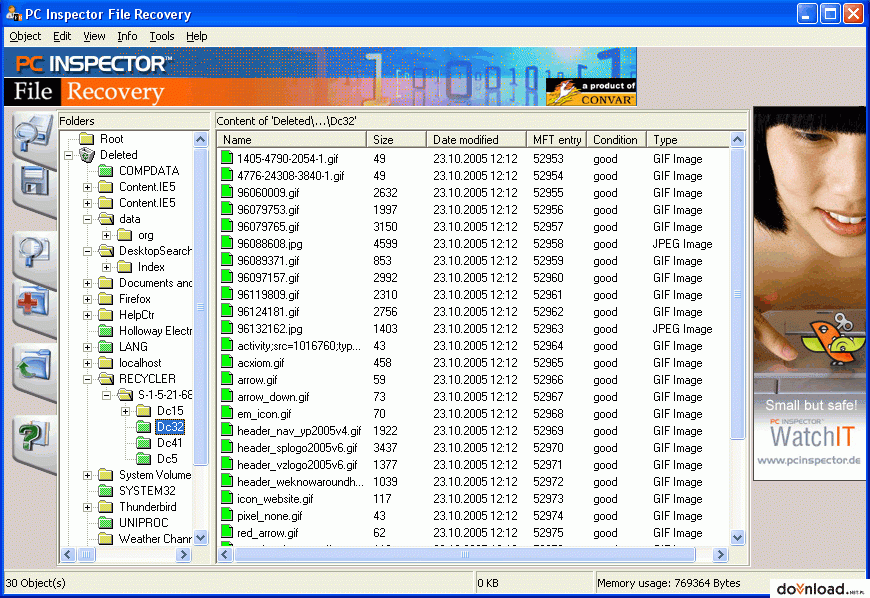
19. PC Inspector File Recovery

PC Inspector File Recovery

An efficient tool that helps you recover files from hard drives, memory cards, and external drives even when the boot sector has been damaged or erased. This freeware recovery tool supports NTFS and FAT 12/16/32 file systems. It features a simple search dialogue to find files on the basis of the name parameter.

Advantages:
  • Supports numerous languages
  • Option to recover files with original date and time stamp
  • Option to salvage undelete files on the network drives
  • Compatible with Windows 7 to XP

20. Orion File Recovery Software

Orion File Recovery Software

This file recovery software is a perfect blend of Undelete or Permanently Delete function. The distinguishing trait of this recovery software that makes it easy-to-use is whenever an individual will open the program; it will initiate a recovery wizard. Further, you can also perform the full drive scan search for all file types.

Advantages:

  • Supports NTFS as well as FAT file system
  • Deep Scan option to find additional files
  • Compatible with Windows 10, 8.1, 8, 7, XP, and Vista
  • Drive scrubber option to permanently delete file and enhance security

Conclusion

Now, you must have got a substantial information about the top 20 Freeware Data Recovery Software in 2017. The afore-mentioned all freeware software tools are snappier, robust, and efficient. But, Stellar Phoenix Windows Data Recovery software - Professional is among one of the highly recommended data recovery software. It is undeniably one of the best free data recovery software with three-simplified steps to address all your data loss situations. This quality-assured, reliable, and secure utility make your recovery journey easy, comfortable, and quick.


Author Bio:

Data recovery expert at Stellar Data Recovery, recovering data since 1993. Playing around with hard drives, Windows OS issues and suggesting fixes is among the major activities I love. Share my knowledge and expertise over different media channels from time to time or as soon as find a new one.

Useful Tools for PC Diagnostics

Useful Tools for PC Diagnostics
Computers have gone a long way from being glorified calculators. Most of us these days (including casual users) can't live without our computers, be it a PC, a laptop or even a tablet. And even though many have shifted to mobile forms of computer technologies, some of still remain loyal to our good old desktops.

As technologies develop and computers become much more reliable with each passing generation, we get the sense that we don't need to put so much energy and effort into the hardware and software maintenance of our beloved machines. Even though that's true to some degree, it's still a good idea to have diagnostics tools at your disposal at all times so you can always know what's going on inside your box. Sometimes things break down unexpectedly and you want to be prepared for such dire occasions. If you don't want to leave anything to chance, then I have some suggestions.

SIW

SIW gives you an incredibly detailed description of what's going on inside your computer. You can check your timings, how well your memory is running, what applications are loading at start-up and how long it takes for them launch the .dll files at autorun and much more. If you want to know exactly what's going on inside your PC, then this is the perfect program for you. It's very intuitive and easy to use, so even if you're not the biggest enthusiast, you should have no problem taking a sneak peak behind the curtains of your computer.

Hiren's BootCD

If you have to use LiveCD to resolve a situation, you know that you have a serious problem. Hiren's BootCD can help you with that, though, because it's an excellent tool with lots of functions and different diagnostics. One of the things that might scare newer users is the text-based interface, but you shouldn't worry about it because it's really easy to use, even though it's DOS-based. It's a Swiss-army knife of diagnostics so if you can't find the solutions using Hiren's BootCD then it might be a time to throw in the towel, cough up the big bucks and get a new one.

A note: Even though it's a great tool, Hiren's BootCD is compiled using older versions of paid software so the legal status isn't exactly clear. That's not to say that you will be arrested for using it, but you should be warned that the software doesn't use free-ware alone.

Ubuntu Live CD

When we talk about diagnostics, we rarely think about a Linux Live CD but it is rather effective when the situation demands it. Ubuntu's user-friendly interface will help you tackle many challenges in the terms of computer malfunction. You can save some of your data if the situation is really bad; you can test your memory; check for viruses and other useful tasks along the way. The best part is that your data will not be in any danger while you're using the Live CD. You can even check the operating system out and see if you like it.

UBCD4Win

Well, let's be fair – Linux isn't for everyone. If you're a long-term Windows user, you probably won't feel comfortable using Ubuntu. This is where UBCD4Win comes in. It's Windows based, doesn't require you to know your way around DOS and enables you to perform a wide plethora of diagnostics without a hitch.

Those are your main go-to diagnostic tools you can use. Each of them has its merits and downside but they are all convenient and will all do a great job in helping you solve your problems.

Image Credit: cooldesign


Author Bio:
As a technician at http://www.citycleaners.org.uk/deep-cleaning-london.html, Rose has a lot of experience with technologies and gadgets.

How to download YouTube Video, MP3, Playlist for iPhone 5S and 5C For Free


Finally, iPhone 5s and iPhone 5 C have been released. If you are about to get your new Apple product, you might be interested how to fill it with your favorite songs and video clips. That’s where you need a good and free YouTube Converter. Let’s learn how it works.

First of all, let’s install free software that will help you. I recommend Freemake YouTube Converter because it can download various YouTube files such as video, songs, playlists and so on.

Click “Download” button on a site to start the downloading process. Then start the installation. Please, be attentive. The software will offer you to install some other programs. If you don’t want to have them on your PC, opt out of any offers. However, it’s the only disadvantage of Freemake YouTube Converter.

If you download YouTube on a regular basis, agree to install a special browser extension. It will let you grab YouTube in one click.

As soon as you are done with the installation, run the software. As you see the interface looks pretty much easy to use. Everything you need to do it to copy and paste YouTube link into it.

FreeMake Youtube Convertor

Now choose what you want to do:

1) Download YouTube video:

When you paste the link into the program, choose a desirable video quality and “Convert to iPhone/iPod” option. Click “Download&Convert” to save videos onto a PC.


Download Youtube Video

2) Download YouTube song:

Paste a link to music video that you want to save in MP3. Again, choose a quality and “Convert to MP3” option. Select “Export to iTunes” if you want to send new files right to your iTunes media library.

Download Youtube Audio


3) Download YouTube playlist, channel, favorites:

Go to YouTube playlist or channel you want to download and copy its link. Paste in into the software and choose if you want to save the playlist in MP3 or as video files. Don’t forget to select “Export to iTunes”.

Download Youtube Playlist


Now, when you have all the content you need, go to iTunes and synchronize it with your iPhone 5S or 5C.

Tips:

1) For those who download YouTube on a regular basis, it’s better use “one-click” download mode. Activate it in the top right corner of the software. Choose “Action” (download, convert to…), “Quality

(best, medium, low) and “Destination” folder.


Download Youtube Video

2) In case you have a slow Internet connection, you may limit download speed. Just click “speed” at the bottom of the software and choose the speed you need.


Author Bio:
This post is written by Selin Longhkaster from Freemake. She is fond of ice skating, technology, photography, music and writing for tech blogs.

Gecko Monitor (Computer Spying/Monitoring Software) Giveaway! [Expired]


Hi my dear Friends! For the first time I am conducting a Software Giveaway contest on our blog Daily Tips Nd Tricks. First let me tell you about the software on which this Giveaway is based on!

The software which you are about to get through this Giveaway is Gecko Monitor. This software is priced to about $40 on their site http://geckomonitor.com.

But through this Giveaway 10 winners are about to grab a lifetime licence of this software worth $40 for FREE!!


What Can Be Done with Gecko Monitor:

Gecko Monitor is a "Computer Monitoring Software" to monitor everything that happens on your PC when you are away. If you are a parent you can monitor your child's activity such as The websites he/she visits, Applications he/she runs, keystrokes he/she types, etc... This software is a boon to Bosses who wants to monitor their employees computers.

In my case: As i am a student, It is a boon to me as i can install it on my College systems and Get my friend's/Staff's password by recording the keystrokes typed by them in the hidden mode offered by this software :D

Features:

A screenshot of trial version! (Click for better view)
  • Takes screenshots of all windows & websites.
  • Logs every application used and tells you when it was used.
  • Logs every website visited and tells you when it was visited.
  • Reports what was typed into every application & website.
  • Monitors all printed documents, including times printed.
  • Emails reports to you remotely & secretly, at times set by you.
  • Innovative timeline feature - an easy to understand timeline of events.
  • Monitors all file activity, including saved, opened & deleted files.
  • Does all of this completely hidden, un-hides with a secret key combo.

Enter into the Below Giveaway and Get this software for FREE!!!


a Rafflecopter giveaway

Tips To Win This Giveaway:

  • Your points are calculated in entries. entries earned shows the points you earned for that day.
  • Options such as Share on Facebook, Share on Google+, Tweet, Pin To Pinterest, Answer this Question are Re-Doable (Once per day), So Bookmark this page (Click Ctrl+D ) and do those options daily to increase your entries.
  • If you need any further clarification, Leave then in the comment box below! I will reply you as soon as Possible :)