

Summary: This blog highlights you about the list of top 20 Freeware Data Recovery Software in 2017. These Recovery tools will help you recover your lost, accidentally deleted, or inaccessible data in simple, fast, and secure way. Use these freeware recovery software tools to recover all your data, be it critical documents, important files, cherished photos, or treasured videos.
20 Best Free Data Recovery Software in 2017
Whether your important documents on which you were working from the past one month or your precious pictures which you took on your last trip got accidentally deleted due to disk failure, corruption, or by any means of the source, it can be recovered. Now, you can easily salvage data you think was lost forever with any of these tallied up 20 Data Recovery Software that comes totally free-of-cost.

If you are facing data loss or accidental deletion, then Stellar Phoenix Windows Data Recovery-Free Edition, a three-step recovery process - Select, Scan, and Recover, is best bet for rescue! Powerful and secure, this all-in-one software efficiently recovers all data, including sensitive documents, important files, photos, to videos, be it from removable drives or hard disks. Some of the highlighting attributes of this user-friendly utility are Deep scan engine, multiple DPIs support, advanced setting options for editing the existing and adding new header, HD-MOV Raw Recovery support, and much more.
Advantages:

If you have accidentally deleted any important file, cherished photo, or video from the recycle bin, MP3 player, Windows computer, or removable drive like USB stick, Recuva will easily recover it within a fraction of time. It supports drive as large as 3TB and is compatible with Windows 10, 8.1, 8, 7, XP, Vista, along with Windows Server versions. It also features an advanced deep scan option for buried files.
Advantages:

PhotoRec is an efficient file recovery software to recover almost 500 different file formats, whether it is lost from damaged hard disk, optical drives, or removable media. An open source platform is a plus point of this freeware data recovery utility.
Advantages:

A Four Step Recovery Software - Browse, Search, Preview, and Recover is an effective and reliable freeware Data Recovery software. It allows you to salvage songs, documents, movies, or pictures that have been accidentally deleted from FAT and NTFS formatted volumes. It has Advanced filtering options, Wizards, hints and context-sensitive help, Surface Scan method, and compatible with most file systems in Windows 10, 8, 7, 2003, 2000, Vista, and Windows XP.
Advantages:

Freeware Puran File Recovery utility is a perfect blend of simplicity, precision, and speed. With its three main recovery modes—Default Quick Scan, Deep Scan and Full Scan, you can efficiently recover lost or accidentally deleted files stored in FAT32 or NTFS format. Its easy-to-understand Tree View option makes navigation via deleted files and selection of desired files a simple process.
Advantages:

Simple design and easy-to-use interface makes Disk Drill a great data recovery software to recover lost, deleted files from memory cards, iPods, flash drives, or internal and external hard drives. The presence of advanced recovery vault feature not only helps in keeping data secure but also allows you use it later. It employs on some data recovery algorithms that effectively reads FAT32, NTFS and many more file systems.
Advantages:

Glary Undelete efficiently caters to the wide needs of novices as well as experts. This software tool offers simple File Types and Folders view, which makes the finding of loss or deleted files much easier. It supports multiple file systems ranging from NTFS, EFS, FAT to NTFS. One of the important features of this software is its support for analyzing recovery possibilities.
Advantages:
The open source software utility to recover your lost or accidentally deleted data easily. It is a great pick for those users who are novice and are experts. You can use this recovery tool to fix partition table, recover deleted partition, fix FAT Tables and much more. It supports DOS, Windows 2000, 2003, XP, Vista, Windows 7 (x86 & x64), and Windows 10. The other operating systems which it supports are: Linux, FreeBSD, NetBSD, OpenBSD, MacOS X and SunOS.
Advantages:
Fast search filter, intuitive user-interface, and quick scanning process make it stand high in the list of freeware undelete tools. Not only does it recover the lost data but it also briefs you about possibilities of recovering the same. You can use this free software to recover deleted files from memory cards, cameras, USB drives, removable media devices, and local drives.
Advantages:
FreeUndelete is a self-explanatory data recovery tool that effortlessly supports FAT12, FAT16, FAT32, NTFS 1.0, NTFS 2.0 and other major file storage systems. It features an effective search tool that lets you instantly filter the recovered files or folders of a particular extension or name only. Further, you can also refine and sort your results on the basis of file name, modified date, extension, size, created date, and recoverability status.
Advantages:
If you have either accidentally deleted or lost your data from memory cards, USB devices, music players and internal/ external hard drives, you can easily undelete the same with this three steps recovery utility. Thanks to its Windows Explorer structured user interface it is much easy-to-use. It is also a perfect option for partition recovery.
Advantages:
A quite simple undelete software, free from the hassles of complex procedures as well as cryptic buttons. It works on a basic filename search criteria and sorts the scan result on the basis of file parameters such as modified date, size, and folder. It optionally searches for the empty file too.
Advantages:
If you are an intermediate-level PC user, then ADRC utility is great for you. This free file recovery software allows you to retrieve lost or accidentally deleted data from hard drives and non-CD/DVD storage devices such as USB drives and memory cards. Via this tool, you can directly transfer the binary raw image from one to another drive.
Advantages:
Like others free data recovery, MiniTool Power Data Recovery is also a great utility to recover your deleted data lost via damaged partitions, removable media, hard drive, or CD/DVD. With this tool, you can easily salvage more than one files or folders at one go.
Advantages:
UndeleteMyFiles Pro is an impressive solution to salvage your lost, accidental deleted, or inaccessible data. The simplified two steps process allows you to easily recover files from SD/CF cards, hard disks, USB, and much more. It provides two basic viewing perspectives—Detailed View and Tree View; you can choose either of them as per your ease. Thanks to its Emergency Disk Image feature, you don’t need to worry about data overwriting and replacement.
Advantages:
If you think that you won’t be able to recover data as your discs have surface spotting or scratches, then give a chance to CD Recovery Toolbox, a great free data recovery tool. It is designed to retrieve lost files from corrupt or damaged optical drive discs such as HD DVDs, Blu-Rays, CDs/DVDs, etc.
Advantages:
Another efficient data recovery utility like afore-mentioned. The best trait of this software is its easy-to-use single program window, which you can use to scan, sort, and undelete files. Comprehensively portable, this software allows you to recover files from floppy disk as well as USB drive. You can use it efficiently to restore complete files in a directory.
Advantages:
A great, free data recovery tool to recover data that is accidentally deleted or lost due to formatting. It employs on disk, USB flash drive, external hard disk, memory card, and SD card. You can do both full recovery and partition recovery.
Advantages:
An efficient tool that helps you recover files from hard drives, memory cards, and external drives even when the boot sector has been damaged or erased. This freeware recovery tool supports NTFS and FAT 12/16/32 file systems. It features a simple search dialogue to find files on the basis of the name parameter.
Advantages:
This file recovery software is a perfect blend of Undelete or Permanently Delete function. The distinguishing trait of this recovery software that makes it easy-to-use is whenever an individual will open the program; it will initiate a recovery wizard. Further, you can also perform the full drive scan search for all file types.
Advantages:
Author Bio:
Data recovery expert at Stellar Data Recovery, recovering data since 1993. Playing around with hard drives, Windows OS issues and suggesting fixes is among the major activities I love. Share my knowledge and expertise over different media channels from time to time or as soon as find a new one.
20 Best Free Data Recovery Software in 2017
Whether your important documents on which you were working from the past one month or your precious pictures which you took on your last trip got accidentally deleted due to disk failure, corruption, or by any means of the source, it can be recovered. Now, you can easily salvage data you think was lost forever with any of these tallied up 20 Data Recovery Software that comes totally free-of-cost.
1. Stellar Phoenix Windows Data Recovery - Professional

If you are facing data loss or accidental deletion, then Stellar Phoenix Windows Data Recovery-Free Edition, a three-step recovery process - Select, Scan, and Recover, is best bet for rescue! Powerful and secure, this all-in-one software efficiently recovers all data, including sensitive documents, important files, photos, to videos, be it from removable drives or hard disks. Some of the highlighting attributes of this user-friendly utility are Deep scan engine, multiple DPIs support, advanced setting options for editing the existing and adding new header, HD-MOV Raw Recovery support, and much more.
Advantages:
- Support for automatic Raw File Recovery
- Provides detailed-oriented scanning status
- Turn on/off files preview any time in mid of scanning
- Option to automatically switch from Quick Scan to Deep Scan
- Support for simultaneous scanning of multiple file systems
2. Recuva

If you have accidentally deleted any important file, cherished photo, or video from the recycle bin, MP3 player, Windows computer, or removable drive like USB stick, Recuva will easily recover it within a fraction of time. It supports drive as large as 3TB and is compatible with Windows 10, 8.1, 8, 7, XP, Vista, along with Windows Server versions. It also features an advanced deep scan option for buried files.
Advantages:
- Simple and easy-to-use wizard
- Fast to download and install
- Available for 64-bit Windows version
- Available in installable as well as portable versions
- Support FAT, NTFS, and exFAT file systems
3. PhotoRec

PhotoRec is an efficient file recovery software to recover almost 500 different file formats, whether it is lost from damaged hard disk, optical drives, or removable media. An open source platform is a plus point of this freeware data recovery utility.
Advantages:
- Compatible with Windows, Mac OS X, Linux, and much more
- Offers handy options such as Features such as add own custom file types and 'unformat function'
4. Pandora Recovery

A Four Step Recovery Software - Browse, Search, Preview, and Recover is an effective and reliable freeware Data Recovery software. It allows you to salvage songs, documents, movies, or pictures that have been accidentally deleted from FAT and NTFS formatted volumes. It has Advanced filtering options, Wizards, hints and context-sensitive help, Surface Scan method, and compatible with most file systems in Windows 10, 8, 7, 2003, 2000, Vista, and Windows XP.
Advantages:
- Easy to download
- Offers an explorer-like view
- Simple Wizard and user-friendly interface
- Allows recovery from network drive, hard drive, or flash drive
- Color coded and highlights the recovery percentage via indicators
5. Puran File Recovery

Freeware Puran File Recovery utility is a perfect blend of simplicity, precision, and speed. With its three main recovery modes—Default Quick Scan, Deep Scan and Full Scan, you can efficiently recover lost or accidentally deleted files stored in FAT32 or NTFS format. Its easy-to-understand Tree View option makes navigation via deleted files and selection of desired files a simple process.
Advantages:
- Supports over 50 file types
- Ensures powerful searching
- Available for both private and non-commercial use
- Compatible with Windows 10, 8, 7, 2008, 2003, XP and Vista
- Available for 32-bit as well as 64-bit Portable Windows versions
6. Disk Drill

Simple design and easy-to-use interface makes Disk Drill a great data recovery software to recover lost, deleted files from memory cards, iPods, flash drives, or internal and external hard drives. The presence of advanced recovery vault feature not only helps in keeping data secure but also allows you use it later. It employs on some data recovery algorithms that effectively reads FAT32, NTFS and many more file systems.
Advantages:
- Comes with Resume recovery option
- Filter result via search tool by name
- Provides option to filter data by data or/ and size
- Supports all recent Windows versions along with macOS
- Offers option to view files altogether or organize them by pictures, video, documents, audio, and archives.
7. Glary Undelete

Glary Undelete efficiently caters to the wide needs of novices as well as experts. This software tool offers simple File Types and Folders view, which makes the finding of loss or deleted files much easier. It supports multiple file systems ranging from NTFS, EFS, FAT to NTFS. One of the important features of this software is its support for analyzing recovery possibilities.
Advantages:
- Easy to download and install
- Compatible with most Windows versions
- Provides Windows Explorer-style view for recoverable files
- Performs automatic sorting on the basis of size, name, and file creation date
8. TestDisk Data Recovery Software

The open source software utility to recover your lost or accidentally deleted data easily. It is a great pick for those users who are novice and are experts. You can use this recovery tool to fix partition table, recover deleted partition, fix FAT Tables and much more. It supports DOS, Windows 2000, 2003, XP, Vista, Windows 7 (x86 & x64), and Windows 10. The other operating systems which it supports are: Linux, FreeBSD, NetBSD, OpenBSD, MacOS X and SunOS.
Advantages:
- Compatible with Windows 10 to XP
- Can find lost partitions for different file types
9. Wise Data Recovery

Fast search filter, intuitive user-interface, and quick scanning process make it stand high in the list of freeware undelete tools. Not only does it recover the lost data but it also briefs you about possibilities of recovering the same. You can use this free software to recover deleted files from memory cards, cameras, USB drives, removable media devices, and local drives.
Advantages:
- Quick to install and easy to use
- Compatible with Windows 8 to XP
- Provides recovery of multiple files simultaneously
- Available in both portable and installer executable version
10. FreeUndelete

FreeUndelete is a self-explanatory data recovery tool that effortlessly supports FAT12, FAT16, FAT32, NTFS 1.0, NTFS 2.0 and other major file storage systems. It features an effective search tool that lets you instantly filter the recovered files or folders of a particular extension or name only. Further, you can also refine and sort your results on the basis of file name, modified date, extension, size, created date, and recoverability status.
Advantages:
- User-friendly design
- Available in portable version
- Ensures recovery of multiple files and folders at one go
- Compatible with Windows 10, 8, 7, XP, 2000, 2003, 2008, and Vista
11. EaseUS Data Recovery Wizard

If you have either accidentally deleted or lost your data from memory cards, USB devices, music players and internal/ external hard drives, you can easily undelete the same with this three steps recovery utility. Thanks to its Windows Explorer structured user interface it is much easy-to-use. It is also a perfect option for partition recovery.
Advantages:
- Option to Import and Export Scanning results
- Provides clear preview of file before recovering
- Can undelete multiple files simultaneously
- Compatible with Windows 10, 8, 7, Vista, XP, and MacOS
12. Restoration

A quite simple undelete software, free from the hassles of complex procedures as well as cryptic buttons. It works on a basic filename search criteria and sorts the scan result on the basis of file parameters such as modified date, size, and folder. It optionally searches for the empty file too.
Advantages:
- Portable- No installation required
- Supports both FAT and NTFS formatted drives
- Work on an easy-to-understand program window
- Compatible with Windows 10, 7, XP, Vista, 2000, NT, ME, 98, and 95.
13. ADRC Data Recovery Tools

If you are an intermediate-level PC user, then ADRC utility is great for you. This free file recovery software allows you to retrieve lost or accidentally deleted data from hard drives and non-CD/DVD storage devices such as USB drives and memory cards. Via this tool, you can directly transfer the binary raw image from one to another drive.
Advantages:
- Doesn't alter the folder structure
- Portable, free from installation hassles
- Compatible with Windows 7, XP, Vista, 2000, and 95
- Option to copy files from a hard disk having bad sectors
- Includes option for backup restore disk image and edit restore boot parameters
14. MiniTool Power Data Recovery

Like others free data recovery, MiniTool Power Data Recovery is also a great utility to recover your deleted data lost via damaged partitions, removable media, hard drive, or CD/DVD. With this tool, you can easily salvage more than one files or folders at one go.
Advantages:
- Intuitive interface
- Option to export deleted files list to a TXT file
- Option to filter on parameters such as extension, date, size, and name.
- Compatible with Windows 10, 8, 7, 2008, 2003, 2000, XP, and Vista
15. UndeleteMyFiles Pro

UndeleteMyFiles Pro is an impressive solution to salvage your lost, accidental deleted, or inaccessible data. The simplified two steps process allows you to easily recover files from SD/CF cards, hard disks, USB, and much more. It provides two basic viewing perspectives—Detailed View and Tree View; you can choose either of them as per your ease. Thanks to its Emergency Disk Image feature, you don’t need to worry about data overwriting and replacement.
Advantages:
- Includes File Wipe feature
- Specialized filters for easing search
- Option of Mail Recovery and File Rescue Wizard
16. CD Recovery Toolbox

If you think that you won’t be able to recover data as your discs have surface spotting or scratches, then give a chance to CD Recovery Toolbox, a great free data recovery tool. It is designed to retrieve lost files from corrupt or damaged optical drive discs such as HD DVDs, Blu-Rays, CDs/DVDs, etc.
Advantages:
- Recovers files over 4GB
- Compatible with Windows 10, 8, 7, 2003, 2000, 98, NT, XP, ME, and Vista
17. TOKIWA Data Recovery

Another efficient data recovery utility like afore-mentioned. The best trait of this software is its easy-to-use single program window, which you can use to scan, sort, and undelete files. Comprehensively portable, this software allows you to recover files from floppy disk as well as USB drive. You can use it efficiently to restore complete files in a directory.
Advantages:
- Option to delete multiple files at one go
- Supports NTFS, FAT12, FAT16, and FAT32 file systems
- Compatible with Windows 7, Vista, 2000, XP, 9x, NT, ME
- Option to recover files from memory cards, hard drives, USB drives, etc.
18. BPlan Data Recovery

A great, free data recovery tool to recover data that is accidentally deleted or lost due to formatting. It employs on disk, USB flash drive, external hard disk, memory card, and SD card. You can do both full recovery and partition recovery.
Advantages:
- Quick process
- Recovers images, videos, documents, etc.
- Compatible with Windows 10, 8.1, 8, 7, and XP
19. PC Inspector File Recovery
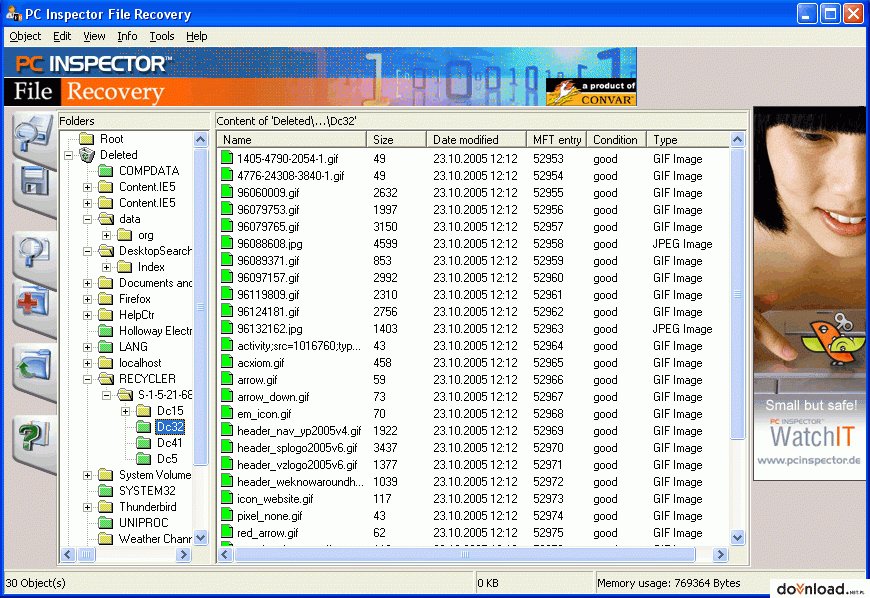
An efficient tool that helps you recover files from hard drives, memory cards, and external drives even when the boot sector has been damaged or erased. This freeware recovery tool supports NTFS and FAT 12/16/32 file systems. It features a simple search dialogue to find files on the basis of the name parameter.
Advantages:
- Supports numerous languages
- Option to recover files with original date and time stamp
- Option to salvage undelete files on the network drives
- Compatible with Windows 7 to XP
20. Orion File Recovery Software

This file recovery software is a perfect blend of Undelete or Permanently Delete function. The distinguishing trait of this recovery software that makes it easy-to-use is whenever an individual will open the program; it will initiate a recovery wizard. Further, you can also perform the full drive scan search for all file types.
Advantages:
- Supports NTFS as well as FAT file system
- Deep Scan option to find additional files
- Compatible with Windows 10, 8.1, 8, 7, XP, and Vista
- Drive scrubber option to permanently delete file and enhance security
Conclusion
Now, you must have got a substantial information about the top 20 Freeware Data Recovery Software in 2017. The afore-mentioned all freeware software tools are snappier, robust, and efficient. But, Stellar Phoenix Windows Data Recovery software - Professional is among one of the highly recommended data recovery software. It is undeniably one of the best free data recovery software with three-simplified steps to address all your data loss situations. This quality-assured, reliable, and secure utility make your recovery journey easy, comfortable, and quick.Author Bio:
Data recovery expert at Stellar Data Recovery, recovering data since 1993. Playing around with hard drives, Windows OS issues and suggesting fixes is among the major activities I love. Share my knowledge and expertise over different media channels from time to time or as soon as find a new one.


