Showing posts with label softwares. Show all posts

FotoJet Designer Has Everything You Need to Create Graphic Designs

Graphic designing is not actually an easy task especially for those who don’t have much design skill and experience. Having a designer to help you and paying them money is yet another expenditure. That is where much graphic design software like FotoJet Designer comes to your rescue.

What Is FotoJet Designer?

FotoJet Designer is a powerful yet easy to use graphic design app that bundles a multitude of templates to help you design eye-catching social media graphics, banners, cards, and posters.

It gives everyone the ability to design like a Pro even with no professional skill. Whether a design novice or a highly experienced designer, you will always find inspiration in FotoJet Designer.

How to Use FotoJet Designer?

Download the app on their developer site. It runs on Mac and Windows computers.

Once the program is installed, you are met with a clean and straightforward user interface that anyone can navigate with minimum effort.

On the popup window, you can see lots of well-designed templates arranged into several categories, such as Facebook Cover, YouTube Channel Art, Poster, Card, Invitation, Banner and Magazine Cover. Choose any category and then open templates to start. To be more creative, you can start from a blank custom page.

Next, you have full control over your work, adding photos, texts, clip art, shapes, and effects at will.

When you get your final satisfaction, save or share with the world via Facebook, Twitter, Pinterest, and Tumblr.

Highlighted features that I like:

  • Fast, Powerful and Easy to Use.
  • Thousands of templates and resources to choose from.
  • Lots of powerful editing tools that work fast and efficiently.
  • Anyone can create unique and professional designs with only a few clicks and with minimum effort.
  • Personalize graphic designs freely.

What Makes FotoJet a Worthy Choice?

Straightforward Interface 

FotoJet’s clean and simple interface makes it a prime choice, especially for the newbies and those who are technically less fluent. You just need to have basic computer skills to be able to use the tool.

Templates & Resources

FotoJet Templates & Resources

There are over 900 professionally designed templates to choose from and thousands of clipart images, text fonts, word art, backgrounds, lines & shapes, which can be applied with simple clicks.

Easy Personalization

FotoJet Easy Personalization

The ease of personalizing your graphic is amazing! Freely move, resize, and rotate photos to make them fit perfectly. There are many photo effects available for enhancing your photos. You are able to add text freely and customize it by changing the font, size, color, style, and effect. Your designing possibilities are endless.

How to Get This Program?

For windows users, you have free downloads. To get a full version, you can buy a license key.

Personal License - The personal license is available on a single computer. The charges would be $ 39.99. You will get free lifetime updates.

Family License - The Family license would enable you to use it on up to five computers. You will also get free lifetime update. In addition, you will get free priority support.

All the purchases carry a 30-day money back guarantee.

Conclusion:

FotoJet Designer is a noteworthy app you can turn to when you are intent on creating inspiring designs for your cards, flyers, invitations, posters, banners, and whatnot. If you are looking for a tool that is quick enough in letting you create graphics, FotoJet Designer is the perfect companion for your requirements.

20 Best Freeware Data Recovery Software in 2017

Summary: This blog highlights you about the list of top 20 Freeware Data Recovery Software in 2017. These Recovery tools will help you recover your lost, accidentally deleted, or inaccessible data in simple, fast, and secure way. Use these freeware recovery software tools to recover all your data, be it critical documents, important files, cherished photos, or treasured videos.

20 Best Free Data Recovery Software in 2017


Whether your important documents on which you were working from the past one month or your precious pictures which you took on your last trip got accidentally deleted due to disk failure, corruption, or by any means of the source, it can be recovered. Now, you can easily salvage data you think was lost forever with any of these tallied up 20 Data Recovery Software that comes totally free-of-cost.

1. Stellar Phoenix Windows Data Recovery - Professional

Stellar Phoenix Windows Data Recovery - Professional

If you are facing data loss or accidental deletion, then Stellar Phoenix Windows Data Recovery-Free Edition, a three-step recovery process - Select, Scan, and Recover, is best bet for rescue! Powerful and secure, this all-in-one software efficiently recovers all data, including sensitive documents, important files, photos, to videos, be it from removable drives or hard disks. Some of the highlighting attributes of this user-friendly utility are Deep scan engine, multiple DPIs support, advanced setting options for editing the existing and adding new header, HD-MOV Raw Recovery support, and much more.

Advantages:
  • Support for automatic Raw File Recovery
  • Provides detailed-oriented scanning status
  • Turn on/off files preview any time in mid of scanning
  • Option to automatically switch from Quick Scan to Deep Scan
  • Support for simultaneous scanning of multiple file systems

2. Recuva

Recuva

If you have accidentally deleted any important file, cherished photo, or video from the recycle bin, MP3 player, Windows computer, or removable drive like USB stick, Recuva will easily recover it within a fraction of time. It supports drive as large as 3TB and is compatible with Windows 10, 8.1, 8, 7, XP, Vista, along with Windows Server versions. It also features an advanced deep scan option for buried files.

Advantages:
  • Simple and easy-to-use wizard
  • Fast to download and install
  • Available for 64-bit Windows version
  • Available in installable as well as portable versions
  • Support FAT, NTFS, and exFAT file systems

3. PhotoRec

PhotoRec

PhotoRec is an efficient file recovery software to recover almost 500 different file formats, whether it is lost from damaged hard disk, optical drives, or removable media. An open source platform is a plus point of this freeware data recovery utility.

Advantages:
  • Compatible with Windows, Mac OS X, Linux, and much more
  • Offers handy options such as Features such as add own custom file types and 'unformat function'

4. Pandora Recovery

Pandora Recovery

A Four Step Recovery Software - Browse, Search, Preview, and Recover is an effective and reliable freeware Data Recovery software. It allows you to salvage songs, documents, movies, or pictures that have been accidentally deleted from FAT and NTFS formatted volumes. It has Advanced filtering options, Wizards, hints and context-sensitive help, Surface Scan method, and compatible with most file systems in Windows 10, 8, 7, 2003, 2000, Vista, and Windows XP.

Advantages:
  • Easy to download
  • Offers an explorer-like view
  • Simple Wizard and user-friendly interface
  • Allows recovery from network drive, hard drive, or flash drive
  • Color coded and highlights the recovery percentage via indicators

5. Puran File Recovery

Puran File Recovery

Freeware Puran File Recovery utility is a perfect blend of simplicity, precision, and speed. With its three main recovery modes—Default Quick Scan, Deep Scan and Full Scan, you can efficiently recover lost or accidentally deleted files stored in FAT32 or NTFS format. Its easy-to-understand Tree View option makes navigation via deleted files and selection of desired files a simple process.

Advantages:
  • Supports over 50 file types
  • Ensures powerful searching
  • Available for both private and non-commercial use
  • Compatible with Windows 10, 8, 7, 2008, 2003, XP and Vista
  • Available for 32-bit as well as 64-bit Portable Windows versions

6. Disk Drill

Disk Drill

Simple design and easy-to-use interface makes Disk Drill a great data recovery software to recover lost, deleted files from memory cards, iPods, flash drives, or internal and external hard drives. The presence of advanced recovery vault feature not only helps in keeping data secure but also allows you use it later. It employs on some data recovery algorithms that effectively reads FAT32, NTFS and many more file systems.

Advantages:

  • Comes with Resume recovery option
  • Filter result via search tool by name
  • Provides option to filter data by data or/ and size
  • Supports all recent Windows versions along with macOS
  • Offers option to view files altogether or organize them by pictures, video, documents, audio, and archives.

7. Glary Undelete

Glary Undelete

Glary Undelete efficiently caters to the wide needs of novices as well as experts. This software tool offers simple File Types and Folders view, which makes the finding of loss or deleted files much easier. It supports multiple file systems ranging from NTFS, EFS, FAT to NTFS. One of the important features of this software is its support for analyzing recovery possibilities.

Advantages:
  • Easy to download and install
  • Compatible with most Windows versions
  • Provides Windows Explorer-style view for recoverable files
  • Performs automatic sorting on the basis of size, name, and file creation date

8. TestDisk Data Recovery Software

TestDisk Data Recovery Software

The open source software utility to recover your lost or accidentally deleted data easily. It is a great pick for those users who are novice and are experts. You can use this recovery tool to fix partition table, recover deleted partition, fix FAT Tables and much more. It supports DOS, Windows 2000, 2003, XP, Vista, Windows 7 (x86 & x64), and Windows 10. The other operating systems which it supports are: Linux, FreeBSD, NetBSD, OpenBSD, MacOS X and SunOS.

Advantages:
  • Compatible with Windows 10 to XP
  • Can find lost partitions for different file types

9. Wise Data Recovery

Wise Data Recovery

Fast search filter, intuitive user-interface, and quick scanning process make it stand high in the list of freeware undelete tools. Not only does it recover the lost data but it also briefs you about possibilities of recovering the same. You can use this free software to recover deleted files from memory cards, cameras, USB drives, removable media devices, and local drives.

Advantages:
  • Quick to install and easy to use
  • Compatible with Windows 8 to XP
  • Provides recovery of multiple files simultaneously
  • Available in both portable and installer executable version

10. FreeUndelete

FreeUndelete

FreeUndelete is a self-explanatory data recovery tool that effortlessly supports FAT12, FAT16, FAT32, NTFS 1.0, NTFS 2.0 and other major file storage systems. It features an effective search tool that lets you instantly filter the recovered files or folders of a particular extension or name only. Further, you can also refine and sort your results on the basis of file name, modified date, extension, size, created date, and recoverability status.

Advantages:
  • User-friendly design
  • Available in portable version
  • Ensures recovery of multiple files and folders at one go
  • Compatible with Windows 10, 8, 7, XP, 2000, 2003, 2008, and Vista

11. EaseUS Data Recovery Wizard

EaseUS Data Recovery Wizard

If you have either accidentally deleted or lost your data from memory cards, USB devices, music players and internal/ external hard drives, you can easily undelete the same with this three steps recovery utility. Thanks to its Windows Explorer structured user interface it is much easy-to-use. It is also a perfect option for partition recovery.

Advantages:
  • Option to Import and Export Scanning results
  • Provides clear preview of file before recovering
  • Can undelete multiple files simultaneously
  • Compatible with Windows 10, 8, 7, Vista, XP, and MacOS

12. Restoration

Restoration

A quite simple undelete software, free from the hassles of complex procedures as well as cryptic buttons. It works on a basic filename search criteria and sorts the scan result on the basis of file parameters such as modified date, size, and folder. It optionally searches for the empty file too.

Advantages:
  • Portable- No installation required
  • Supports both FAT and NTFS formatted drives
  • Work on an easy-to-understand program window
  • Compatible with Windows 10, 7, XP, Vista, 2000, NT, ME, 98, and 95.

13. ADRC Data Recovery Tools

ADRC Data Recovery Tools

If you are an intermediate-level PC user, then ADRC utility is great for you. This free file recovery software allows you to retrieve lost or accidentally deleted data from hard drives and non-CD/DVD storage devices such as USB drives and memory cards. Via this tool, you can directly transfer the binary raw image from one to another drive.

Advantages:
  • Doesn't alter the folder structure
  • Portable, free from installation hassles
  • Compatible with Windows 7, XP, Vista, 2000, and 95
  • Option to copy files from a hard disk having bad sectors
  • Includes option for backup restore disk image and edit restore boot parameters

14. MiniTool Power Data Recovery

MiniTool Power Data Recovery

Like others free data recovery, MiniTool Power Data Recovery is also a great utility to recover your deleted data lost via damaged partitions, removable media, hard drive, or CD/DVD. With this tool, you can easily salvage more than one files or folders at one go.

Advantages:
  • Intuitive interface
  • Option to export deleted files list to a TXT file
  • Option to filter on parameters such as extension, date, size, and name.
  • Compatible with Windows 10, 8, 7, 2008, 2003, 2000, XP, and Vista

15. UndeleteMyFiles Pro

UndeleteMyFiles Pro

UndeleteMyFiles Pro is an impressive solution to salvage your lost, accidental deleted, or inaccessible data. The simplified two steps process allows you to easily recover files from SD/CF cards, hard disks, USB, and much more. It provides two basic viewing perspectives—Detailed View and Tree View; you can choose either of them as per your ease. Thanks to its Emergency Disk Image feature, you don’t need to worry about data overwriting and replacement.

Advantages:
  • Includes File Wipe feature
  • Specialized filters for easing search
  • Option of Mail Recovery and File Rescue Wizard

16. CD Recovery Toolbox

CD Recovery Toolbox

If you think that you won’t be able to recover data as your discs have surface spotting or scratches, then give a chance to CD Recovery Toolbox, a great free data recovery tool. It is designed to retrieve lost files from corrupt or damaged optical drive discs such as HD DVDs, Blu-Rays, CDs/DVDs, etc.

Advantages:
  • Recovers files over 4GB
  • Compatible with Windows 10, 8, 7, 2003, 2000, 98, NT, XP, ME, and Vista

17. TOKIWA Data Recovery

TOKIWA Data Recovery

Another efficient data recovery utility like afore-mentioned. The best trait of this software is its easy-to-use single program window, which you can use to scan, sort, and undelete files. Comprehensively portable, this software allows you to recover files from floppy disk as well as USB drive. You can use it efficiently to restore complete files in a directory.

Advantages:
  • Option to delete multiple files at one go
  • Supports NTFS, FAT12, FAT16, and FAT32 file systems
  • Compatible with Windows 7, Vista, 2000, XP, 9x, NT, ME
  • Option to recover files from memory cards, hard drives, USB drives, etc.

18. BPlan Data Recovery

BPlan Data Recovery

A great, free data recovery tool to recover data that is accidentally deleted or lost due to formatting. It employs on disk, USB flash drive, external hard disk, memory card, and SD card. You can do both full recovery and partition recovery.

Advantages:
  • Quick process
  • Recovers images, videos, documents, etc.
  • Compatible with Windows 10, 8.1, 8, 7, and XP

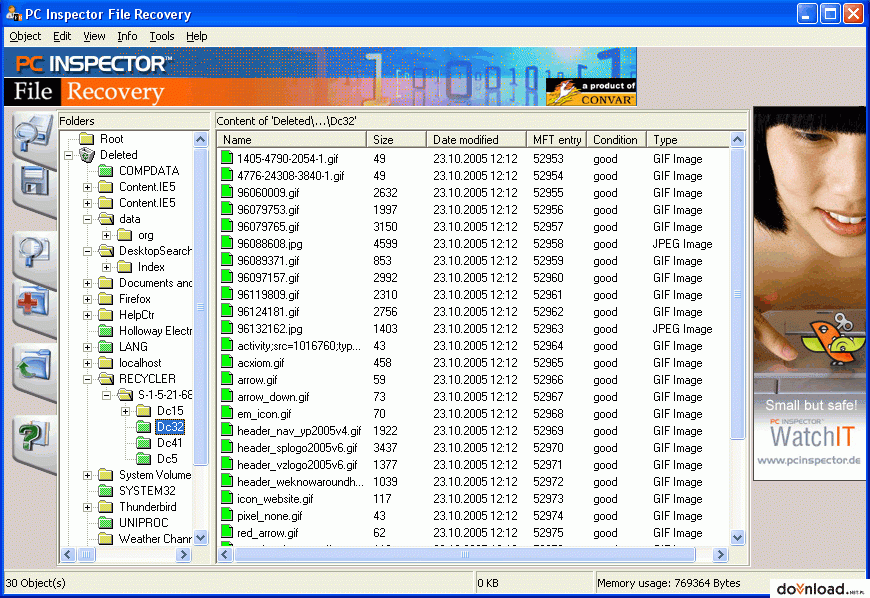
19. PC Inspector File Recovery

PC Inspector File Recovery

An efficient tool that helps you recover files from hard drives, memory cards, and external drives even when the boot sector has been damaged or erased. This freeware recovery tool supports NTFS and FAT 12/16/32 file systems. It features a simple search dialogue to find files on the basis of the name parameter.

Advantages:
  • Supports numerous languages
  • Option to recover files with original date and time stamp
  • Option to salvage undelete files on the network drives
  • Compatible with Windows 7 to XP

20. Orion File Recovery Software

Orion File Recovery Software

This file recovery software is a perfect blend of Undelete or Permanently Delete function. The distinguishing trait of this recovery software that makes it easy-to-use is whenever an individual will open the program; it will initiate a recovery wizard. Further, you can also perform the full drive scan search for all file types.

Advantages:

  • Supports NTFS as well as FAT file system
  • Deep Scan option to find additional files
  • Compatible with Windows 10, 8.1, 8, 7, XP, and Vista
  • Drive scrubber option to permanently delete file and enhance security

Conclusion

Now, you must have got a substantial information about the top 20 Freeware Data Recovery Software in 2017. The afore-mentioned all freeware software tools are snappier, robust, and efficient. But, Stellar Phoenix Windows Data Recovery software - Professional is among one of the highly recommended data recovery software. It is undeniably one of the best free data recovery software with three-simplified steps to address all your data loss situations. This quality-assured, reliable, and secure utility make your recovery journey easy, comfortable, and quick.


Author Bio:

Data recovery expert at Stellar Data Recovery, recovering data since 1993. Playing around with hard drives, Windows OS issues and suggesting fixes is among the major activities I love. Share my knowledge and expertise over different media channels from time to time or as soon as find a new one.

EaseUS Data Recovery Wizard Free

Using computers, lap tops, and other gadgets to store big data is very efficient and effective. Unlike the traditional way, it is more hassle-free and easier. This is why an array of businesses and industries are able to handle and access their data without any discomfort. Even though technology is truly beneficial, there are complicated problems that people encounter. Accidental deletion, hard drive failure, system crash, partition loss, and RAW partition are few technical issues which can affect large data.

 
When you have been using a poor data recovery software, EaseUS Data Recovery Wizard Free comes to your rescue. It is one of the file recovery software that can restore and access data with a peace of mind. Whether you engage in health care, Information Communication Technology (ICT), or other industries, it is an amazing solution you can depend on.

How to Recover your Lost Data Using EaseUS Data Recovery Wizard Free?

With the development of data recovery software free, retrieving data will be a breeze. In using this EaseUS Data Recovery Wizard Free, there are three easy and simple steps for you as follows:
  1. LAUNCH
  2. SCAN
  3. RECOVER
After a few minutes, you will be able to use lost data in your business. Whether you want to improve your customer service or innovate quality products, you can make them come to life. EaseUS Data Recovery Wizard is free to download. Nevertheless, when you want to take advantage of Data Recovery Wizard Pro, rest assured that it is available at a more reasonable cost. Thus, extraordinary recovery and huge savings are guaranteed.

Why Choose EaseUS Data Recovery Wizard Free?

Unlike other tools, EaseUS Data Recovery Wizard Free will never cause headache and disappointment on your part. It has built-in features, which can guarantee fast and awesome data recovery. Using the solution, you will never feel worried how to handle data loss and other complex technical problems in the near future. Here is the list of few reasons why you should employ the data recovery software today.
  • Easy and Safe recovery software - Whatever gadgets you have, EaseUS Data Recovery Wizard Free is easy to use. It is also safe for PC, Server, and laptop. It is an ideal solution when issues take place, including virus attack and hard drive failure.
  • Clear and Successful - When recovering data, you will be able to have a successful and clear result. Fast or remarkable recovery quality is guaranteed. This is why, many companies reckon on the tool.
  • Flexible and Time-saving - If you need to import or export any scanning result, you will never experience a difficulty in data recovery. After that, just resume the process without rescanning.
EaseUS Data Recovery Wizard has been making a noise online. Apart from having quality or functional performance, it is available at a fairer cost. Thus, retrieving any information as well as gaining a big saving will never be a dilemma. Take an action now and see how it works. You will realize that your efforts and money are really worth it.

5 Best VPNs for Torrents and P2P File Sharing

Torrents have become incredibly popular for sharing files online, and as networks continue to grow for P2P file sharing, increasingly more people are tuning in to this massive content sharing system. Of course, there are inherent security risks with any type of file sharing. This, coupled with the fact that the content of torrent files is usually something copyrighted, such as music or movies, is making users look deeper for ways to protect their privacy and stay anonymous.

Most people have at least basic anti-malware software installed on their devices, which is really helpful in screening files that may have viruses tucked away in them somewhere. However, this type of software really doesn’t do anything to secure your actual connection, it just secures your device.

Where there’s a will, there’s a way, and VPNs have answered the call. VPNs - Virtual Private Networks—offer users a secure and anonymous connection, along with global access to any content they want, regardless of their location. Not all VPNs are created equal though, and if you’re frequently downloading and sharing torrent files, you’re going to want a VPN that’s fast enough to get the job done.


Here are the top five VPNs for torrents and P2P file sharing, and how they compare in terms of price and connection quality.

#5. EarthVPN

Monthly Rate: $3.99


EarthVPN is a great, simple way to protect your privacy online. The connection is relatively fast - definitely fast enough for downloads - and the rates are some of the lowest you’ll find. Although the software is simple and the website doesn’t seem like much to look at, these guys offer loads of features and provide one of the better VPNs I’ve seen.

EarthVPN has the strongest 256-bit encryption available, so your connection is secure from snoops and hackers on public networks. You also get unlimited bandwidth, so there’s never any worry about hitting a monthly cap.The software is compatible with all major operating systems, and even allows three simultaneous connections, so you can use it on just about any device. The only real drawback? No live chat support.


#4. TunnelBear

Monthly Rate: $4.99
 

Okay, I am a huge fan of TunnelBear. The prices are low, the software is great, and let’s face it, the TunnelBear marketing gimmick is downright cute. These guys really know how to sell a product, and their product is awesome all the same.

TunnelBear’s encryption is tough stuff—256-bit and military grade, with settings in the software that you can use to optimize your connection for speed versus security. While TunnelBear is not compatible with Linux, it works on just about everything else—Windows, Mac, Android and iOS.What I love about TunnelBear is how easy it is to use. There is no manual connection configuration and no compressed files to mess with. It’s a simple download and install procedure. To top it all off, they even offer a free version to take for a spin before you sign up for a service plan.


#3. HideMyAss

Monthly Rate: $9.99


Where HideMyAss really shines is its server network. Often, the speed of your connection can really be impacted by the number of servers a VPN has. Too few and there’s not enough bandwidth to go around, not enough locations and you can have a hard time establishing a reliable connection. However, with servers in 190 countries, HideMyAss has one of the largest networks in the world.

With HideMyAss you get software that is compatible with just about every operating system but Linux. You can also use their software simultaneously on up to two devices.The customer support is really comprehensive too, with 24/7 help available on their live chat, phone and e-mail support lines. With unlimited bandwidth and a 30-day, money-back guarantee, there’s not much to lose by giving these guys a try.


#2. IPVanish

Monthly Rate: $10.00


IPVanish is another great VPN to try, with unlimited bandwidth and up to two simultaneous connections under one account. The one major drawback with these guys is that their software isn’t compatible with iOS, so mobile Apple users won’t have much use for it.

However, they do offer 24/7 customer support, with a live chat feature on their website you can use for immediate assistance and an e-mail ticket system for less pressing issues. Plus, they offer a 7-day refund policy for customers who do not find the service works well for them.


Like most other VPNs, IPVanish offers unlimited bandwidth and 256-bit encryption, plus a huge network of servers. Their network includes locations in 60 countries, so wherever you are, you should be able to connect with IPVanish.


#1. ExpressVPN

Monthly Rate: $12.95

ExpressVPN is definitely the best VPN I’ve ever seen. The software is incredibly simple and user-friendly, and the support staff is awesome when you need some assistance. They have the standard e-mail and live chat support, but what’s really incredible is that they usually get back to you within 20 minutes of sending them an e-mail—totally unheard of in this business.

The software works on all operating systems, including Linux, so you can use it seamlessly on all of your devices. It allows two simultaneous connections too—one on a mobile device and one on a home connection.

They offer a rock solid 30-day, money-back guarantee and will give you a refund—no questions asked—if you decide their service isn’t for you. If you do decide to keep it, you can even get a month of free service for you and a friend through their unique referral program.

Their connection is lightning fast, thanks to their massive server network, and with unlimited bandwidth, you’ll never have to worry about too many torrent downloads. Hands down, ExpressVPN is absolutely the best VPN for the job, and worth every penny.

Even if you only do your file sharing at home, most countries have government surveillance programs for internet users, so your connection is anything but anonymous. With a VPN, you get an IP address and access to remote servers to make your connection totally untraceable back to you. ExpressVPN is, in my opinion, the best VPN to keep you protected.

If you’re on public networks frequently, this software is particularly indispensable. These networks are absolute hotbeds of criminal activity, and hackers specifically target them to infiltrate your connection and steal your information. With an encrypted tunnel for your web traffic, your information stays secure from your device to the server.There’s no need to get paranoid and modify your routine—share away, my friends. But messing with torrent files can be a bit like a virtual game of hot potato, so be smart. Protect your devices with anti-malware software, and always use a VPN to keep things private and anonymous.

Be a Responsible Parent- Get a Mobile Spy App

Get a Mobile Spy App
Being a responsible parent does not only mean to raise your children with healthy food, respectable shelter and get them to reach high academic levels, it also means to get them to know the difference between good and bad, and save them from the social evils around them.

Many parents focus on the academic achievements of their children. Often such standards get the children under pressure and cause them to lose their understanding of the social and moral etiquettes. For instance, children might start taking drugs to relieve the academic tension they constantly undergo in their houses and schools. Also, they might start hanging out with dealers who offer unfair means to pass in exams and tests. All these activities are prevalent in children who are constantly forced by their parents to improve in their studies.

Mobile spy application can be purchased at a reasonable price, considering the company is chosen smartly. Many spy app developers out there offer almost all features for a low price package. Parents out there who are on a budget constraint should consider buying and experimenting with one of the trustable spy software first. The software can be installed on the children's mobile phone easily. As soon as the software is installed on the handset it starts functioning. This functioning includes recording the data of all activity and then transferring it to an online account. This online account can, of course, be only accessed by the parents who purchased the spy software.

Parents can keep a check on all the people their children are staying in contact with. All the calls that are being made, what timings they are made at and to whom, everything can be checked by parents. If any mysterious texts messages are being exchanged by your children make sure you take the necessary and immediate steps.

Spy software also allows parents to track down each and every step of their children by using the geographical tracker in the application. This tracker will update parents about all the locations being visited by their teenagers. So now there is a clear short cut to know whether your teenager is partying at night club or studying in the college library. Even better or worse maybe, your children could be involved in some illegal activity to earn cash. Track all these people down who are after your children to get their path straight.

There are times when parents simply want to make sure that the friends their children hang out with are of proper upbringing themselves. Now of course these children will hardly pull out a word of 'hello' in front of you, but could be loading your children with weird thoughts and notions behind your back. But fret not, since this very handy mobile phone will help you with this situation. Many spy software companies now offer the feature of live audio recording. This live audio recording system can be put to start manually, at any time, from anywhere. Once switched on, all the surrounding sounds can be listened to as audio recordings. These audio recordings are uploaded on the same accounts the parents access rest of the information from.

So with all these benefits, it is hardly a surprise that many parents are now easily monitoring their children's activities from their homes. No need to ruin dinners with interrogative questioning sessions, simply pull out your laptop and spy on your child without him/her ever coming to know about it. They are your responsibility and with the help of a mobile spy application, you can carry out your responsibility better than ever before.


Image Credit: Source.

The Basics of PC Utilities Software

PC system utilities are programs that encompass several applications that help clean up and fix numerous computer issues. While most PC utility software programs differ greatly in the services that they offer, there are several basic functions common to the majority of these programs.

Registry Fix:

Your registry is constantly changing with updates, new registry entries and deletion of old entries. Because of this, there are usually numerous entries in your registry that are very old, useless or corrupted, and these entries can create numerous errors. Your registry is a vital part of your computer, and it can easily be harmful to your computer to delete registry files that are necessary. Instead of trying to clean the registry manually, PC utilities software can scan and detect which files need to be removed and which files need to stay without harming your computer.

On the chance that the removal does damage your computer, there is usually the option to restore the registry to a backup file that was made before the cleaning process to return your computer to normal.

Junk File Cleaning:

Temporary files, cookies, recycle bin files and much more are all junk files that needlessly take up space in your computer. Not only does this rob you of hard drive space, but it may also significantly slow down your computer. A quick scan and sweep of the junk files can free up gigabytes of space and speed up your computer.

System Optimization:

You may not be using the best settings or options for your computing needs. System optimization tools can improve your Internet browsing, save laptop battery life, increase speed and more. You can also set the options to optimize performance for work related activities, gaming, typical home usage, server use and more.

Defragmentation:

As you add, change and delete files on your computer, these files fragment and spread out over your system. The more changes, additions and deletions are made, the more fragments are created. When too many fragments are created and when too many files are fragmented, it can slow down computer speed since it needs to find all of the fragments of a file in order to use it. Defragmentation software finds these fragments and puts them back together to create a more complete file allowing the computer to easily find and access the file.

Error Detection:

Though you may not always notice, your system may be dealing with errors that can be affecting performance or damaging files, programs or the entire system. Error detection finds and resolves errors found in your system. If it can't resolve the issue, it can usually provide the user with information on the error as a reference to fix it.

Why Do I Need PC Utility Software?

The Basics of PC Utilities Software

One of the most important times to get PC utility software is when you are dealing with a slow and problematic computer. A good utility software can remedy several problems that may be causing performance issues. Though a good utility software is a good start, it's also a good idea to get a quality antivirus software to ensure that no viruses are causing the issue. Antivirus software will also provide constant virus protection to keep your computer safe from future infections.

PC utilities software is also beneficial for anyone who wants to regularly maintain their computer. Regular computer maintenance is important to keep your computer running well for as long as possible and utility software is a great asset to have for maintenance.

If the software doesn't run regular scans, it's a good idea to run a scan at least once every week. If you run into any viruses or moderate to severe errors, it's also a good idea to run the software directly afterward to resolve additional errors and clean up junk which may have been created during the error.


Image Credit: Grant Cochrane.

How to download YouTube Video, MP3, Playlist for iPhone 5S and 5C For Free


Finally, iPhone 5s and iPhone 5 C have been released. If you are about to get your new Apple product, you might be interested how to fill it with your favorite songs and video clips. That’s where you need a good and free YouTube Converter. Let’s learn how it works.

First of all, let’s install free software that will help you. I recommend Freemake YouTube Converter because it can download various YouTube files such as video, songs, playlists and so on.

Click “Download” button on a site to start the downloading process. Then start the installation. Please, be attentive. The software will offer you to install some other programs. If you don’t want to have them on your PC, opt out of any offers. However, it’s the only disadvantage of Freemake YouTube Converter.

If you download YouTube on a regular basis, agree to install a special browser extension. It will let you grab YouTube in one click.

As soon as you are done with the installation, run the software. As you see the interface looks pretty much easy to use. Everything you need to do it to copy and paste YouTube link into it.

FreeMake Youtube Convertor

Now choose what you want to do:

1) Download YouTube video:

When you paste the link into the program, choose a desirable video quality and “Convert to iPhone/iPod” option. Click “Download&Convert” to save videos onto a PC.


Download Youtube Video

2) Download YouTube song:

Paste a link to music video that you want to save in MP3. Again, choose a quality and “Convert to MP3” option. Select “Export to iTunes” if you want to send new files right to your iTunes media library.

Download Youtube Audio


3) Download YouTube playlist, channel, favorites:

Go to YouTube playlist or channel you want to download and copy its link. Paste in into the software and choose if you want to save the playlist in MP3 or as video files. Don’t forget to select “Export to iTunes”.

Download Youtube Playlist


Now, when you have all the content you need, go to iTunes and synchronize it with your iPhone 5S or 5C.

Tips:

1) For those who download YouTube on a regular basis, it’s better use “one-click” download mode. Activate it in the top right corner of the software. Choose “Action” (download, convert to…), “Quality

(best, medium, low) and “Destination” folder.


Download Youtube Video

2) In case you have a slow Internet connection, you may limit download speed. Just click “speed” at the bottom of the software and choose the speed you need.


Author Bio:
This post is written by Selin Longhkaster from Freemake. She is fond of ice skating, technology, photography, music and writing for tech blogs.

Gecko Monitor (Computer Spying/Monitoring Software) Giveaway! [Expired]


Hi my dear Friends! For the first time I am conducting a Software Giveaway contest on our blog Daily Tips Nd Tricks. First let me tell you about the software on which this Giveaway is based on!

The software which you are about to get through this Giveaway is Gecko Monitor. This software is priced to about $40 on their site http://geckomonitor.com.

But through this Giveaway 10 winners are about to grab a lifetime licence of this software worth $40 for FREE!!


What Can Be Done with Gecko Monitor:

Gecko Monitor is a "Computer Monitoring Software" to monitor everything that happens on your PC when you are away. If you are a parent you can monitor your child's activity such as The websites he/she visits, Applications he/she runs, keystrokes he/she types, etc... This software is a boon to Bosses who wants to monitor their employees computers.

In my case: As i am a student, It is a boon to me as i can install it on my College systems and Get my friend's/Staff's password by recording the keystrokes typed by them in the hidden mode offered by this software :D

Features:

A screenshot of trial version! (Click for better view)
  • Takes screenshots of all windows & websites.
  • Logs every application used and tells you when it was used.
  • Logs every website visited and tells you when it was visited.
  • Reports what was typed into every application & website.
  • Monitors all printed documents, including times printed.
  • Emails reports to you remotely & secretly, at times set by you.
  • Innovative timeline feature - an easy to understand timeline of events.
  • Monitors all file activity, including saved, opened & deleted files.
  • Does all of this completely hidden, un-hides with a secret key combo.

Enter into the Below Giveaway and Get this software for FREE!!!


a Rafflecopter giveaway

Tips To Win This Giveaway:

  • Your points are calculated in entries. entries earned shows the points you earned for that day.
  • Options such as Share on Facebook, Share on Google+, Tweet, Pin To Pinterest, Answer this Question are Re-Doable (Once per day), So Bookmark this page (Click Ctrl+D ) and do those options daily to increase your entries.
  • If you need any further clarification, Leave then in the comment box below! I will reply you as soon as Possible :)