Showing posts with label Computer. Show all posts

Things to consider before buying a laptop in 2019

If you want to buy a laptop, then this question will definitely come in your mind. Which processor should i take i3 or i5 or i7. Which processor should i take AMD or Intel. How many GB of RAM should i take? Should take 2GB or take 4GB or take 8GB. And which operating system should we take? And much more.

Friends, when you want to buy any computer for the first time in life, then all these questions will definitely come in your mind. But do you know the answers to all these questions? So to know the answers to all these questions, you read this article completely.

Things to consider before buying a laptop:-


first of all you have to think that for what purpose i buying computer? Means for work purpose or for other works. So now it comes to whether we should take a laptop or a desktop? Desktop are able to do more work than laptops.


Things to consider before buying a laptop
The advantage of taking a laptop is that it is portable and has a good battery backup. But in future you can not make any changes in the laptop, that means you cannot change the processor of the laptop and you can not change graphic cards of the laptop. But you can change the ram and hard-disk.

The advantage of taking a desktop is that you can change the different parts of desktop in the future. Such as processor, graphic card, motherboard etc. But it is not portable. Here we will discuss that how to choose a right laptop.

By using the desktop, you will find a better performance than a laptop.

also read:- computer unknown facts

How to choose laptop processor:-


So now let's talk about the processor. There are two types of companies in the market that make processors, one is Intel and the other is AMD. If you want to buy a laptop below the price of RS 20000 then you can take a processor of AMD. Because AMD processor costs less but its power is higher compared to Intel.

processor
processor


But if you want to buy a laptop above the price of 20000, then you can take Intel processor. The Intel company makes different types of processes.
Meaning that the Intel company makes processors for different tasks.

If you do not have to do much work in a laptop, and if you want to watch movies or browsing or want to perform some small task then you should take the i3 processor. And if you want to do video editing or want to run big software then you should take the i5 processor. Because in the i3 processor you cannot do all this work easily. And if you want to playing high quality games then you should take i7 processor.

also read:- useful websites for students

How to choose a laptop RAM:-


then second is ram(random access memory). The work of processor is processing of the data. Whenever you open a software in your computer, it is stored in memory. And there comes the concept of RAM. Meaning if your computer will have more RAM then you can run many software simultaneously.
ram


If you take i3 processor then 4GB RAM is sufficient for you. If you take i5 or i7 processor then 8GB RAM is right for you. And there are also generations of RAM. Such as DDR1, DDR2, DDR3, DDR4 etc. The latest version of ram is DDR4.

How to choose laptop hard drive:-


Then third is hard drive. There are two types of hard drives.
1. HDD (hard disk drive)
2. SSD (solid state drive)

You get more space in HDD. for example 1TB, 2TB and more. If you required more space or memory then according to your requirements you can choose your required hard drive. Speed of read-write is more inside SSD compared to HDD. But you get less space in SSD. SSD has a higher price than HDD.

What we have discussed is all about hardware parts of laptop. Now let's know about software.

also read:- types of websites- static and dynemic websites

Best os for pc or laptop:-

  
When you go to buy a laptop, the salesman asks you which operating system do you want. And you may ask that what is the best operating system for PC or laptop? There are many types of operating system in laptop.

For example,
1. Windows
2. Linux
3. Dos
4. Ubantu

But most people use the Windows operating system. If you want to buy windows operating system then the price of windows operating system is aroun 6000. Linux and dos are operating system are free.

If you buy a laptop of a DOS operating system, then you can later upgrade the operating system of Windows in that laptop.

Fourth is screen size and resolution. According to your requirements you can choose the screen size of laptops. Such as 15.6 inch, 14.8 inch etc.

It all depends on your budget. If your budget is high then you can buy laptop which has more configuration. But if you buy laptop for your home then I recommended that you should buy desktop. Because desktop has more power than laptop.

So friends in this article we have discussed the things consider before buying a laptop? And how to choose a laptop? And I hope now you can choose laptop as per your requirement. If you like this article then share it to your friends. If you have any questions then you can ask your questions in comment. Thank you.

Computer unknown facts- do you know about it

Computer unknown facts:-


Hello friends,  you are welcome today in this new article. Today I will discuss about some related facts of computer. That you should know about. So to learn about unknown facts of computer you have to read this article fully. So let's get start.

Computer unknown facts, computer inovation
Computer unknown facts


 Friends, who do not know about computers nowadays? Everyone knows about. And we use computer. So here we will discuss about computer and its innovation and also the parts of computer like hard-disk, pen drive, mouse etc.. and its innovation.

First pen drive,


You know about that  Charles Babbage is called the father of computer. Nowadays you see 32GB or 64GB pen drive in small size.  But did you know how big the first pen drive was? The size of the world's first pen drive(IBM 11, 13) was as big as a washing machine. And it was invented by IBM. And the capacity to store data of this pan drive was only 5MB. 

Computer unknown facts, first pendrive
First pendrive


 And you know what is the capacity of pen drive nowadays. Now that you are using Windows in your computer, it was Microsoft's project. When this project was about to begin, then the name of this project was named Interface Manager. But after that the name of this project was named Windows Suitable. 

Otherwise, the name of the operating system you are using may be the interface manager. What a nice name " interface manager". Please tell us in the comment box that how you feel about this name.

Our smart phone is also a computer and it is a mini computer. That is amazing.

First hard-disk,


The world's first hard-disk was invented by IBM and the capacity of this hard-disk was only 1 GB. And that hard disk was worth millions. It was very costly. IBM's first computer built by IBM's 12  engineers. And the name of that computer was the dirty dozen.

The world's first micro-processor was made by Intel company. And that microprocessor was just made for calculator not computer. But later Intel company updated that processor. And later that processor started using in the computer. And now Intel company keeps trying to make their processors smaller.

Computer is a sea of information and general knowledge. Now a days when we require the information about any topic, simply we search it on the internet and get the information about that topic. Computer is an amazing gadget in the world. 

9 of the 10 supercomputers work on the Linux operating system. Because there are no viruses in the Linux operating system mostly.  Yo do not think you should use Linux too.

The world's first web browser was built in 1980. And it was made by Certain burner lee. Whose name was World Wide Web, later changed its name to Nexes.

Computer unknown facts, world's first web browser
World's first web browser


Do you know who made the world's first mouse? The world's first mouse was created by the Dogles. Who was a computer engineer. And that mouse was made entirely of wood, leaving the wire. Nowadays all of you know about the mouse.

Do you know how much long word you can type in the keyboard by using only one row and which word you can write? So you can write the long word "TYPEWRITER" only by using only one row.

The world's first computer size was as large as a room and the weight of that computer was 50 tons. So you can get an idea of how big the world's first computer was.

Also read:- Important Gmail settings-secure your Gmail account now

So friends were some facts related to computer and technology that you should know about. If this article is helpful to you then share this blog post with your friends and if you are interested to learn about computer, technology, social media tips and tricks, blogging then you can follow this blog. Thank you.

Computer Tips and Tricks - How to Play and Download Online Videos using VLC media player

VLC Media Player comes with great tricks, tips and hacks and to play and download online videos using VLC Media player is one of the best VLC Media player features. However, the option is somehow hidden and not known by all.Previously, I published an article on how to convert media files using VLC Media player. Today’s stroll, I would brief you guys on how to easily play and download any online video using the VLC Media player. Stay tuned and follow the simple guide below.

How to Play and Download Online Videos using VLC Media Player


1.       Firstly, launch your VLC Media player software.

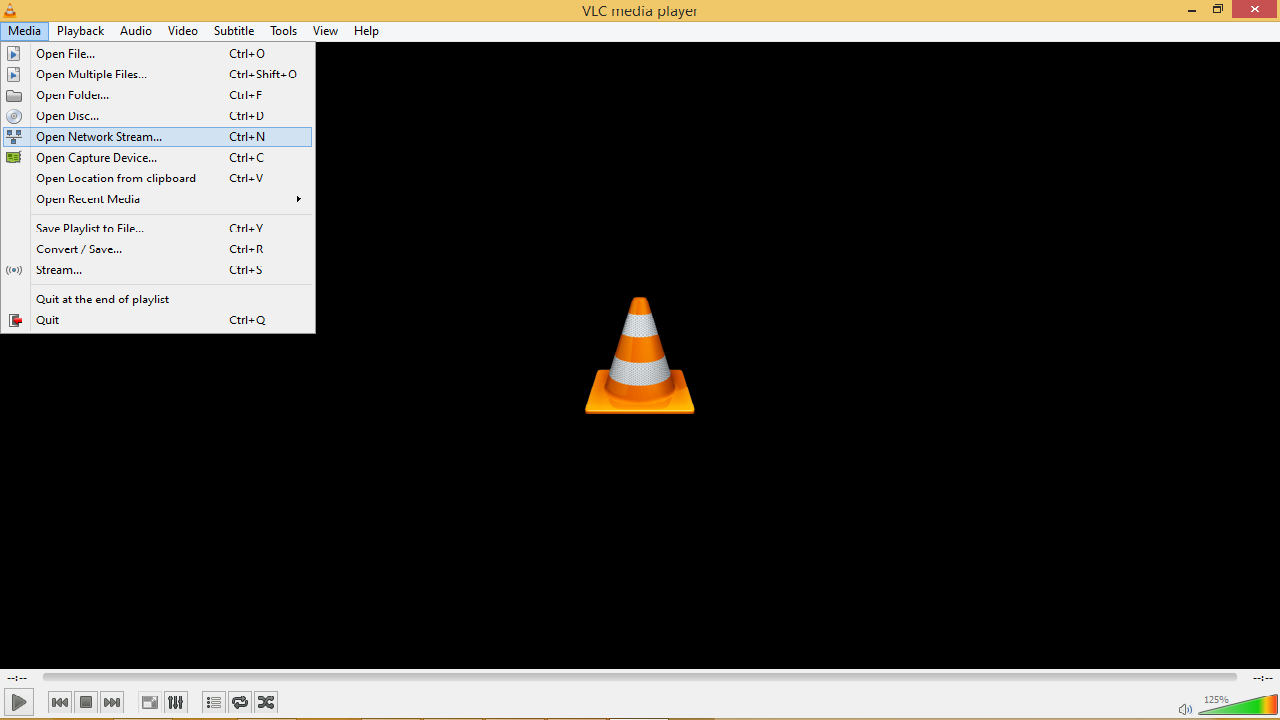
2.       After that, go to the top navigation menu and click on Media.

vlc1

3.       Scroll down to Open Network screen >> Network tab, and paste the url of the video.

vlc2

4.       That’s it. You can now play or download.

That’s all on how to Play and download online videos using VLC Media Player. Hope you did enjoyed the guide. If you have any question or say, feel free o drop your comment via comment section and I won’t hesitate to respond.


Read more: How to Hack 


                                      SHARING IS CARING!!

Computer Tips and Tricks - How to Recover Lost or Deleted Browser History

Few day back, my PC encountered a problem when I was trying some malicious software out in other to test-run some few stuffs, along the process, my browser was forced to shut down and this escalated to the deletion of my browser history which almost frustrated me. As a geek, I killed the frustration with a smile knowing that I would find a solution to the problem.

search-lost-browser-history
Luckily for me, I stumbled upon a guide, and finally recovered my browser’s history.

Today’s stroll, I would walk you through the process on how to easily recovery your lost or deleted browser history.

How to Recover Lost or Deleted Browser History

1.       First-off, download the Systenance Index.dat tool, and install on your computer.

2.       After that, launch the tool, and below click on “search” button.

3.       Once you’ve clicked on search button, all your history, past, deleted or lost would be searched for by looking up to the index.dat file.

4.       After the search is completed, then click OK and analyze your history.

5.       You can easily filter your history search result, and if you wish to save, click on the file, and select the save option.

That’s it. Simple right? Follow the steps carefully and you’re gamed.

Computer Tips and Tricks - How to Find Serial Key Of Any Software for Free

By getting alot of mails on can you please provide me the serial key of photoshop,sony vegas pro,adobe premium pro and so on i have finally decide to write this post.This post is related to find serial key of any software for free.There are some free trial software that are made available on the internet, but serial key or activation key or number is needed to activate those software for lifetime usage. However, most online sites do leak the serial key or number online, but the problem is how to find them.


find-serial-key

In this guide, I would walk you through the process on how to find the serial key or activation key of any software.

How to Find Serial Key of Any Software

1.       Firstly, visit Google homepage.

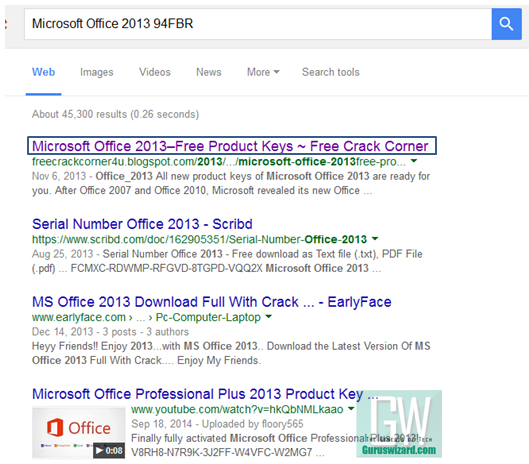
2.       After that, input “the software name” with “94FBR”. For instance, “Microsoft Office 2013 94FBR”.

3.       You’ll be given direct search results having the software’s serial or product key.

find-serial-key1

4.       Simply copy the key and input on the software’s text field, and you’re done.


Recommended: Windows 7 Product key 2015 Updated


                                              SHARING IS CARING!!

Computer Tips and Tricks - How to cut Video Clips and capture Images in VLC media Player


VLC media player is the favorite of everyone .Almost everybody love this media player it is completely free to download and it has better sound performance and alot of facilities.VLC Media player supports video and audios in many file formats and one best VLC media player tips and tricks is that, you can easily cut video clips and capture Images while watching or streaming videos with VLC Media player.In this guide, I would walk you through the process on how to cut video clips and take images using VLC Media player.

Read more: How to hack wi-fi using Android phone

1.       Firstly, use your VLC Media player to play the video you wish to cut.

2.       After that, right-click and select advance control, as seen in the image below.

vlc-advance

3.       Now, the advance control navigation will be out. You can now perform your action. Just as seen in the image below, you’ve an option to record, take snapshots and others.


vlc-advance1
4.       
      Simply utilize the option and cut some part of the clip you want to, and also take as many  snapshots you want to.

F          Read More: Tips and Tricks Of Everything

                        Don't forget to share this because Sharing Is Caring!!!


Computer Tips And Tricks - Make your computer greet you every time you start Windows

Do you watch movies? Have you always loved the way how Computers in movies welcome their users by calling out their names? I bet that you too would want to know how you can achieve similar results on your PC and have a computer said welcome. 

Then you are at the right place, this article describes exactly how you can make your computer welcome you like this.

With this trick, you can make your Computer welcome you in its computerized voice. You can make your Windows based computer say "Welcome to your PC, Username."

Make Windows Greet you with a Custom Voice Message at Startup

To use this trick, follow the instructions given below:-

  1. Click on Start. Navigate to All Programs, Accessories and Notepad.
  2. Copy and paste the exact code given below.
Dim speaks, speech
speaks="Welcome to your PC, Username"
Set speech=CreateObject("sapi.spvoice")
speech.Speak speaks
     3.  Replace Username with your own name
     4.  Click on File Menu, Save As, select All Types in Save as Type option, and save the file as Welcome.vbs or "*.vbs".
     5.  Copy the saved file. 
     6.  Navigate to C:\Documents and Settings\All Users\Start Menu\Programs\Startup (in Windows XP) and toC:\Users\ {User-Name}\AppData\Roaming\Microsoft\Windows\Start Menu\Programs\Startup (in Windows 8, Windows 7 and Windows Vista) if C: is your System drive. AppData is a hidden folder. So, you will need to select showing hidden folders in Folder options to locate it.
     7.  Paste the file.


 Make your Computer Welcome you at startup

Now when the next time you start your computer, Windows will welcome you in its own computerized voice. 

Note: For best results, it is recommended to change sound scheme to No Sounds.
You can change the sound scheme to No Sounds by following the steps given below:-
  1. Go to Control Panel.
  2. Then click on Switch to Classic View.
  3. Then Click on Sounds and Audio Devices.
  4. Then Click on the Sounds Tab.
  5. Select No Sounds from the Sound Scheme option.
  6. If you wish to save your Previous Sound Scheme, you can save it by clicking Yes in the popup menu.
  7. Click on OK.
Change Sound Scheme to No Sounds

Try it yourself to see how it works. In my personal opinion, this is an excellent trick. Whenever I start my PC in front of anybody and the PC welcomes me, the fellow is left wondering how brilliant a computer do I have.

Computer Tips And Tricks - Make your Computer Talk

Have you ever wondered how can you make your computer speak whatever you input to it like in the movies? Would it not be fun? If only it was possible! Rejoice, because now it is possible. Well, if you wish to know how to do this, then you have come to the right place. With this trick, you can create a script in Windows which will make your computer speak whatever you input to it.

To create one such talk script, follow the steps given below:-

Make your Computer Talk

Steps
  1. Open Notepad.
  2. Copy and paste the exact code given below.
          Dim Message, Speak
          Message=InputBox("Enter text","Speak")
          Set Speak=CreateObject("sapi.spvoice")
          Speak.Speak Message
        3. Click on File MenuSave As, select All Types in Save as Type option, and save the file as Speak.vbs or "*.vbs".
        4.  Double click on the saved file, a window will open like the one in the image. Enter some text in enter text column and click OK.

    Now your Computer will speak / talk what you typed in Step 4. Try it yourself.

    Windows Compatibility: This VBS file can be executed on all versions of Windows including Windows XP,Windows VistaWindows 7 and Windows 8.

    If you enjoyed this post please subscribe to my youtube channel CLICK HERE to Subscribe.

    Top 5 Branded Laptops 2015 - Latest Laptops Below $600

    Recently updated, our list of top rated laptops includes the best modern touchscreen capable laptops and featherlight ultra thin laptops. These are PC laptops only, and all under $600. Each one is great for the road warrior, but be careful to choose what is right for you. Often times portability comes at the cost of performance, but we took care of that by including an incredible list of diverse machines.


    Our Top Laptops


    5Toshiba Satellite C55D-A5120 Laptop

    Toshiba model costs less simply because it uses a cheaper processor. The AMD processor is an e-series dual core and should run just as fast as the Intel competitor. In fact, since it uses an AMD processor you get the performance of an AMD Radeon graphics processing unit, actually making this a better laptop for gaming. If you want to save a little money but still have a high quality laptop, absolutely check this one out.

    • AMD QUAD - CORE E2 - 3800
    • 4GB DDR3 Memory / 500GB HDD
    • Windows 8.1

    Price: $300


    4ASUS K200MA-DS01T HD Touchscreen

    This ASUS is packed with modern technologies like IceCool Technology that keeps the palm rest cool, and Palm Proof Technology that prevents inadvertent cursor movement when typing. It also has SmartLogon facial recognition technology, allowing you to logon password-free. It also has 320 gigabytes of hard drive space and one USB 2.0 port and one USB 3.0 port.
     

    • Intel Bay Trail - M N2830 Dual - Core 2.16GHz(Turbo up To 2.41GHz)
    • 11.6" inch HD Display Touch Screen
    • 500GB Hard drive storage , 4GB RAM

    Price: $315

    If you are enjoying this post why don't you subscribe my youtube channel  
    CLICK HERE to Subscribe.


    3Asus X200MA Touchscreen Laptop

    The X200 series is probably the most portable laptop in existence. It weighs in at just 3 pounds and is under 11 inches in diameter. This is practically a huge a cell phone with massive processing power and a touch screen. The corei3 processor uses very little power and keeps battery life high. With 500gb of storage and 4gb of ram, you can store your media and play it too.


    • Intel Celeron  N2815    1.86GHz
    • 11.6" inch HD Touch Screen
    • 4GB Memory , 500GB Hard Drive
    • Black , Windows 8

    Price: $309


    2Samsung Chromebook 2

    If you do not need Microsoft Office, and you generally use your laptop for browsing, email, facebook, and other basic things you don’t need to look any further. Chromebooks are inexpensive, functional, and beautiful. This latest Samsung Chromebook is an excellent laptop replacement that is far easier to use than Windows 8. Google’s own Chrome OS is sleek and fun to use, and integrates seamlessly in to your Google account just like an Android device. The quality of Samsung electronics further pushes the value and makes this a sweet buy.


    • 4GB DDR3L SDRAM
    • 16GB Solid - State Drive
    • Chrome OS
    • 8H Battery Life

    Price: $259


    1ASUS Transformer Book T100TA-H2-GR


    At a very low price you can have a new tablet and a new laptop in one. This device is powered by an ultra fast Intel quad core processor and comes with over 500GB of solid state storage. The screen has brilliant colors and high resolution for its relatively small size. It is the perfect device for travel, productivity, and entertainment. The very best thing about this device is the 11 hour battery life, so you can do what you need to do without interruption. You can buy the transformer in white, black, or pink making it a great option for students.


    • Intel Quad Core Baytrail - T     Z3740  1.33GHz     2GB RAM
    • 500GB Hard Drive Keyboard Dock
    • Storage Capacity  64 GB Solid In Tablet , 500GB Hard Drive In Dock
    • 1.2 MP Webcam
    • Includes Windows 8.1

    Price: $500


    They are the top 5 branded laptops under $600.If you have any kinds of questions please comment below i will definitely help you to solve your problem.That's it for today see you in next post.

    Easy Way to Remove Ask.com Conduit toolbar (Adware) on browser

    Disturbing Adware

    Recently emerging unwanted toolbars appear in your web browser. Do you often find your default search engine changed to a search engine that is unfamiliar? It is an attack of adware (advertisement attack) that originated from the application installation mistake on your computer. Most providers download a free application that is in the top rank in Google is working with advertising companies to try to trick you also install the toolbar, addons, or other forms of advertisement in your browser. As usual, you will hit next, next and next to install an application on your computer, and you have been unconsciously install adware which will also interfere with your daily activities a day using your browser.

    This simple article will give you an easiest way to remove all Adware in all of your browsers (Firefox, Chrome, IE, Opera, etc.) with only 2 clicks.

    Check out simple tutorial below :
    1. Download adware remover HERE !!
    2. Turn off all current browsers
    3. Open AdwCleaner, click Search then wait Search process complete
    4. Click Delete, and reboot your computer after the deleting process is completed.
    5. Cheer, your browser has been cleaned up.

     The following is an adware that could be removed by this simple program :
    • Remove Absolute Uninstaller - Ask Toolbar
    • Remove Ad-ware - Google Chrome
    • Remove Anvir Task Manager Free - Dealio Toolbar
    • Remove Any Video Converter - Google Chrome
    • Remove AVG Free - Yahoo Toolbar
    • Remove AVG Linkscanner - Yahoo Toolbar
    • Remove Conduit Toolbar
    • Remove Bitcomet - Google Toolbar
    • Remove BitTorrent - Ask Toolbar
    • Remove BS.Player - BS. ControlBar
    • Remove Burn4free - 1Click DVD Copy Pro
    • Remove BurnAware Free - Ask Toolbar
    • Remove CDBurnerXP - OpenCandy
    • Remove Clamwin - Ask Toolbar
    • Remove COMODO Internet Security - Ask Toolbar
    • Remove Core Temp - Search Enhancement
    • Remove Darkwave Studio - OpenCandy
    • Remove Defraggler - Google Toolbar
    • Remove Driver Sweeper - OpenCandy
    • Remove ExtractNow - Registry Reviver
    • Remove Flashget - Google Toolbar
    • Remove FLVPlayer4Free - Video Download Toolbar
    • Remove Free Commander - eBay Shortcuts
    • Remove Facemoods Toolbar
    • Remove HwMonitor
    • Remove ICQ - ICQ Toolbar
    • Remove IE7Pro - Grab Pro Toolbar
    • Remove ImgBurn - Ask Toolbar
    • Remove Immunet - Ask Toolbar
    • Remove IObit SmartDefrag - IObit Toolbar
    • Remove IrfanView - Google Toolbar
    • Remove MediaCoder - Nitro PDF Reader
    • Remove MediaInfo - OpenCandy
    • Remove µTorrent - µTorrent toolbar
    • Remove Orbit Downloader - Grab Pro
    • Remove PC Tools Spyware Doctor - Google Toolbar
    • Remove PC Wizard - Ask Toolbar
    • Remove PicPick - Bing Toolbar
    • Remove Recuva - Yahoo Toolbar
    • Remove Spyware Terminator - Web Security Guard
    • Remove Webshot - OpenCandy
    • and Remove other suspicous malware / adware on your registry.
     http://thousand-tips.blogspot.com

    Hack WiFi Password

    Find WiFi Password - Find secret Wifi Password - Wifi password software - Looking Password WiFi when in a hotspot area often confronted us when to start an internet connection. Some operators Hotspot password set so that not just anyone can use the internet connection via WiFi. Although there are sometimes in the hotspot area frills Free WiFi, but the password is still required, with specific intent.

    WiFi (Wireless Fidelity) is a technology to connect to the internet without going through the network cable / wireless distance. Originally intended for the use of WiFi devices and wireless Local Area Network (LAN). WiFi allows anyone with a computer, laptop or cell phone to connect to the internet using access point (or hotspot known) nearby. Can we find WiFi hotspots in public places. For example, in hotel, restaurant, mall, office, school, etc..


    Looking for WiFi passwords could easily by asking the operator Hotspot. But there is an obstacle for some people who want to access the Internet via WiFi. If so, the software is become a mainstay for finding WiFi protected by a password.

    Software to steal WiFi passwords :

    • Wzcook. This software is capable when using Windows XP, originally not run on windows 7, either to the latest version. Password Wif Hotspot easily detected.
    • K-MAC. This software runs on a Mac, has the ability to create or change MAC-Address Ip instantly. Secure MAC Address each ration internet access can run uprooted. Just need to occasionally change the MAC address and network re refreshes Wifi / Wireless / Hotspot
    • Kismet. This software is a security tool that runs on Linux. This application has the ability to see the network password.
    • Aircrak-PTW. Is an application that serves to break into the wireless password given password.
    There are many more software to find the WiFi password. To get the above software please browse to the keyword name of the software, there is a lot to give. I just give information not share the software to find WiFi password.

    Use this knowledge to good things. By thousand-tips.blogspot.com

    Learn Programming Web and JAVA


    Learn Programming Web and JAVA - Programming - Java Programming - HTML programming - There are many kinds of programming in the world of computers or technology for example Java programs and the Web, as well as many others. But here we will discuss about the two programming, web and java. We will learn web programming and java.


    Learning Web Programming-WWW

    If defined, the web is a computer network consisting of various sites that offer text and offers a chart also illustrates a voice over internet protocol hypertext such a course www.searchpicture.com/find-223344-web.php.
    Web is also famous for its world wide web or abbreviated as WWW. WWW is a service of the internet's most popular among the other because the Internet is also widely used when the arrival of the WWW service. Well, this goes to the WWW protocol HTTP or HyperText Transfer Protocol.

    The web page contains an HTML syntax that can be translated through the internet browser. HTML is able to create a variety of content ranging from graphics, text, animation and video that can be seen when using the internet to look for an update.

    Web now becomes a standard interface of all the services available on the internet. Almost a whole using www. The advantages of web applications more than the desktop application that makes web adopted by the company and serve as the information technology strategy.

    Some of the reasons why choosing to learn web programming with the www, this is the reason. The first is due to the easy access to information, and server setup is also easy, also because this information is easily distributed, and the latter because free platform so that information can be presented by a browser with a variety of operating systems are different.

    Web Programming - HTTP

    Hyper Text Transfer Protocol, or HTTP is a protocol used for transferring various documents contained in the world wide web. For the development of HTTP was coordinated by the World Wide Web Consortium (W3C) and the Internet Engineering Task Force (IETF) working in a series which they describe HTTP RFC are now commonly used, namely HTTP / 1.1.

    HTTP has a duty to ask and answer the relationship between the client and the server. Typically, a client of HTTP as a web browser will initiate a request by dealing with IP headed to a specific port. Then, the server from the HTTP port that will listen and wait for the client to send a request code. Then after some code then processes the request received and the server determines whether the request was successful or answer or other errors.

    Well, that's the way the work of web programming so that we can get a variety of requests we are on the internet, be it data, video, pictures or anything else.

    Programming Web 1.0 and Web 2.0

    Apart from the name of the web 1.0 and 2.0 has some significant differences, here's the difference:
    • Read write user behavior.
    • The main perpetrators of corporate users and their communities.
    • Relationship with the client-server server peer to peer.
    • Programming languages ​​HTML and XML content viewer.
    • The pattern of relationships with publishers and users in the direction of two-way interactive.
    • Content management taxonomy or directory also from folksonomies or marker.
    • Serving a variety of channels of information portal RSS or syndication.
    • Relationships between accessor.
    • Content sources publisher or owner of the site users. 

    Web 1.0 is the first generation of the web and is the latest revolution of the Internet world because of the presence of Web 1.0 has changed the workings of the industry and the media.

    Web 2.0 is the second generation of the web by bringing forward a collaboration by sharing information online. Or may be referred to as the business revolution in the computer world since the use of the Internet is used as a platform.

    Well, this is an attempt to know and understand how the rules in order to know how to achieve success on that new platform. Some Web 2.0-based services these include social networks, flickr, and wiki.

    For web 3.0 is still debate among researchers and analysts. Web 3.0 is claimed to have the potential to become the next generation technology for the web version of this definition can be accessed Broadbrand mean as mobile and web services on demand.

    That was the difference between the web version 1.0, version 2.0 and version 3.0 web. Now we will turn to the language of web programs.

    This is a web programming language you need to know:

    HTML is a markup language that is used in the manufacture of a web page. Web browser using HTML example is Mozilla Firefox and Microsoft Internet Explorer. PHP or Personal Home Page widely used in a dynamic website. Most PHP on a Linux operating system.

    ASP or Active Server Pages is a web programming language to create a dynamic web pages. ASP is working on the web server. XML or Extensible Markup Language is a W3C recommended markup used for the description of a variety of data.

    WML or Wireless Markup Language or languages ​​used in an XML-based applications. WML is the language used wireless program.

    PERL is a Unix operating system for the machine as well as to the operating system, DOS, BeOS, Windows, VMS, PocketPC and EBCDIB. CFM created using ColdFusion and Adobe ColdFusion software. Javascript is a scripting language that runs reliably for the client.

    CSS or Cascading Style Sheets is a stylesheet language used in the display settings document written in a markup language. CSS is specifically regulated by the W3C or World Wide Web Consortium.

    Java programming

    Java is a programming language that can be used by a computer or by mobile phone. Java-based applications are generally compiled into p-code and can run with the java virtual machine. Java adlah its general or non-specific. The functionality of the Java makes this application can run several different operating system platforms.

    In accordance with the slogan "Write once, run anywhere". Now become a java programming language the most popular and widely used for the development of various software.

    Advantages and Disadvantages of Java

    First, Multiplatform. This is the major advantage of Java is that it can be run in multiple platforms or computer operating system in accordance with the slogan that has been discussed earlier.

    Then, OOP or Object Oriented Programming. Java has a complete library or library. Libraries in question here is a collection of progeam included in Java. It would be easy to make use of the programmers. Completeness of the library is getting big again with the Java community.

    There is also no lack of definite advantages here are some deficiencies possessed by Java. Although there are several platforms that demonstrate the advantages of Java, but there is also lack of owned Java slogan "Write once, run anywhere". But there are some things that time is not yet compatible or relevant to one platform with one platform to another. For instance for the J2SE platform SWT-AWT bridge that will not work with Mac OS X.

    Another shortcoming is easy to didekompilasi. Decompilation is reversing a ready-made code into the source code. That may be possible because the code is so Java bytecode that stores the language with a high level. This happens also in the Microsoft NET Platform. So it would be easy to program pirated because the program is difficult to hide.

    Then, the other due to lack of memory Java uses a lot, larger than the high-level language in a generation before there was Java. However, this problem does not apply to all technologies. Only people who use computer technology or machinery that has been aged longer or more than four years experience this problem. However, not the case with people who use the latest version of the technology.

    Thanks for reading our article.
    thousand-tips.blogspot.com

    How to Add RAM with Flashdisk in Windows 7

    How to Add RAM with flashdisk in Windows 7 - External RAM - flash to RAM - Excuse Blogger - Dear blogger world. This time I will share about how to add RAM (random access memory), especially in Windows 7. In general, windows 7 operating system is in need of a fairly large memory capacity. So if your computer operating system you are using win7 running slowly, this is the best solution to optimize the operation of your computer. Advantages of this method is that we do not need to buy RAM that cost fairly, again, we are practical and can quickly add capacity RAM memory without having to disassemble your computer, simply by plugging a flash drive you have, and turn it ReadyBooster.

    However, the flash must first meet the following requirements in order to be external RAM :

    1. Capacity is required at least 256 MB (or 250 MB after formatting).
    2. Devices larger than 4 GB will have only 4 GB which can be used for ReadyBoost feature.
    3. Devices should have a data access time 1 millisecond or even less than 1 millisecond.
    4. Devices should be able to do a reading at least 2.5 megabytes per second for random readings in 4 KiB block over the entire drive. In addition, the device must also be capable of writing at least 1.75 megabytes per second for random writing in 512 KiB blocks over the entire drive.
    5. Devices should at least have an empty space (free space) is 235 MB.
    6. The device must be formatted using the NTFS file system, FAT16, or FAT32. ExFAT file system not supported.

    Note: If you can not use flash as a RAM, it is possible the flash you do not meet any of the above regulations.

    Tutorial make pendrive directly into RAM :

    1. Plug in your favorite pendrive / flashdisk in the PC.
    2. Once your pen drive is detected by the PC, immediately wrote to open explorer, My computer.
    3. Right click on your flash, and select Properties.
    4. After the Properties window appear, select the ReadyBoost tab at the top.
    5. Check the "Use this device", then specify how much capacity will be used as RAM (MB)
    6. Press OK, then automatically you're already a flash external RAM, and undoubtedly the operation of the computer you are going to be more "wuuush" than before (depending on the amount of capacity used).

    This is the preview :

    Good Luck Bloggers !!

    Http://thousand-tips.blogspot.com